

Introduction
I have a current project that connects to a remote database server using Visual C# as client window application. So before I started my project, I tested it if it is possible to connect and the result, it does connect. For those does who failed to solve this problem, here's my tutorial/guide.
Test Project Requirements
- VMware Workstation 5.5
- CentOS 4.4
- Visual C# Express Edition
- MySQL Data Connector .Net v1.0.7
Scenario
The client's OS is MS Windows XP and the server is CentOS Linux. The client will connect to the Linux server to query and process some transaction. But in the sample code, it demonstrate only how to connect remotely in the server. My server's IP address is 192.168.10.117 and a MySQL port of 3306 (default port).
Screenshots of project
Step 1. Setup the Linux server, be sure you already installed MySQL server. In our case, we use VMware and a CentOS 4.4 is installed. For installation help, google it! The first thing to do is configure your IP tables by using iptables command. see illustration below.

If your configuration does not allow foreign connection to your MySQL, then change that and allow it. In real scenario if your server is public, I recommend that you must have a new server which can only be access through local network. Or if cannot afford, just setup well the IP tables that only local connections are allowed. Anyway, here's my new IP tables setup in my server;

In MySQL CLI, create a user that can access everywhere. To do this, see sample below.
mysql> GRANT ALL PRIVILEGES ON *.* to 'beasaw'@'%' IDENTIFIED BY 'qwerty';
Explained: the command shown above is to allow user, beasaw, to access anywhere using a password qwerty.
That's it... server setup completed.
Step 2. Before you create a new project in VCS, test first the connection using the command.
C:\> mysql\bin\mysql --host=192.168.10.117 --port=3306 --user=beasaw --password=qwerty
See image below.

Step 3.
- Open your Visual C# and create a new project, name it to remoteMySQL.
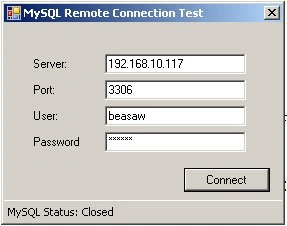
- In Form1.cs, layout just like the screenshot above.
- Add a reference, MySql.Data.dll (assumed that you already installed the MySQL data connector .Net v1.0.7)
- Add mysql to the project: using MySql.Data.MySqlClient;
- Begin your codes, see sample code (download link below)...
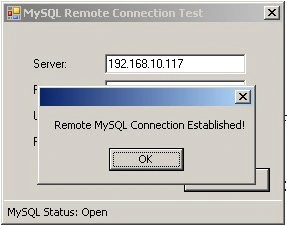
That's it... You can create as many applications you want with this method. Like Ticketing System, connecting 10 terminals to the servers simultaneously and etc. And of course, connection varies also to your MySQL server setup.
jel wieuPosted Oct 20, 2014, 2:15 AM
How i can connect to mysql hosting online on Cpanel
Camilo III LozanoPosted Mar 7, 2014, 5:08 AM
either way, your can always direct connection from your C# application to you SQL server and be sure that the port 3306 is open. there are other way aside from my method.. like using ADODB or ODBC.
praveenkumar muthuPosted Mar 7, 2014, 4:45 AM
Mr.Camilo i have one doubt our server machine accessing our sql database in our client machine via giving the client machine ip address given from the server machine and get the connection of the client machine and just view the databases and tables in our client is it possible to write the coding in c# and sql please sent it me Mr.Camilo
praveenkumar muthuPosted Mar 7, 2014, 4:43 AM
Thank you camilo i am searching in this program you are using Linux but I need to connect in to that in sql server if you dont mine tell me mr.camilo
Camilo III LozanoPosted Jun 21, 2011, 9:29 AM
i think there's no way for that issue. you really need to disable your firewall or add exception to mysql to accept outgoing and incoming requests in your computer.
Camilo III LozanoPosted Jun 17, 2011, 8:40 AM
hello Ahmet! have you check you firewall in windows server 2003? Go to Control Panel -> Windows Firewall then try disable the firewall and try add mysql in EXCEPTIONS tab to except filtering mysql broadcasting to your network. :)
Ahmet COBANPosted Jun 17, 2011, 5:05 AM
hi im ahmet from turkey i've ms server 2003. mysql with phpmyadmin on it i tried day by day connect with c# to my remote dbase but i cant. allowed ip or port etc. i tried eveything please help for it
Petrociano ValleceraPosted Feb 8, 2011, 5:02 AM
Thank you very much this article had help me a lot
Al GolubevPosted Dec 2, 2010, 12:11 PM
What do you advise for a C# beginner