SIGN UP MEMBER LOGIN:    
ARTICLE

Gridview paging and multiple row delete using checkbox

Posted by Lion Articles | ASP.NET Controls in C# August 14, 2009
This article describes how to bind GridView using LINQ, dynamic paging and how to delete multiple rows using checkbox selection.
Reader Level:
Download Files:


This article gives you information about GridView paging and multiple row deletion using CheckBox selection and LINQ.

Step 1: Create Default.aspx file like

<%
@ Page Language="C#" AutoEventWireup="true"  CodeFile="Default.aspx.cs" Inherits="_Default" %> 

<!DOCTYPE html PUBLIC "-//W3C//DTD XHTML 1.0 Transitional//EN" "http://www.w3.org/TR/xhtml1/DTD/xhtml1-transitional.dtd">


<html xmlns="http://www.w3.org/1999/xhtml">

<head id="Head1" runat="server">

    <title>Untitled Page</title>   

</head>

<body>

    <form id="form1" runat="server">

    <div align="center">

        <table >          

            <tr>

                <td>

                    <div align="center">               

                      <table >

                            <tr>

                                <td>

                                    <asp:GridView ID="GridView1" runat="server" AutoGenerateColumns="False"

                                        onpageindexchanging="GridView1_PageIndexChanging">          

                                        <Columns>               

                                            <asp:TemplateField>

                                                <ItemTemplate>

                                                    <asp:CheckBox ID="ch1" runat="server" />

                                                </ItemTemplate>

                                            </asp:TemplateField>

                                            <asp:BoundField HeaderText="EMPLOYEE ID" DataField="id" />

                                            <asp:BoundField HeaderText="EMPLOYEE NAME" DataField="name" />

                                            <asp:BoundField HeaderText="CITY" DataField="empcity" />

                                        </Columns>

                                    </asp:GridView>

                                 </td>

                             </tr>

                            <tr>

                                <td>

                                    <asp:Button ID="Button1" runat="server" Text="Delete" onclick="Button1_Click" />

                                 </td>

                            </tr>

                      </table>       

                    </div>

                </td>

            </tr>

        </table>       

    </div>

    </form>

</body>

</html>

Step 2 : Script file for create empinfo table.

SET
ANSI_NULLS ON

GO

SET QUOTED_IDENTIFIER ON

GO

IF NOT EXISTS (SELECT * FROM sys.objects WHERE object_id = OBJECT_ID(N'[dbo].[empinfo]') AND type in (N'U'))

BEGIN

CREATE TABLE [dbo].[empinfo](

          [empid] [int] IDENTITY(1,1) NOT NULL,

          [empname] [text] NOT NULL,

          [cityid] [int] NOT NULL,

 CONSTRAINT [PK_empinfo] PRIMARY KEY CLUSTERED

(

          [empid] ASC

)WITH (PAD_INDEX  = OFF, IGNORE_DUP_KEY = OFF) ON [PRIMARY]

) ON [PRIMARY] TEXTIMAGE_ON [PRIMARY]

END

GO

SET ANSI_NULLS ON

GO

SET QUOTED_IDENTIFIER ON

GO

IF NOT EXISTS (SELECT * FROM sys.objects WHERE object_id = OBJECT_ID(N'[dbo].[city]') AND type in (N'U'))

BEGIN

CREATE TABLE [dbo].[city](

          [cityid] [int] IDENTITY(1,1) NOT NULL,

          [cityname] [nvarchar](50) NOT NULL,

 CONSTRAINT [PK_city] PRIMARY KEY CLUSTERED

(

          [cityid] ASC

)WITH (PAD_INDEX  = OFF, IGNORE_DUP_KEY = OFF) ON [PRIMARY]

) ON [PRIMARY]
END

Step 3 : Create Default.aspx.cs file like

using
System;
using System.Configuration;
using System.Data;
using System.Linq;
using System.Web;
using System.Web.Security;
using System.Web.UI;
using System.Web.UI.HtmlControls;
using System.Web.UI.WebControls;
using System.Web.UI.WebControls.WebParts;
using System.Xml.Linq;
using System.Data.Linq.Mapping;
using System.Windows.Forms;
using System.Collections; 

public partial class _Default : System.Web.UI.Page

{


    private int currentpage = 0;


    ArrayList alist = new ArrayList();


    protected void Page_Load(object sender, EventArgs e)

    {

        if (!IsPostBack)

        {

            Bindgridview(); //Bind Gridview.

        }

    }


    private void Bindgridview()

    {

        using (testgridviewDataContext db = new testgridviewDataContext())

        {


            var info = from emp in db.empinfos

                       join cityinfo in db.cities on emp.cityid equals cityinfo.cityid

                       select new

                       {

                           id = emp.empid,

                           name = emp.empname,

                           empcity = cityinfo.cityname

                       };


            if (info != null)

            {

                GridView1.AllowPaging = true;

                GridView1.PageSize = 5;

                GridView1.PageIndex = currentpage;

                GridView1.DataSource = info;

                GridView1.DataBind();

            }

        }

    }

    protected void GridView1_PageIndexChanging(object sender, GridViewPageEventArgs e)

    {

        currentpage = e.NewPageIndex;

        Bindgridview();

    }

    protected void Button1_Click(object sender, EventArgs e)

    {

        for (int i = 0; i < GridView1.Rows.Count; i++)

        {

            System.Web.UI.WebControls.CheckBox cbb = (System.Web.UI.WebControls.CheckBox)GridView1.Rows[i].FindControl("ch1");


            if (cbb.Checked == true)

            {

                int id = Convert.ToInt32(GridView1.Rows[i].Cells[1].Text);

                alist.Add(id);

            }

        }


        using (testgridviewDataContext db = new testgridviewDataContext())

        {

            for (int j = 0; j < alist.Count; j++)

            {

                int id = Convert.ToInt32(alist[j]);

                var info = from p in db.empinfos

                           where p.empid == id

                           select p;


                foreach (var deleteinfo in info)

                {

                    db.empinfos.DeleteOnSubmit(deleteinfo);

                }

                try

                {

                    db.SubmitChanges();

                }

                catch (Exception ex)

                {

                    Response.Write("Error:" + ex.Message);

                }

            }

        }

        currentpage = 0;

        Bindgridview();

    }

}

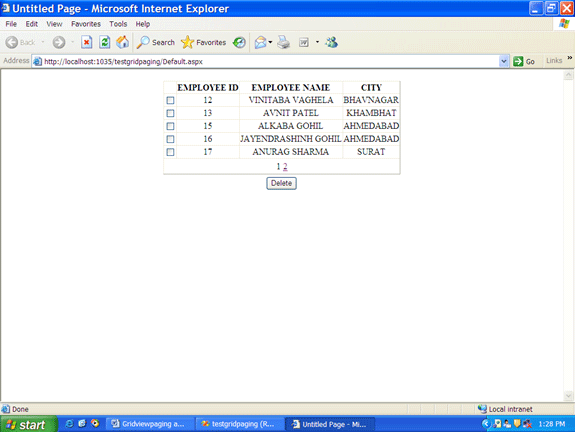
Step 4 : Run your project. Page output like this.
1.gif

For more information download my source code.

Login to add your contents and source code to this article
share this article :
post comment
 

hi , I have using data gridview inside the header template bind the data in dropdown list ....it have plan like message plan,free cost plan...if i select message plan who are all have message plan only display in grid view ..any one help for me

Posted by Rajamanikkam S Mar 31, 2012

hi i can't open the database file and it says thatconnection to the sqlserver files require sql server express 2005 to function properly ..can u help me on that

Posted by Akila Akila Apr 07, 2011

Thanks. This is exact code what I want.

Posted by swapnil zarbade Oct 22, 2010

excelent example , man im new in linq and i want to use stored procedure with linq rather than linq query its possible? and has the same efficiency??

Posted by abas shahen Aug 16, 2009
Become a Sponsor
PREMIUM SPONSORS
  • ceTE software specializes in components for dynamic PDF generation and manipulation. The DynamicPDF™ product line allows you to dynamically generate PDF documents, merge PDF documents and new content to existing PDF documents from within your applications. Visit DynamicPDF here
    Finally – a virtual platform that delivers next-generation Windows Server 2008 Hyper-V virtualization technology from a managed hosting partner you can truly depend on. Visit www.maximumasp.com/max for a FREE 30 day trial. Hurry offer ends soon. Climb aboard the MaxV platform and take advantage of High Availability, Intelligent Monitoring, Recurrent Backups, and Scalability – with no hassle or hidden fees. As a managed hosting partner focused solely on Microsoft technologies since 2000, MaximumASP is uniquely qualified to provide the superior support that our business is built on. Unparalleled expertise with Microsoft technologies lead to working directly with Microsoft as first to offer IIS 7 and SQL 2008 betas in a hosted environment; partnering in the Go Live Program for Hyper-V; and product co-launches built on WS 2008 with Hyper-V technology.
Team Foundation Server Hosting
Become a Sponsor