

If a traditional Windows Client applications, it is often required to show a quick company image or copyright information before an application actually starts. The image that is displayed before the application starts is called splash screen. One more use of a splash screen is, to show user some action while your application is loading initial required data.
It is very easy to add a splash screen to a WPF application. Just follow these simple steps.
Step 1. Add an Image to
Project
First step is you need to find an image that you would like to use as a splash screen. Once you have the image, add image to your project by right clicking on the Project name in Solution Explorer and select Add Existing Item menu item. Browse the file and add it to the project.
Step 2. Set Build Action
Now Right click on the Image name and select Properties menu item.
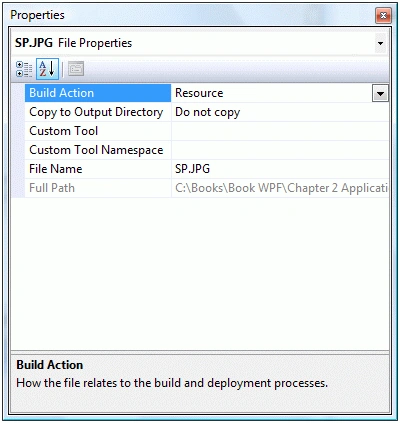
On Properties window, you will see Build Action property. By default, Resource item is selected as Build Action in dropdown as you can see below.
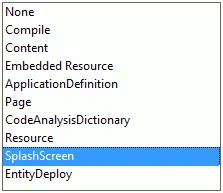
Now you need to select SplashScreen option from the drop down.
Step 2. Build and Run
That's it. Now when you build and run your project, you will see Splash Screen appears before the application Window is visible.

Summary
In this small article, you saw how to add a splash screen to a WPF application.
Join the conversation! Your thoughts help the community grow.