ARTICLE

Making a uninstall shortcut with Visual studio setup project

Posted by Nipun Tomar Articles | Visual Studio .NET February 05, 2009
Tags: C#, VS Setup
In this Article you will learn how to Make a uninstall shortcut with Visual studio setup project.
Reader Level:

A simple solution that I use:

Make a batch file (Uninstall.bat) with the following call
@echo off
msiexec /x {xxxxxxxx-xxxx-xxxx-xxxx-xxxxxxxxxxxx}
(Path depends of your Windows version, check where your system32 folder is located)
That last part is the product code which you can find in the properties of your setup project.
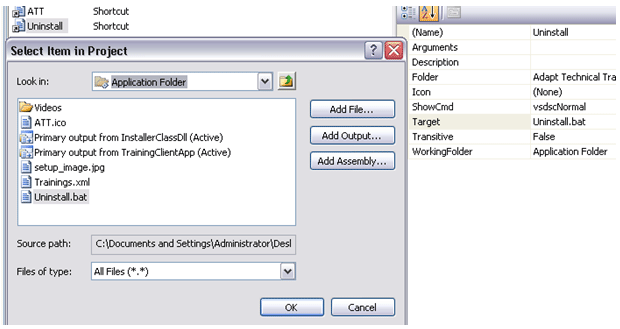
  1. Add the Uninstall.bat in application folder

    right click on Application Folder > Add > File > Uninstall.bat


  2. Right click on "User's Programs Menu" and select "Create Shortcut to User's Programs Menu".


  3. Rename it to Uninstall
     
  4. Change the target of Uninstall shortcut to the Uninstall.bat.

    Uninstall shortcut > Properties Window > Target > Application Folder > Uninstall.bat


  5. Rebuild the project and you are done.

Login to add your contents and source code to this article
Article Extensions
Contents added by z z on Jul 01, 2010
HOW TO HIDE THE COMMAND WINDOW THAT APPEARS WHILE UNINSTALLING THE PROJECT.
post comment
     

Hello Nipun, I want you to write me exact code in uninstall.bat file:` @echo off msiexec.........????? my system32 folder actually is in C:\Windows\System32 so what exactly should I write in uninstall.bat file???/ and my second question . I made an install project,so when I install it, and then I make changes and rebult my project, then I am trying to reinstall, it doessn't allows me, and says that at first I uninstall last version, and after it try to do .....so where can I set the proporty about reinstall allowance property.. thanks beforehand

Posted by Hayk Davtyan Jan 07, 2012

Hi, It's working fine. can we hide product code when we are uninstalling.

Posted by subhash sekhar Jan 04, 2011

I am using the same approach as Stephen suggests, you can see a closer description here: http://endofstream.com/creating-uninstaller-in-a-visual-studio-project/

Posted by Peter Nielsen Aug 30, 2010

Instead of making a batch file, I coded my Program.cs file to catch String[] arguments, looking for "-uninstall" as the first argument, and the GUID as the second, if this is met, then Program.cs uses a Process object to run msiexec /x using the provided GUID. I then placed an Uninstall shortcut that calls MyApp.exe -uninstall [ProductCode]


This worked for me, setup replaces [ProductCode] token with the actual product code in the shortcut, and the uninstall dialog is launched. I did this to keep the workings internal rather than have another file associated with the Program Files directory, as Vista protocol is getting pickier.

Sample Code

Program.cs

static void Main(String[] args)
{
if(args.Length > 1) && (args[0] == "-uninstall")
{
Process uinst = new Process()
uinst.StartInfo.FileName = Environment.GetFolderPath(SystemPath) +
"\\msiexec";
uinst.StartInfo.Arguments = "/x " + args[1];
uinst.Start();
}
else
{
// Normal app loading here
}
}

Then create a link in the Start Menu in the setup that links to your app, and set Arguments property of link to "-uninstall [ProductCode]"

Any thoughts?   stebo0728@hotmail.com

Posted by Stephen Buckley Jun 28, 2010

I never tried that on vista, may vista issue. however you can try Windows Script Host. Its Run method allows to run a program/script in invisible mode.

example

Set WshShell = CreateObject("WScript.Shell")
WshShell.Run chr(34) & "C:\Folder\file.bat" & Chr(34), 0
Set WshShell = Nothing

Copy the lines above to Notepad and save the file with .VBS extension. Edit the .BAT file name and path accordingly, and save the file. Double-click the .VBS file to run it.

Posted by Nipun Tomar Jul 09, 2009
COMMENT USING
PREMIUM SPONSORS
Over-C is a holistic consortium of communications and technology specialists. We build, deploy and market both business as well as consumer products and solutions.
SPONSORED BY
  • PDF reports have never been easier to create. With our included WYSIWYG Designer, you can layout your reports, set up your data source and let DynamicPDF ReportWriter do the rest.
Get Career Advice from Experts