

Image Slideshow in WPF
In this article, I will create a simple slideshow using WPF and C#.
The pages are designed using Expression Blend. Expression blend is really very good in designing the pages for WPF and Silverlight applications. What I really liked is the way in which we can easily create the pages and design the controls with it.
Now back to original topic.
The design of the page will look like this: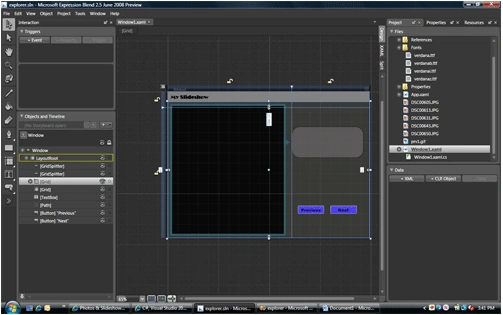
<GridSplitter> is a new control I used in this application. <GridSplitter> is very useful in designing the page when you want to split the pages into different sections. One of the most common example is "windows explorer". In the coming week, I will try to build an application like "windows explorer" in WPF using <GridSplitter>
Here in this application I have created a simple Button control. One thing I will like to try is to create fancy buttons in WPF.
<Path Fill="#FF325E69" Stretch="Fill" Margin="0,125.008,3.37,0" VerticalAlignment="Top" Height="24" Grid.Row="1" Data="M640,160 L559.5,239.5 719.5,239.5 z" Width="32.5" HorizontalAlignment="Right" RenderTransformOrigin="0.5,0.5">
<Path.RenderTransform>
<TransformGroup>
<ScaleTransform ScaleX="1" ScaleY="1"/>
<SkewTransform AngleX="0" AngleY="0"/>
<RotateTransform Angle="89.218"/>
<TranslateTransform X="0" Y="0"/>
</TransformGroup>
</Path.RenderTransform>
</Path>
Array to hold the images name
string[] imgs = new string[] { "prv1.gif", "DSC00650.JPG", "DSC00643.JPG", "DSC00631.JPG", "DSC00613.JPG", "DSC00605.JPG" };
Array for the caption of the image:
string[] caption = new string[] { "My Closeup",
"Waterfall, isn't it beautiful",
"Near the waterfall",
"Again Waterfall from different angle",
"Relaxing in my home",
"Enjoying at one of the tourist spot" };
Code to show the image:
private void showImage(string img,int i)
{
BitmapImage b1 = new BitmapImage();
b1.BeginInit();
b1.UriSource = new Uri(img, UriKind.Relative);
b1.EndInit();
image1.Stretch = Stretch.Fill;
image1.Source = b1;
label1.Text = caption[i];
//label1.Content = caption[i];
}
Button click events:
//Next Button Click
private void Button_Click(object sender, RoutedEventArgs e)
{
if (selected == 0)
{
selected = imgs.Length - 1;
showImage(imgs[selected], selected);
}
else
{
selected = selected - 1; showImage(imgs[selected], selected);
}
}
//Previous Button Click
private void Button_Click_2(object sender, RoutedEventArgs e)
{
if (selected == imgs.Length - 1)
{
selected = 0;
showImage(imgs[selected], selected);
}
else
{
selected = selected + 1; showImage(imgs[selected], selected);
}
}
The output will be as follows: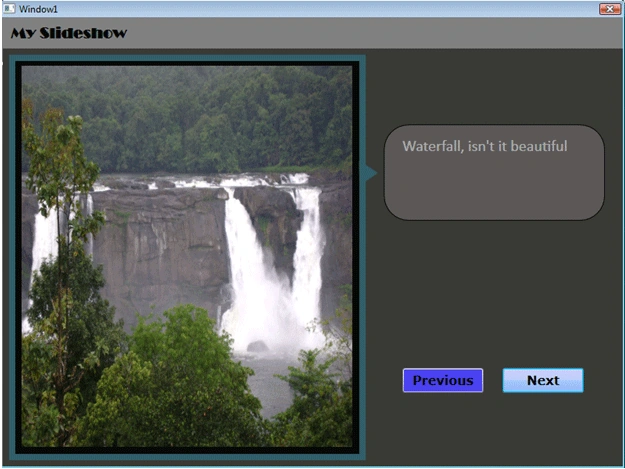
In future, I will try to beautify this page using more controls and new features of WPF.
logeshwaran elumalaiPosted Sep 3, 2014, 10:17 AM
nice