

This is an open source project named as RNetworking. In this project I am showing a social networking web site functionality. In this you can make your profile, search other profiles by name, manage friend network by sending friend request, you can also chat with other users.
I made this application in .NET 3.5 and my database is in SQL Server 2008. I have my database in application folder App_data. To run this application just attach this database on your machine and change the connection string in App_Code -> DataBaseClass.cs. This is my database layer class.
Now when you run the application, the first time the login page will show. If you have already registered with the site, then enter your Email id and password and the application will redirect to your profile page. And if you don't have an account then click on Not Registered Yet ?. This will redirect you to registration page.
You can use: [email protected]
rahul
rahul
This is the login page.
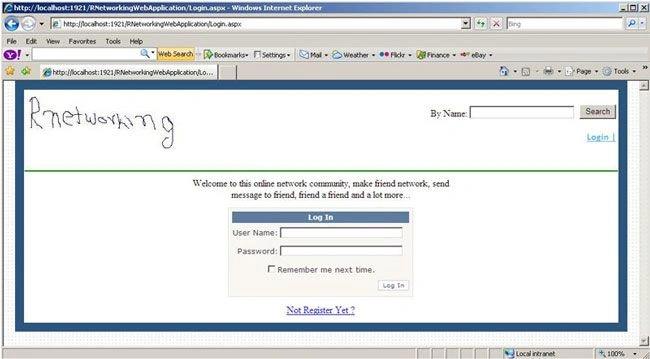
Image 1.
Below is the registration page.

Image 2.
This is user detail page.
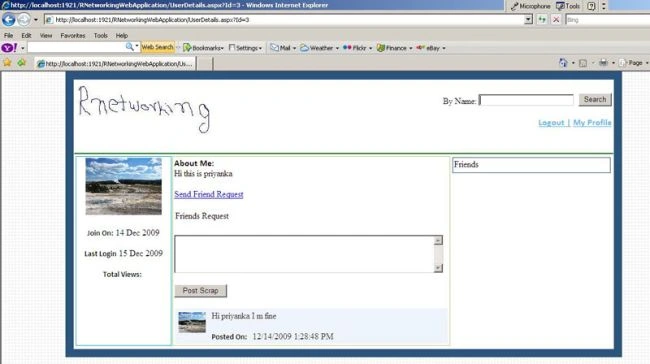
Image 3.
From the top of the page you can search user. This is search result page.
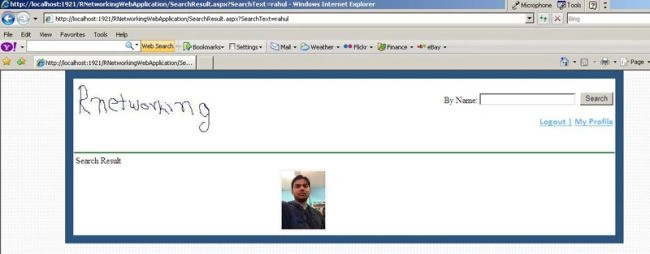
Image 4.
By clicking on user image you will be redirected to your user profile. You can send friend requests to any user from his profile page and you can chat
with this user. The page will look like this:
with this user. The page will look like this:
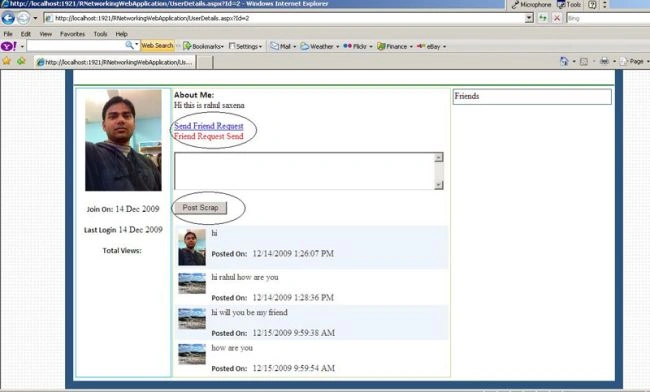
Image 5.
The profile page will look like below when friend request is sent to any user.
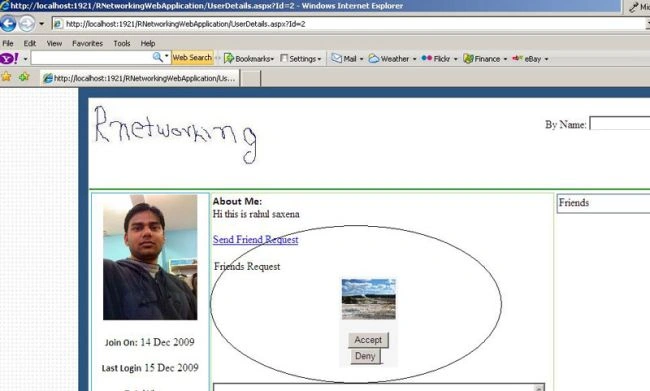
Image 6.
From here user can accept friend request and deny friend request. If user accepts request then this user will show in right side in friend section.
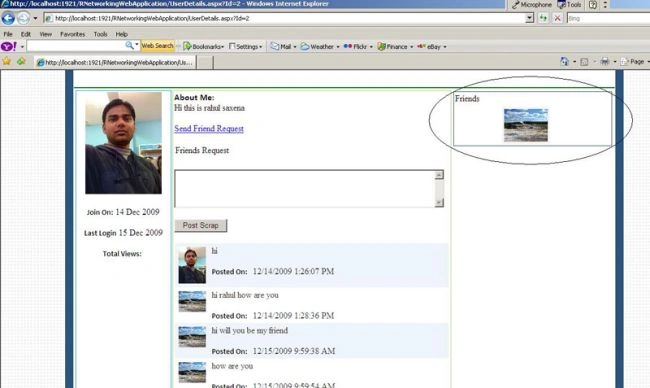
Image 7.
jay fischerPosted Jul 22, 2019, 9:09 AM
Where is the DataBaseClass in this project
Nitin kumarPosted Jun 18, 2019, 2:48 PM
Plz tell me how to change sql queries ... mail me - [email protected]
Raj SinghPosted Jan 11, 2018, 8:11 AM
[email protected]
Raj SinghPosted Jan 11, 2018, 12:19 AM
Can you please send your database query code in my mail id...........
Mohammad Ali KhanPosted Jun 8, 2016, 1:03 PM
not working. :(
Reza MohebifarPosted May 29, 2016, 6:05 AM
HTTP Error 500.19 - Internal Server Error : 14: <section name="scriptResourceHandler" type="System.Web.Configuration.ScriptingScriptResourceHandlerSection, System.Web.Extensions, Version=3.5.0.0, Culture=neutral, PublicKeyToken=31BF3856AD364E35" requ
Hector Nunez RivasPosted May 23, 2016, 12:58 AM
you should create some tutorials on how you can improve it and also start creating it
Praveenu VeenuPosted Feb 26, 2016, 12:13 AM
Hi, i'm not an intelligent in asp.net but i have to submit one project to my university using asp.net c#. i'm trying to develop social media it includes most of the features in Facebook, for that i got your open source but still i could not run this in my laptop please advice me and help me sir.
ping pongPosted Jan 22, 2016, 2:58 AM
Sir. the database in not working. Can u tell me how to attach it... please..
Gagandeep SharmaPosted Jan 12, 2016, 11:49 PM
I need source code in mvc can please send on [email protected] in MVC
Gautam SharmaPosted Jan 10, 2016, 9:37 PM
u can mail me at [email protected].
Gautam SharmaPosted Jan 10, 2016, 9:33 PM
Sir. the database in not working. Can u tell me how to attach it... please..
zeel patelPosted Nov 22, 2015, 10:59 PM
Why you r not piblishing it create it more fancily and publish it to public u can earn money
praveen palPosted Nov 17, 2015, 1:02 PM
gr8 rahul bhai..
aditya rajPosted Oct 29, 2015, 8:23 AM
really great but i need to show chat msg bethought refresh or reload buttons
narmeen rathorePosted Oct 22, 2015, 6:19 AM
can u plz help me to develop application in c# asp .net without queries
Rahul Kumar SaxenaPosted Oct 14, 2015, 2:19 AM
Thanks Hajinder Jassal
Rahul Kumar SaxenaPosted Oct 14, 2015, 2:18 AM
Welcome Muhammad Muhammad
Muhammad MuhammadPosted Oct 14, 2015, 12:48 AM
Thank You Sir
Micah DavidPosted Oct 9, 2015, 7:10 PM
protected void btnPost_Click(object sender, EventArgs e) { if (txtTitle.Text == "") { ScriptManager.RegisterClientScriptBlock(btnPost, this.GetType(), "alert", "<script>alert('Insert Location ... !!')</script>", false); } else { lblMessage2.Text = ""; if (txtName.Text == "") { ScriptManager.RegisterClientScriptBlock(btnPost, this.GetType(), "alert", "<script>alert('Insert Department Name ... !!')</script>", false); } else { lblMessage2.Text = ""; if (txtDate_Posted.Text == "") { ScriptManager.RegisterClientScriptBlock(btnPost, this.GetType(), "alert", "<script>alert('Insert Date... !!')</script>", false); } else { lblMessage2.Text = ""; if (txtcontent.Text == "") { ScriptManager.RegisterClientScriptBlock(btnPost, this.GetType(), "alert", "<script>alert('Insert Category ... !!')</script>", false); } else { lblMessage2.Text = ""; if (!object.Equals(Session["UserId"], null)) { if (FileUpload1.PostedFile != null) { string myMap = MapPath("~/").ToLower(); Random r = new Random(); int next = r.Next(); string ImageName = FileUpload1.PostedFile.FileName; // ToSaveImageName = DateTime.Now.ToString("yyyy-MM-ddTmm:hh:ss"); //ToSaveImageName.Replace('-', '1'); //ToSaveImageName.Replace(':', '2'); //Directory.CreateDirectory(myMap + ToSaveImageName); sImageFileExtension = ImageName.Substring(ImageName.LastIndexOf(".")).ToLower(); if (sImageFileExtension == ".gif" || sImageFileExtension == ".png" || sImageFileExtension == ".jpg" || sImageFileExtension == ".jpeg" || sImageFileExtension == ".bmp") { string ImageSaveURL = myMap + "UserImage/" + next + sImageFileExtension; try { FileUpload1.PostedFile.SaveAs(ImageSaveURL); //Added connectionString to webconfig file and calling here // string str = ConfigurationManager.ConnectionStrings["conString"].ConnectionString; // string post = "Insert INTO ADTABLE (MyId,Title,Name,HashTag,ADContent,ImageName) VALUES('" + Session["UserId"].ToString() + "','" + Request.QueryString["Id"].ToString() + "','" + txtTitle.Text + "', '" + txtName.Text + "', '" + txtHashTag.Text + "', '" + txtcontent.Text + "', '" + sImageFileExtension + "')"; dbClass.MyDataBaseToInsert("InsertPaidTable", txtTitle.Text, txtName.Text, txtHashTag.Text, txtcontent.Text, sImageFileExtension); // string post = "Insert INTO ADTABLE (MyId,Title,Name,HashTag,ADContent,ImageName) VALUES('" + Session["UserId"].ToString() + "','" + Request.QueryString["Id"].ToString() + "','" + txtTitle.Text + "', '" + txtName.Text + "', '" + txtHashTag.Text + "', '" + txtcontent.Text + "', '" + sImageFileExtension + "')"; // dbClass.ConnectDataBaseToInsert(post); Response.Redirect("~/Pages/UserProfile.aspx?Id=" + Request.QueryString["Id"].ToString()); { // Response.Redirect("~/Account/Login.aspx"); } } catch (Exception ex) { } } else { } } else { ToSaveImageName = "No"; sImageFileExtension = "Image"; } } } } } } } }
Micah DavidPosted Oct 9, 2015, 7:10 PM
Please send me the correct code to my email at: [email protected]. this is the page i created but is not inserting to database.
Micah DavidPosted Oct 9, 2015, 7:08 PM
Hi I tried creating more pages but their are not working. Example I wanted to create a page that has textbox name, textbox content, image upload and like button but the problem is that the data is not inserting, only the image is inserting into folder. Also I was told that the method you used on this project can not be used in a real life project. Is it true?
Micah DavidPosted Oct 9, 2015, 7:02 PM
Hi I tried creating more pages but their are not working. Example I wanted to create a page that has textbox name, textbox content, image upload and like button but the problem is that three data is not inserting only the image is inserting into folder. Also I war told that the method you used on this project can not be used in a real life project. Is it true?
Former memberPosted Sep 7, 2015, 2:30 AM
amazing..am using studio-2008 am unable to use source code. can you help me Rahul sir..
Hajinder JassalPosted Sep 5, 2015, 5:23 PM
if we deny friend request it will also shown in our friend list............
Rahul Kumar SaxenaPosted Sep 2, 2015, 1:26 AM
Thanks amirzf zarifkar
Rahul Kumar SaxenaPosted Sep 2, 2015, 1:26 AM
shafaz mj Youc an dowmload Source Code From top..
Rahul Kumar SaxenaPosted Sep 2, 2015, 1:26 AM
Thanks shafaz mj
amirzf zarifkarPosted Aug 26, 2015, 4:44 AM
THANKS FOR BEST TATURIALS
shafaz mjPosted Aug 23, 2015, 1:34 PM
my id [email protected]
shafaz mjPosted Aug 23, 2015, 1:33 PM
hi sir. Its very nice. Can you please mail me the source code.
Rahul Kumar SaxenaPosted Jul 20, 2015, 9:04 AM
Thanks Vipul Malhotra
Vipul MalhotraPosted Jul 20, 2015, 8:26 AM
nice Article
Rahul Kumar SaxenaPosted Jul 10, 2015, 4:24 AM
Thanks 2 All
Rahul Kumar SaxenaPosted Jul 10, 2015, 4:24 AM
Thanks nofact noface
nofact nofacePosted Jul 9, 2015, 8:18 PM
thank you my dear programmer
Rahul Kumar SaxenaPosted Jun 8, 2015, 1:35 AM
Welcome Anass Lamrabet
Anass LamrabetPosted Jun 7, 2015, 12:13 PM
Thnk you very mutch
V SinghPosted Mar 31, 2015, 8:48 AM
ok i sand u
tussharPosted Mar 30, 2015, 4:34 PM
[email protected]
tussharPosted Mar 30, 2015, 4:33 PM
Please give me some more information about database and connecting it ...
V SinghPosted Mar 25, 2015, 3:50 PM
can u give me some idea.....for developed social networking site like facebook...interface...and how to manage it's database ...becoz database handling it's so complax ......
AKSHAY T R AkshayPosted Mar 25, 2015, 1:57 AM
is there any gateways to send a message??
AKSHAY T R AkshayPosted Mar 25, 2015, 1:55 AM
sir how to send messages??
Rahul Kumar SaxenaPosted Mar 7, 2015, 4:02 AM
Thanks Hammad Saleem...
Hammad SaleemPosted Mar 6, 2015, 6:37 PM
i ll check your all work on this site last night you are absolutely brilliant.. Keep it up
Rahul Kumar SaxenaPosted Mar 2, 2015, 9:23 AM
Thanks Nitin bro...
Rahul Kumar SaxenaPosted Mar 1, 2015, 11:52 PM
Thanks Tim Mohan... :)
Tom MohanPosted Mar 1, 2015, 7:54 PM
Great one.
Rahul Kumar SaxenaPosted Feb 27, 2015, 4:05 AM
Thanks Nishant Saxena
Nishant saxenaPosted Feb 27, 2015, 2:55 AM
good
Rahul Kumar SaxenaPosted Feb 26, 2015, 11:43 PM
thanks..
Rahul Kumar SaxenaPosted Feb 26, 2015, 11:42 PM
Thanks Onkar Nikam..
Rahul Kumar SaxenaPosted Feb 26, 2015, 11:41 PM
Thanks Vinay Kashyap...
Rahul Kumar SaxenaPosted Feb 26, 2015, 11:41 PM
Thanks Khargesh Rajput...
Khargesh RajputPosted Feb 26, 2015, 10:58 PM
good work sir
Rahul Kumar SaxenaPosted Feb 26, 2015, 1:02 PM
Thanks 2 all...
venkatesh venkatPosted Feb 11, 2015, 4:24 AM
good job
Ramchand RepallePosted Dec 8, 2014, 4:19 AM
good one...
Ashok SelsanPosted Dec 8, 2014, 4:01 AM
nice work rahul ....please send me this project code to [email protected]
Onkar NikamPosted Nov 26, 2014, 3:48 AM
how to implement like and reply functionality ....and great work dude
aayush ajmeraPosted Nov 13, 2014, 4:32 PM
great work
aayush ajmeraPosted Nov 13, 2014, 4:32 PM
just want to appreciate your work dude
aayush ajmeraPosted Nov 13, 2014, 4:32 PM
Hi Rahul
Rahul Kumar SaxenaPosted Oct 30, 2014, 2:12 PM
thanks Vithal... :)
Vithal WadjePosted Oct 30, 2014, 1:06 PM
good work
s sowmiyaPosted Oct 24, 2014, 5:47 AM
pls send me source code to [email protected]
bhavika vyasPosted Oct 18, 2014, 1:19 AM
I want t make page where guest wil submit there wishesh with name and it will display on page in asp.net c# wesite how can this possible. please suggest something
David MinPosted Sep 28, 2014, 3:51 PM
can u please send the database detail on [email protected]
Gaurav VermaPosted Sep 4, 2014, 8:51 AM
please send me database details on [email protected],thanks
Sourabh ChauhanPosted Sep 3, 2014, 4:30 AM
can u please send the database detail on [email protected]
afrida tabassumPosted Aug 23, 2014, 7:00 AM
plzzz send the database on [email protected]
prasanna moharanaPosted Aug 21, 2014, 12:10 AM
can u please send the database detail and there is no .sln file in this application so please send me the correct one [email protected]
shonil chandPosted Aug 18, 2014, 5:48 AM
cn pliz share this code with me at [email protected]
ashutosh rathPosted Aug 18, 2014, 1:53 AM
can you please share db design with me at [email protected] thanks.
Tommy TranPosted Aug 11, 2014, 8:39 AM
thanks
test userPosted Jul 31, 2014, 12:50 AM
Can u please send me the database details to [email protected]
Prince PatelPosted Jul 22, 2014, 1:17 PM
I want project definition for this type of project on my email [email protected] as soon as possible
khushi anandPosted Jul 15, 2014, 1:25 PM
hi there.. there is no .sln file in this application. pls send the correct application at [email protected]
Gurunatha DogiPosted Jul 15, 2014, 6:24 AM
Thanks @Rahul, Great helpful article
lokendra siriyaPosted Jul 14, 2014, 2:28 AM
can u please mail me database details at [email protected]
Rahul Kumar SaxenaPosted Jul 4, 2014, 7:39 AM
thanks prakash...
Prakash KaruppiahPosted Jul 3, 2014, 6:58 AM
thanks brother....... very nice..
khushboo kumariPosted Aug 20, 2013, 10:29 AM
can i get the database design for this application please send me at [email protected]
patel akashPosted Aug 17, 2013, 12:00 PM
i like your try to make this site of social networking
patel akashPosted Aug 17, 2013, 11:59 AM
please sent me a database & sours code of this project i want to try to make one project on social networking site
aravind aPosted Jul 28, 2013, 8:32 PM
can i get the database design for this application please send me at [email protected]
krispan chathurangaPosted Mar 19, 2013, 10:33 AM
There is no any solution file(.sln) in this zip. so how I open this using visual studio...?
Abhinav SinghPosted Mar 2, 2013, 2:27 PM
please send me the database detail on [email protected] ,since I am using Microsoft SQL Server 2005, I am unable to install 2008 ,My final year project is Social Networking website , last date of submission 13 march 2013 , I will be highly obliged to you
subramanya vPosted Feb 26, 2013, 1:50 AM
can u please attach DB script.
Saad OmairPosted Feb 20, 2013, 11:56 PM
Thank u
Gangadhar bcPosted Dec 14, 2012, 10:31 AM
hi, can i get source code for scrapbook
Gangadhar bcPosted Dec 14, 2012, 10:31 AM
hi, can i get source code for scrapbook
Gangadhar bcPosted Dec 14, 2012, 10:30 AM
hi, can i get source code for scrapbook
sana mokashiPosted Oct 23, 2012, 2:59 AM
Send Me the Table's Definition or structure or Table entities.
sana mokashiPosted Oct 23, 2012, 2:58 AM
Will you please send me the database.? I have SQL server but its not taking it and having error -"does not support this format of databse". Will You Please help me out????
Linda SibisiPosted Aug 3, 2012, 3:14 AM
Hello guys I downloaded the project and am using SQL 2005 and visual studio 2010, I can't attach the database as it is in sql 2000. It's in version 655 and I'm using version 611. Please advise?
samuel lalaPosted Jul 21, 2012, 5:08 PM
Line 55: cmd.Connection = con; Line 56: da = new SqlDataAdapter(cmd); Line 57: da.Fill(dt); Line 58: con.Open(); Line 59: cmd.ExecuteNonQuery(); cannot run...what to do can you please send me the database file as well cuz it not [email protected]
hadeer mohamedPosted Jul 2, 2012, 5:10 AM
plz i need to make message in my website "send , revive " how can i make it? i need help because i need it in my graduation project and my mail is [email protected]
Yhonue SantamariaPosted Jun 8, 2012, 3:37 PM
thx man, I was looking for something like this so long ago.
Anuj GargPosted May 15, 2012, 1:40 AM
mind blowing dude....
swapnil shelkePosted May 8, 2012, 1:46 PM
fantastic..
Raveendra BabuPosted May 2, 2012, 4:41 AM
f
purva upadhyayPosted Apr 30, 2012, 2:38 AM
hi rahul..i hve tried so many times but the project is not running...when i tried to attact the database in sql server 2008 its showing error...plz help
ishvarya thenappanPosted Apr 10, 2012, 10:05 AM
Am under in the project of social network..but i hav to do oly the user friend request..tht is to accept and deny the request from the user..for tht i need separate codings..can u plz do a favour for me and send to my mail [email protected]
ishvarya thenappanPosted Apr 10, 2012, 9:59 AM
U done a great job....am having ur project in my machine..bt i need the codings separately for accept & deny user..I am under in the project to do that module only..kindly plz hlp me
alfarok hakeePosted Apr 8, 2012, 11:25 PM
Hello, how do you change the connection string? where do you change it and what do you change it to?? all your comments and feed back are not clear on how to do that!! many thanks anyway for the work
Raman PundirPosted Apr 3, 2012, 3:49 AM
hi rahul... I have configured the application, but while running this application I am getting error CS0016: Could not write to output file 'c:\Windows\Microsoft.NET\Framework\v2.0.50727\Temporary ASP.NET Files\rnet\0305ae85\af48181d\App_Code.u4379trd.dll' -- 'The directory name is invalid. ' Pls help me out...my mail id is [email protected]
keval kanjariyaPosted Mar 17, 2012, 7:00 AM
hi,your project is really very good as i read & seen. but when i run the project that time <authentication mode="Windows"/> this type of error occured. so pls give me solution for that.
Kinley TashiPosted Mar 7, 2012, 3:01 PM
i have downloaded the code and i strongly felt that what if we add some chat features withon the site...
herro alllPosted Mar 3, 2012, 10:48 PM
USE [RNetworkingWebApplication] GO /****** Object: Table [dbo].[User] Script Date: 03/03/2012 19:04:47 ******/ SET ANSI_NULLS ON GO SET QUOTED_IDENTIFIER ON GO SET ANSI_PADDING ON GO CREATE TABLE [dbo].[User]( [ID] [int] IDENTITY(1,1) NOT NULL, [Email] [varchar](500) NOT NULL, [Password] [varchar](500) NOT NULL, [Name] [varchar](500) NOT NULL, [Country] [varchar](500) NULL, [RegisterDate] [datetime] NULL, [LastLogin] [datetime] NULL, [Description] [varchar](50) NULL, [ImageName] [varchar](1000) NULL, CONSTRAINT [PK_User] PRIMARY KEY CLUSTERED ( [ID] ASC )WITH (PAD_INDEX = OFF, STATISTICS_NORECOMPUTE = OFF, IGNORE_DUP_KEY = OFF, ALLOW_ROW_LOCKS = ON, ALLOW_PAGE_LOCKS = ON) ON [PRIMARY] ) ON [PRIMARY] GO SET ANSI_PADDING OFF GO /****** Object: Table [dbo].[Scrap] Script Date: 03/03/2012 19:04:47 ******/ SET ANSI_NULLS ON GO SET QUOTED_IDENTIFIER ON GO CREATE TABLE [dbo].[Scrap]( [Id] [int] IDENTITY(1,1) NOT NULL, [FromId] [int] NOT NULL, [ToId] [int] NOT NULL, [Message] [text] NOT NULL, [SendDate] [datetime] NULL, CONSTRAINT [PK_Scrap] PRIMARY KEY CLUSTERED ( [Id] ASC )WITH (PAD_INDEX = OFF, STATISTICS_NORECOMPUTE = OFF, IGNORE_DUP_KEY = OFF, ALLOW_ROW_LOCKS = ON, ALLOW_PAGE_LOCKS = ON) ON [PRIMARY] ) ON [PRIMARY] TEXTIMAGE_ON [PRIMARY] GO /****** Object: Table [dbo].[Friends] Script Date: 03/03/2012 19:04:47 ******/ SET ANSI_NULLS ON GO SET QUOTED_IDENTIFIER ON GO SET ANSI_PADDING ON GO CREATE TABLE [dbo].[Friends]( [Id] [int] IDENTITY(1,1) NOT NULL, [MyId] [int] NOT NULL, [FriendId] [int] NOT NULL, [Message] [varchar](5000) NULL, [FriendStatus] [bit] NULL, [FriendShipDate] [datetime] NULL, [ImageName] [varchar](500) NULL, CONSTRAINT [PK_Firends] PRIMARY KEY CLUSTERED ( [Id] ASC )WITH (PAD_INDEX = OFF, STATISTICS_NORECOMPUTE = OFF, IGNORE_DUP_KEY = OFF, ALLOW_ROW_LOCKS = ON, ALLOW_PAGE_LOCKS = ON) ON [PRIMARY] ) ON [PRIMARY] GO SET ANSI_PADDING OFF GO /****** Object: Default [DF_Firends_FriendStatus] Script Date: 03/03/2012 19:04:47 ******/ ALTER TABLE [dbo].[Friends] ADD CONSTRAINT [DF_Firends_FriendStatus] DEFAULT ((0)) FOR [FriendStatus] GO /****** Object: Default [DF_Firends_FriendShipDate] Script Date: 03/03/2012 19:04:47 ******/ ALTER TABLE [dbo].[Friends] ADD CONSTRAINT [DF_Firends_FriendShipDate] DEFAULT (getdate()) FOR [FriendShipDate] GO /****** Object: Default [DF_Scrap_SendDate] Script Date: 03/03/2012 19:04:47 ******/ ALTER TABLE [dbo].[Scrap] ADD CONSTRAINT [DF_Scrap_SendDate] DEFAULT (getdate()) FOR [SendDate] GO /****** Object: Default [DF_User_RegisterDate] Script Date: 03/03/2012 19:04:47 ******/ ALTER TABLE [dbo].[User] ADD CONSTRAINT [DF_User_RegisterDate] DEFAULT (getdate()) FOR [RegisterDate] GO
herro alllPosted Mar 3, 2012, 10:46 PM
hey I converted your DB to SQL Script so, anybody can create & use ur DB in SQL server 2005 or earlier You can download the DB SQL Script from here https://rapidshare.com/files/3812745357/RNetworkingDB_Script.sql Please Rahul, Upload the script file with ur Sample code, so anyone get it easily To Use : Just Run the script through New Query at your MS SQL Management Studio thanks
ashishPosted Feb 17, 2012, 2:43 AM
great application
Avinash SinghPosted Feb 8, 2012, 4:02 AM
plz send database tables in txt file bacoz i hv sqlserver2005..."[email protected]"
prashant vermaPosted Feb 7, 2012, 10:42 AM
hi sir,can u plz snd me the db file of this project after converting it into sql 2005 db file as im unable to use the sql 2008 db file,my e-mail : [email protected],plz send it as soon
Avinash SinghPosted Jan 20, 2012, 1:58 PM
plz send database table and sp in text file my email id is "[email protected]"
kavita tanejaPosted Jan 6, 2012, 1:38 AM
Please help me 4 open the database. i have try ed to attached the database in 2005 and 2008 but database file is not attached.
rim royPosted Dec 31, 2011, 8:14 PM
please give me the solution for this. my mail id --- [email protected]
BalaPosted Dec 9, 2011, 10:12 AM
Tell me clearly step by step what and all I have to do with this file........... Please help me, i'm new to this but i'm crazy abt own social networking.!
Raj DognePosted Dec 7, 2011, 7:13 AM
pahle chat to bana lo phir chat karenge thanks for code
umesh nivangunePosted Oct 12, 2011, 11:40 PM
i won't able to attach database
prakash tambeeditedPosted Sep 24, 2011, 11:30 PMEdited Sep 25, 2011, 1:43 AM
database detail table's stored procedure
sunil rohazPosted Sep 23, 2011, 11:47 AM
Rahul i m not attach the database please send alter method of this problem
Prakash kumar JhaPosted Aug 27, 2011, 7:04 PM
plz some tutorial about ur project also
krishna patelPosted Jul 3, 2011, 6:47 PM
sir please send me database file of your project, e-mail: [email protected] mob-7737622335
prakash palPosted May 23, 2011, 6:11 AM
hi.. rahul thanx for this nice appl,, i m using it, but there is no option for chat..
Arpit MathurPosted May 6, 2011, 7:38 AM
Plz provide me database design and all stored procedure on this mail id ([email protected])
vijay khotPosted May 1, 2011, 3:13 PM
Hi Rahul this is nice project can u help me my current working project.I am MCA Student in So I Want to learn more and more Can U send me your notes or example on [email protected] or [email protected] Thank You........
Aashiq shaikhPosted Apr 30, 2011, 4:57 PM
Excellent work...............!!
Deepak JhambPosted Apr 18, 2011, 3:19 PM
HII RAhul can u email at [email protected] to talk to u regarding some business opportunity
veenu sehgalPosted Apr 16, 2011, 5:23 AM
hi plz can u give me full information about ur Rnetworking application plzzzzz help me which database i should have to use plz reply me on my email [email protected] . i vill wait ur reply plzzzz
veenu sehgalPosted Apr 16, 2011, 5:04 AM
hi rahul m new here and want to make social networking site in asp.net and ur site is really very goo plz help me can u send me source code and database of ur creating social networking site plzzzzzzzzzzzzzzzzzzzzzzzzzz
pratik anjaniaPosted Apr 11, 2011, 5:56 AM
can you please send the table(s) in .txt format at : [email protected]
pratik anjaniaPosted Apr 11, 2011, 5:55 AM
can you please send you table in .txt format at : [email protected]
decha taratPosted Mar 28, 2011, 9:02 AM
can you please send you table in .txt format at : [email protected]
Anuj TripathiPosted Mar 25, 2011, 1:02 PM
SDAD
gitesh tyagiPosted Mar 24, 2011, 4:14 PM
hello rahul first of all congrats ur project is in demand..:) well i need db tables in text as stated by u u'll b uploading it but its urgent for me can u mail me at [email protected] plz.. or either comment all the table names and column names and their types etc....
Rahul Kumar SaxenaPosted Mar 17, 2011, 2:40 PM
hey could u plz help me how to load the data base into my system for running it
Ankit TripathiPosted Mar 17, 2011, 2:13 PM
Please tell me how and what to change in connection string
jhay ternuraPosted Mar 16, 2011, 2:54 AM
how to run this application?do i need 3rd party application?
syed rafiPosted Feb 22, 2011, 3:21 AM
hi can u send tables in txt format. This is my Email.id [email protected]
anu mettuPosted Feb 17, 2011, 2:49 AM
i am unable to access database please help me
mohit ranjanPosted Feb 10, 2011, 6:07 AM
very nice project
mohit ranjanPosted Feb 10, 2011, 6:07 AM
ve
prakash pandianPosted Feb 2, 2011, 12:07 AM
dear rahul... I have a problem to open this project,the problem is IIS Intallation problem in my system. then how to install the IIS. plz try to solve it this problem. It's my humble request.
Rahul Kumar SaxenaPosted Feb 1, 2011, 6:04 PM
halo
Pradip GamieditedPosted Feb 1, 2011, 3:27 PMEdited Feb 1, 2011, 3:27 PM
hi rahul i have used this code,it's a really nice work done by you.But i found some difficulties in that.whenever i click on "Accept" button it is not able to see in right side friend list as you have mentioned in image 7.Can u plz help me on that?
chandrabose paramasivamPosted Jan 26, 2011, 4:04 PM
I'm a student.. i'm in need of social network source code in asp 4.0 ...can u help? .
AMBU SANGOLIPosted Jan 25, 2011, 1:15 AM
PLEASE MAIL ME MY MAIL ID IS [email protected]
AMBU SANGOLIPosted Jan 25, 2011, 1:09 AM
Server Error in '/' Application. The resource cannot be found. Description: HTTP 404. The resource you are looking for (or one of its dependencies) could have been removed, had its name changed, or is temporarily unavailable. Please review the following URL and make sure that it is spelled correctly. Requested URL: /RNetworkingWebApplication/Login.aspx
rupali dumbrePosted Jan 22, 2011, 8:23 AM
which are the three table give it in txt file if u can plzz
tsoloane lehlobaPosted Jan 17, 2011, 5:00 AM
dnt u have a documentation abt the whole project where u hv clarified the code?
Ramakant shindePosted Jan 10, 2011, 9:26 AM
I dont have sqlserver 2008 so please send script database, on my mail account, so I can create tables.
Manish PandeyPosted Jan 5, 2011, 10:45 AM
Hi rahul i have sqlserver 2005 so pls send me datatbase.txt file on my emailid [email protected] pls pls pls pls pls pls pls...........................................................
sagar joshiPosted Dec 30, 2010, 1:19 AM
Its nice to see ur app.Begginers are always searching for this type of material.Can u add little more?Can u post an article like "Orkut-Step by step" & explain how to develop this project?U have used webservices in this project.Mostly begginers dont know webservice so i ll learn it from ur project.Thank u so much for ur nice post rahul.I expect something more in future.
sandeep pathakPosted Dec 19, 2010, 3:53 AM
hello rahul plz send databse in .txt format my id is [email protected]
sandeep pathakPosted Dec 19, 2010, 3:44 AM
how i can use ur mdf file .i am using sql 2005 plz send ur database file in .txt file
sandeep pathakPosted Dec 18, 2010, 10:13 AM
plz send your database in txt format [email protected] its emergency
sanjay mewadaPosted Dec 18, 2010, 1:52 AM
www.sanjaymewada.blogspot.com
priya sharmaPosted Dec 17, 2010, 9:00 AM
very good. keep it up
sagarika mishraPosted Dec 16, 2010, 1:21 AM
Hello Rahul, this is sagarika frm hyd..I need some help from you for using online chatting in my project..sender part is almost completed..but receiver part is not working..Can you send me the both sender and receiver part with its database please?I m currently using VS2008 and SQL2005... Thanx.........
prakash pandianPosted Dec 6, 2010, 3:28 AM
how can i ask c-sharp corner Admin.
prakash pandianPosted Dec 4, 2010, 1:25 AM
i have a converter tool for Sql server to Ms-access database tool. the problem is while converting they will need a Login (Username and Password ) didn't mismatch. kindly send the database Ms-access database format for that database. otherwise your project is really superb. it's really helpful.
KKPosted Nov 30, 2010, 2:42 AM
Compiler Error Message: CS0234: The type or namespace name 'Linq' does not exist in the namespace 'System' (are you missing an assembly reference?) Source Error: Line 1: using System; Line 2: using System.Collections.Generic; Line 3: using System.Linq; Line 4: using System.Web; Line 5: using System.Data; Source File: c:\inetpub\wwwroot\RNetworkingWebApplication\App_Code\DataBaseClass.cs Line: 3 Any reason ?
KKPosted Nov 27, 2010, 4:30 PM
Is there any solution file from where I can execute the project ? I extracted the folder but couldnt find one.
kapil kapseditedPosted Nov 27, 2010, 2:01 AMEdited Nov 27, 2010, 2:03 AM
can u please send it in sqlerver2005 my email id [email protected] thanking u
swapnil salaskarPosted Nov 19, 2010, 5:54 AM
nice work keep it up it helps me tooooo much
Emmanuel BasseyPosted Oct 29, 2010, 12:26 PM
Please thank you so much for this wonderful application. I have sqlserver 2005. can you please send me the database table in txt file? this is my email [email protected]
arun kumarPosted Oct 27, 2010, 3:41 AM
hello rahul ji i go through your social networking project ..its amazing you r superb....! you r my legend
suraj manikpuriPosted Oct 21, 2010, 9:30 AM
Rahul database not support in my vs2008 version???
suraj manikpuriPosted Oct 20, 2010, 10:22 AM
sir can i use your source code for my website
Mirash MoossaPosted Sep 30, 2010, 3:06 AM
What is the ID in the user database........?????????? can u explain it.....???????What is the use of it???????Is the numbers automatically generated???????
julx geditedPosted Sep 23, 2010, 1:31 AMEdited Sep 23, 2010, 1:34 AM
sir cn u translate this works of your into an pure asp script with database of microsoft acess hoping for your response thx^^here's my email [email protected]
Dhaval JaviyaPosted Sep 21, 2010, 7:35 AM
hi rahul i have sqlserver 2005 so plz send me datatbase.txt file on my emailid [email protected]
sartaj husainPosted Sep 14, 2010, 2:29 AM
Hello Rahul. I downloaded RNetworkingWebApplication.zip file but when I run in Visual Studion 2008 I did'nt fing Tables and other content in RNetworkingWebApplication.mdf. Please help or Send me RNetworkingWebApplication.mdf in my e mail addess. [email protected]
pratik nayeePosted Sep 13, 2010, 2:40 AM
best work rahul
julx gPosted Aug 31, 2010, 8:18 AM
dude!!help me out..em getting sick in undrstng the connection string,,
Joseph WoldesemaitPosted Aug 28, 2010, 7:30 PM
Great job, Rahul! Are you making any upgrades to the Social Networking app based on the new ASP.NET 4.0?
anurag sachanPosted Jul 27, 2010, 9:02 AM
how can i access ur database wid d help of oracle 10g....plz
nduduzo lubanyanaPosted Jul 22, 2010, 6:36 AM
hi rahul I'm a VB.NET developer; I’d like to have this type of an exercise in VB.NET. Is it possible to you, to get it for me?
bhumika singhalPosted Jul 9, 2010, 5:44 AM
hiiii want the code of this how i will get the code reply me on through mail... my id is:- [email protected]
Chriztopher ChongPosted Jun 25, 2010, 6:18 AM
Hi Rahul, I need your help in opening your db file, I have sql 2005 and 2008 but seems that I cant turn on ur db file even I have attached into my machine, when i try to open it pop out a message about the file cannot opened because its version 655. This server support version 612 and earlier. Please help on this as I highly need it as my reference for my final year project. Thank you Rahul for your hardwork.
Ashwini VermaPosted Jun 24, 2010, 9:44 AM
I highly needed this. I am working on the project for my own social networking site, now sure this will help me a lot. Thank you MR. Rahul
kuljot vijPosted Jun 11, 2010, 2:49 AM
can you please mail me full information about your project how to run email address- [email protected]
Waqas ArifPosted May 22, 2010, 3:05 AM
i've done thoank you and great work
Waqas ArifPosted May 22, 2010, 2:31 AM
Great work man but i cant find your db :( where is db?
aga sgaPosted May 18, 2010, 1:50 PM
hi, thanks very much it looks very good. but i am unable to check it. can you please send me the script file for sql2005? if so then please email it to me on [email protected] thank you very much.
aga sgaPosted May 18, 2010, 1:50 PM
hi, thanks very much it looks very good. but i am unable to check it. can you please send me the script file for sql2005? if so then please email it to me on [email protected] thank you very much.
akumiro akumiroPosted Feb 25, 2010, 10:27 AM
Can you please show in details how to attach and use your database? I am having a lot of trouble getting this thing to work and i was hoping that someone can help. I have a VS2008 as SQL 2008. Whenever i run the application, this the error i get: <address>A network-related or instance-specific error occurred while establishing a connection to SQL Server. The server was not found or was not accessible. Verify that the instance name is correct and that SQL Server is configured to allow remote connections. (provider: Named Pipes Provider, error: 40 - Could not open a connection to SQL Server)</address><address> </address><address>This happens at this part of the code:</address><address> </address><address><address>public DataTable ConnectDataBaseReturnDT(string Query)</address><address> {</address><address> dt = new DataTable();</address><address> con = new SqlConnection(@"Data Source=RAHUL-SqlServer2008; Initial Catalog=RNetworkingWebApplication; uid=sa; pwd=wintellect;");</address><address> cmd.CommandText = Query;</address><address> cmd.Connection = con;</address><address> da = new SqlDataAdapter(cmd);</address><address> da.Fill(dt);</address><address> con.Open();</address><address> cmd.ExecuteNonQuery();</address><address> con.Close();</address><address> return dt</address></address>
Dipa AhujaPosted Jan 25, 2010, 9:04 AM
hi.. i have sql server 2005.. so is there any way to access your DB?
Nikhil KumarPosted Jan 15, 2010, 4:06 AM
Rahul your db is not correct because its not able to access :( try to update :)
Nikhil KumarPosted Jan 14, 2010, 1:01 AM
Rahul i am unable to access your db so can you please send you tables in .txt format... at :[email protected] Thanks !!!!