

In this article, we will look into new synchronization framework provided by Microsoft. This Sync Framework enables collaboration and offline access for applications and devices. It allows to access data from various locations, sharing and taking data offline. Developers can create a robust sync system that integrates an application with any kind of data store over any kind of protocol and network. By using Sync framework, we can ensure that all data stores are having correct data and concurrent updates are handled properly. We can make our application to get updated data from any data store by proper synchronization among its data stores. We can synchronize different kind of data stores like databases, files, folders, RSS feeds etc. Currently, it is in 1.0 version with support to ADO.NET 2.0. First, we will discuss about the services provided by it followed by its architecture, components and participants.
Services:
- Sync Framework core components: These can be used to create synchronization providers for any type of data store. A synchronization provider is a software component that allows a replica to be synchronized with other replicas.
- ADO.NET Sync Services: This can be used to synchronize databases for offline and collaborative scenarios.
- Metadata Storage Service: This can be used to store synchronization metadata in a lightweight data store. This metadata contains the necessary information needed for synchronization.
- File Systems: This can be used to synchronize files and folders in a file system.
- FeedSync Services This can be used to synchronize RSS and Atom feeds with data in a local store.
Architecture:
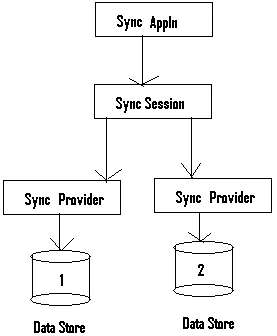
Here, we are synchronizing the data stores by sync providers within session object. The session object will connect the two providers and makes API calls to determine changes and synchronize both of them by using metadata services.
This sync framework will be handy to maintain data stores with correct data. For example, this framework can be used to synchronize public contacts in address-book data store and outlook data store.
Components:
- Runtime: This component will control the synchronization session object, communicates with client applications and interacts with providers on behalf of client. We can start, cancel or host synchronization session and resolve conflicts and errors during synchronization. Both managed and unmanaged interfaces provide access to the runtime.
- Metadata Services: This component synchronizes metadata on behalf of client applications. It helps to develop applications and providers without having knowledge on inner details and working of metadata. It also provides Metadata Storage Service, an optional metadata storage component for applications that do not have a logical location to store synchronization metadata. Metadata Storage Service uses a lightweight data store and runs in the client process. Both managed and unmanaged interfaces provide access to the metadata services.
- Provider: A provider acts as an interface to hide the data store complexities from the runtime. Implementing a provider is the core task for synchronizing custom data. A provider can implement either a managed or an unmanaged version of the interface.
Participants:
A participant is a device or service that can synchronize with other systems using sync framework. This framework will synchronize data among participants of varying functionality.
Sync framework supports below participant types:
- Full participant: This will locally hosts the runtime and stores metadata.
- Proxy participant: This kind of participant will start synchronization from a remote provider by handling calls locally and forwarding it to remote provider.
- Partial participant: This can store metadata but cannot process it. It depends on full participant for runtime services and start of synchronization.
- Simple participant: This cannot store metadata, cannot host the runtime. It depends on full participant to do everything.
I am ending the things here. I hope this article will be helpful for all.
Join the conversation! Your thoughts help the community grow.