

In this article, we will look into new feature of VS 2010 called as DataTips pinning. This feature is available in all editions of VS 2010. DataTips is a nice feature helpful while debugging an application. It works only in break mode to view contents of a variable within current execution scope. A DataTip appears in source code window, when you place a mouse over a variable in current scope and it disappears on mouse out. In VS 2010, we can pin a DataTip so that it remains open and sticks to a specific location in source code. We can drag a DataTip to any location within source code window. To pin a DataTip, right click on a variable and click Pin to Source as shown below:
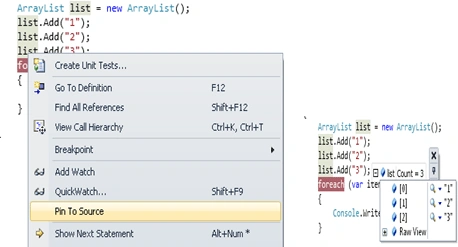
A pinned DataTip closes, when debugging session ends or clicking on close icon. We can expand members of variable like array or object by clicking + sign before variable name in DataTip.
Unpinned DataTip:
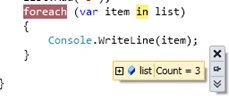
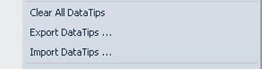
When we click on unpin a DataTip, it will get floated above any open windows. We can close all DataTips by clicking Debug menu --> Clear All DataTips. Similarly, we can import/export DataTips using Debug menu as shown below:
We can view contents behind a DataTip, by making it transparent temporarily by holding Ctrl key. This applies to DataTips that are not pinned or floating.
So, using this feature we can pin a DataTip to a specific location in source window or make it float on top of all open windows. I hope this article will be helpful for all.
Gowtham RajamanickamPosted Apr 11, 2016, 1:51 AM
need moew article
Gowtham RajamanickamPosted Apr 11, 2016, 1:51 AM
good one..