

Introduction
In finance world many times we need to calculate general financial calculation like interest calculation, regression analysis, internal rate of return etc. .NET does not provide readymade functions for these regular financial functionalities. Building these functionalities from scratch is not a big thing but testing it end to end with different scenarios is a challenge. We will try to understand how we can reuse 'Financial' classes from Microsoft.VisualBasic namespace. These functions are time tested and you do not need to code from scratch.
In this part we will understand how we can calculate the future value for a given rate of interest, period and monthly invested amount.
I have uploaded a sample source code which has a simple UI to calculate the future value.
Understanding the future value fundamental
First let us understand how future values are calculated in finance domain. Let's say you have decided to invest for two year in some scheme. Let's say the amount is 1000 (I am not thinking in terms of INR, $ or pounds) at rate of interest of 10%. So for the first month you will invest 1000 with 10% interest in the second month you will get 1100. Now in second month you invest 1000, so the total is 1000 + 1100. Now the rate of interest on 2100 is 210. So after two months you will get 2310.
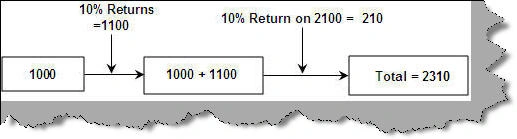
The above calculation is nothing but future value calculation. This is available as a readymade function in 'Microsoft.VisualBasic' namespace. Once you import the name space you will get a 'Financial' static class which has a 'FV' function. This function takes in rate of interest , number of months and amount per month. Once we give this it calculates the value you will get after the defined period. I have wrapped the 'Financial.FV' function in a class 'ClsFutureValue'.

Download the source code from the top attached with this article to see how the FV function works. Below is the screen shot of the sample project.

Join the conversation! Your thoughts help the community grow.