Blue Theme Orange Theme Green Theme Red Theme
 
Mindcracker MVP Summit 2012
Home | Forums | Videos | Advertise | Certifications | Downloads | Blogs | Interviews | Jobs | Beginners | Training
 | Consulting  
Submit an Article Submit a Blog 
 Jump to
Skip Navigation Links
TechnologyExpand Technology
WebsiteExpand Website
DevExpress UI Controls
Search :       Advanced Search »
Home » SharePoint » Pull a column value from another list in your site in Sharepoint Portal Server

Pull a column value from another list in your site in Sharepoint Portal Server

In document and form libraries, you can create custom columns or metadata properties and interestingly, you can autopopulate these columns with data that can be hardcoded or extracted from other lists that are part of the same site where your document library is located.

Page Views : 83610
Downloads : 0
Rating :
 Rate it
Level : Intermediate
   Print Read/Post comments Post a comment  Similar Articles  
   Email to a friend  Bookmark  Author's other articles  
 
Team Foundation Server Hosting
Become a Sponsor
 Tag Cloud
 Latest Jobs
More ... 
 Latest Interview Questions
More ... 

What is a list?

According to the SPS Admin guide, list is a collection of information that you share with team members. SharePoint has a set of built-in lists. You can customize these lists or even create your own lists. You can import an excel sheet in SharePoint to create a list automatically. The data in the newly created list will be extracted from the excel sheet. In document and form libraries, you can create custom columns or metadata properties and interestingly, you can autopopulate these columns with data that can be hardcoded or extracted from other lists that are part of the same site where your document library is located. This is a very common question. People ask me how they can populate a column with data from another list.

Recently, some one emailed me the following question:

I have a list of Projects in SharePoint called as "Projects" and list contains following columns:

1. Project Name
2. Project Manager
3. Status

I want to make another list called "Project Milestones" where one of the fields in this list would be the name of the Project from the "Projects" list.
Is there a way to have this be a drop down that points to the "Project Name" field from the "Projects" List?

Of course, yes! We can pull data from other lists to be displayed in our list.

Here is the answer to the question emailed by the user:

1. Add a new column in your "ProjectMilestones" list. This is the list where you want to show data from the other list. This can a document library or a form library, depending on your needs.
2. Name the new column as "ProjectName".
3. Column type should be "Lookup"
4. In the "Get Information From:" drop down under "Optional Settings for
Column", select "Projects" list.
5. In "In this column" drop down, select "Project Name".
6. Click OK.
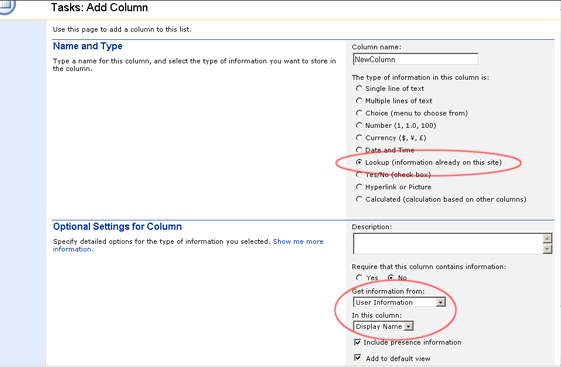
Add Column Screen

This newly added field will display project names from the "Projects" list.

Let's talk about the lookup field a bit. Lookup field refers to values from a field in another list as you saw above. It's a great way of linking two lists together. You can easily pull column values from different lists already available in your site. If you are a programmer like me, then you may want to look at the way how we can add a lookup field to the form programmatically. Here is the code:

SPSite site = SPControl.GetContextSite(Context);
SPFieldCollection fields = site.AllWebs["mysite"].Lists["mylist"].Fields;

SPList lookupList = site.AllWebs["mysite"].Lists["mylookuplist"];

Guid lkListID = lookupList.ID;

fields.AddLookup("Lookup_FieldName", lkListID, true);

If you work regularly with SharePoint, then you will find this tip to be very helpful.


Comment Request!
Thank you for reading this post. Please post your feedback, question, or comments about this post Here.
Login to add your contents and source code to this article
 [Top] Rate this article
 
 About the author
 
Shafiq Ahmed
S.S. Ahmed specializes in SharePoint and has been using SharePoint for the last 4 years. He has 8 years experience in developing web based applications. He uses C#, VB and PHP for developing web applications. He also designs graphical interfaces for web applications. Ahmed regularly writes about SharePoint.
Looking for C# Consulting?
C# Consulting is founded in 2002 by the founders of C# Corner. Unlike a traditional consulting company, our consultants are well-known experts in .NET and many of them are MVPs, authors, and trainers. We specialize in Microsoft .NET development and utilize Agile Development and Extreme Programming practices to provide fast pace quick turnaround results. Our software development model is a mix of Agile Development, traditional SDLC, and Waterfall models.
Click here to learn more about C# Consulting.
 
Introducing MaxV - one click. infinite control. Hyper-V Hosting from MaximumASP.
Finally – a virtual platform that delivers next-generation Windows Server 2008 Hyper-V virtualization technology from a managed hosting partner you can truly depend on. Visit www.maximumasp.com/max for a FREE 30 day trial. Hurry offer ends soon. Climb aboard the MaxV platform and take advantage of High Availability, Intelligent Monitoring, Recurrent Backups, and Scalability – with no hassle or hidden fees. As a managed hosting partner focused solely on Microsoft technologies since 2000, MaximumASP is uniquely qualified to provide the superior support that our business is built on. Unparalleled expertise with Microsoft technologies lead to working directly with Microsoft as first to offer IIS 7 and SQL 2008 betas in a hosted environment; partnering in the Go Live Program for Hyper-V; and product co-launches built on WS 2008 with Hyper-V technology.
Dynamic PDF
ceTE software specializes in components for dynamic PDF generation and manipulation. The DynamicPDF™ product line allows you to dynamically generate PDF documents, merge PDF documents and new content to existing PDF documents from within your applications.
Discover the top 5 tips for understanding .NET
Ricky Leeks presents the top 5 tips for understanding .NET Interoperability. Learn more.
Nevron Chart for .NET 2010.1 Now Available
The leading .NET charting control now features PDF, Flash and Silverlight export, visualization of large datasets and more. Deliver true charting functionality to your BI, Scorecard, Presentation or Scientific apps. Download evaluation now.
ASP.NET 4 Hosting
Get 2 Months Free of ASP.NET Hosting for Only $4.95/month! Receive FREE MS SQL and MySQL Databases Including ASP.NET 4/3.5, MVC 3.0, Silverlight 4, Windows 2008/IIS 7.0 Plus FREE IIS 7 Modules. Host UNLIMITED ASP.NET Web Sites – Click Here!
 
 Post a Feedback, Comment, or Question about this article
Subject:
Comment:
Team Foundation Server Hosting
Become a Sponsor
 Comments
Prepopulating Column Value from another list by Sachin On October 27, 2006

Hi Shafiq,

Your submission was really helpful. Can you help me with the following?

I've one custom list (List1)with field with following three columns,

Name

Age

Salary

and SharePoint "ID"

I want to populate Salary Column in another list (List2) with exact values from Salary column of List1.

Your help is greatly appreciated.


Thanks,

Sachin


Reply | Email | Modify 
"In this column" only shows "ID" and "Title" by Jesse On July 13, 2007
I have tried a number of methods to link supervisor names from a sheet containing employees with their respective supervisors (called "Employee List") to a sheet containing employees with their tasks (called "Tasks"), so that supervisors will show up there as well linked to tasks (for email reminder purposes), and keep running into the problem that "In this column" only offers "ID" and "Title" as options, neither of which are even column names in the "Employee List" list. I added a separate column in "Tasks" called "Supervisors", type "Lookup", get information from "Employee List", and then the snag that it does not give me the correct column options that are in the file. Any idea why this is happening or what I could to to correct it? Thank you very much for your help!
Reply | Email | Modify 
joining lists by Jesse On July 18, 2007
Hello,
Does anyone know if it is possible to join two lists in SharePoint, just as one can join two tables in a database.

I have Emp list with columns: Employee, Supervisor

I have a project list with columns: ProjectName, Employee.

I have populated the Emp list with the names of employees and supervisors.
I have populated the Project list with various projects and the employees assigned to the projects (one row for each project/employee pair).

Question:
If I add a Supervisor column to the Project table, can I automatically populate it from Emp.Supervisor by creating the equivalent of a JOIN OPERATION?

Thanks,
RJ
Reply | Email | Modify 
Re: joining lists by Ibrahim On August 19, 2008

Hi,

You can join two list on the sharepoint using sharepoint designer and refer the below link

http://www.google.com/search?hl=en&q=display+two+lists+in+one+dataview+webpart+in+sharepoint

Reply | Email | Modify 
linking a column from a list on another site by Mubaraka On September 11, 2007
He can v link a column on a site from a list on another site?
Reply | Email | Modify 
Integration with 2 lists from2 seperate sites by radix On December 11, 2007
If there are 2 subsites under one root how to use lookup from list of one site to other? is it possible?
Reply | Email | Modify 
Need more than one field back from a lookup by Larry On October 21, 2008
I have two SharePoints lists, Project List and Effort List. Multiple records in the Effort List tie to an individual record in the Project List. I can use the Lookup (information already on this site) field/column in the Effort List to allow uses to select a field in the Project List. Where I can't figure out what next is it will only bring back the field they selected from the Project List, but what I want is it to bring back multiple fields from that selected record. Example: Project List has multiple records, with four fields each: Project ID, Project Description, Project Cost, Project Due Date Effort List has multiple records, with three fields each: Project ID, Effort Description, Effort Status If Project ID abc is selected in a drop down within the Effort List New Item entry, I want to bring back more than Project ID abc, I also want to display Project Description, Project Cost and Project Due Date. I have SharePoint Designer 2007. Any help is appreciated.
Reply | Email | Modify 
Re: Need more than one field back from a lookup by Allan On February 13, 2009

Our company has posted an open source project to codeplex that will allow you to do exactly what you need to to:

www.codeplex.com/SLAM

Please use the discussion forum on codeplex to let us know if you found the tool useful.

Reply | Email | Modify 
Populate List value by haric On March 26, 2009
Hi Shafiq I have one custom list Course and another custom list Registration. course custom list has fields like id , course name etc. in registration list i created a look up coulmn id to pull the course id from course list. i have another column course title in registration list. so if i select course id 10 in registration list , i want to auto populate the course title which has course id 10. how do i do that? any help would be much appreciated. i can make course title look up column and select the title form the drop down manually. since i have too much of data in list , it is real pain for me to manaully select the title. is there any work around to auto populate the course title in registration list based on the ID. i am new to sharepoint and i am totally lost here. please help Thanks Hari
Reply | Email | Modify 
Is it possible to prepopulate columns in one table from another ? by sergio On May 7, 2009
I have 2 lists.  The first has the following kind of info in it.

NAME                 DEPARTMENT                JOB ROLE
David Scott        ICT                                Technician
Mark Jones        ICT                                Technician
Andrew Parker  Sales                             Salesman


I am wanting a second table to give me a summary of the information in the 1st table.  What i want exactly is for the 2nd table to diaply a count of the number of instances in a column and display that information in the 2nd list based on what i enter into column 1 in the 2nd list.  i.e.

JOB ROLE                 COUNT OF ROLES
Technician                      2
Salesman                       1

The 2nd table is using the values i entered into the 1st column to lookup and count the number of that instances from the 1st table and then returning the results.

Is this possible to do ?

thanks for the assistance.

Sergio
Reply | Email | Modify 
autopopulating the subsequent lists by Lauren On July 7, 2009
I have my lists set up and the lookup column works great until there is a major update to the "base" list. When new data is entered, its pushed to the connected lists but not automatically displayed on the subsequent list making it tough to recognize when there is updates made. Do you know of a way to make the lookup fields automatically repopulate?

Thanks, Lauren
Reply | Email | Modify 
Workflow to move entire row from one list to another list on same site. by Pawan On October 1, 2009
Hi Shafiq,

Is it possible to create workflow to move entire row from one list to other list on a same site when any net item is created or modified in first list.
Please response.
Reply | Email | Modify 
Add Columns / Fields Programmatically to a SharePoint List by eliza On February 8, 2010
Good one. Even i wold like to add on to this
You can think of a SharePoint List somewhat similar to a table present within a Database. As tables consist of different columns, a SharePoint List also comprises of different columns / fields and these fields can indeed have different attributes associated to it (like "Required field check", "Max Length", "Display Formats", etc).We can use SharePoint API to create these fields and associate the corresponding attributes programmatically within an existing List.
Thanks

Reply | Email | Modify 
link the title column to the document in a document library by swaminathan On March 31, 2010
 I am looking for a solution to link the title column to the document in a document library.

any solutions available. Please help!
Reply | Email | Modify 
How to programatically get the next item ID for a SharePoint list by eliza On June 24, 2010
For each item in a SharePoint list,an ID is associated with it.This ID is automatically generated when we add a List item. It is easy to get the item id after the item is added(either programtically or by viewing the ID column of the list).But how to get the ID of the item before the item is added to the list ?
Here is a solution to this problem.
public static int NextListItemID(SPSite oSite, Guid listId)
{
      int listItemId = -1;
      Microsoft.SharePoint.SPSecurity.RunWithElevatedPrivileges(delegate()
        {
                 if (oSite.WebApplication.ContentDatabases.Count > 0)
                 {
                   //Get the connection string for the sharepoint database
                            string connString = oSite.WebApplication.ContentDatabases[0].DatabaseConnectionString;
   
                           //Establish a connection
            SqlConnection con = new SqlConnection(connString);
 
                           try
                           {
                                 con.Open();

Reply | Email | Modify 
Linking Sharepoint Lists by Shannon On October 11, 2010
I am trying to use a column in an existing Sharepoint List "Clients" to populate a new list "Sales Pipeline".  I have gone through the steps in this article.  When I get to the Get Information portion, I selected "Clients", but then when it asks from which column, the column I need is not listed??  Can you advise how to resolve this issue?

Thank You!

Shannon
Reply | Email | Modify 
LookUp Id field allows multiple values by Srinivas On July 22, 2011
Hi, Am Srinivas, I have a list Address with ID field as a LookUp filed in another list named Customer field name Customer_ID which allows multiple values. Am trying to add the Customer_ID using API. Address ID's 1,2,3,4 needs to update the Customer_ID. But Customer_ID will updates with 4, last ID from Addres. Please any one suggest me. Thanks.
Reply | Email | Modify 
How to add code to the Lookup column or to a button in SharePoint by John On December 22, 2011
Hi Shafia, This is very helpful. I'm very new to SharePoint but have 10+ years of C# ASP.NET experience. Could you please help me with the below queries? 1. How to add the above code to the SharePoint List and do stuff programmatically in a list. 2. To Clone Project XYZ rows to New Project a. I have SharePoint LIST with ‘Project Month’ column. Under this Project Month (say December 2011), I have list of projects related to Project Month. b. Next Month (Jan 2012) I have to clone all the Projects under December 2011 to Jan 2012 with all the data. But also have to do some calculation while cloning. Could you please provide some guidance to go in right direction how to achieve the above task. Say I want to add a button (To Clone Project XYZ rows to New Project) to a SharePoint List page and then want to programmatically copy the list rows from Project XYZ row and clone them to with new Project name Abc with all the rows under the Project XYZ Thanks John
Reply | Email | Modify 
autopopulating the information fron list to registeration forms by Lakshmy On December 23, 2011
I have a list with all employees details with phone No,Projects etc . And When user enters his emp Id for some registeration,all static informations should be fetched and displayed in the form. Could you please help me to work on this. I am using sharepoint 2007. Thankzz.
Reply | Email | Modify 
Discover the top 5 tips for understanding .NET Interop
 © 2012  contents copyright of their authors. Rest everything copyright Mindcracker. All rights reserved.