

One interesting way of showing your error messages when using validation controls is to use images instead of text for identifying errors on your ASP.NET pages.
Here I will demonstrate you that by using Custom validator. Why Custom validator? Because it provides more flexibility in writing validation rules using javascript.
<script type="text/javascript" language="javascript">
function isInteger(s)
{
var i; for (i = 0; i < s.length; i++)
{ // Check that current character is number.
var c = s.charAt(i);
if (((c < "0") || (c > "9"))) return false;
} return true;
// All characters are numbers
}
function validate_Integer(source, args)
{
var txtintval=document.getElementById("<%= txtInt.ClientID %>");
if(!isInteger (txtintval.value))
{
args.IsValid=false;
}
Else
{
args.IsValid=true;
}
}
</script>
Use the above validate function for your custom validator clientside function as shown below.
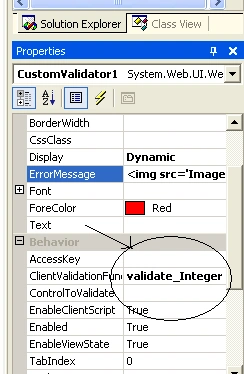
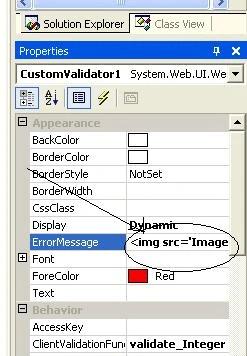
Now instead of error message add the image tag as shown below.
<
img src=alert.gif' style='width:15px;height:15px;'>Note : Image tag doesn't have have an end tag. So don't add.
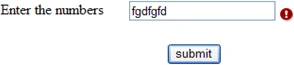
Then in test your page that shows images for errors.
See the picture below.
Know More:
You can also embed sound instead of error message or error image.
<asp:RequiredFieldValidator ControlToValidate="TextBox1" EnableClientScript="false" ID="RequiredFieldValidator1" runat="server" Text="<bgsound src='C:\Windows\Media\Windows Error.wav'>"></asp:RequiredFieldValidator>
Just make sure that the EnableClientScript="false" when you want a sound instead of a text message.
Note: This technique doesn't work in firefox(Mozilla), Opera, Safari browsers when used with dotnet1.1 and Vs2003, but works with IE . However it works fine in all browsers (IE,Firefox,opera,safari) when used with dotnet 2.0 and VS2005. The reason is with cross browser compatibility of Asp.net validators i.e the emit script that is understood only by IE but not with other browsers. But now the issue is solved in higher versions.
The reason modern, non-Microsoft browsers do not support client-side validation in the validation controls is because of the client-side script emitted by BaseValidator. The client-side validation script emitted by BaseValidator includes, among other things, a JavaScript block that creates an array of the validators. This array, then, can be enumerated on the client-side script to check the validity of all of the validation controls. This array is registered in the BaseValidator's RegisterValidatorDeclaration() method, but unfortunately uses the client-side script document.all[validatorID]. An example of the array declaration when rendered on an ASP.NET Web page can be seen below:
<script type="text/javascript" language="javascript">
<!--
var Page_Validators = new Array(document.all["_ctl1"], document.all["_ctl2"], document.all["_ctl3"]);
// -->
</script>
The problem with document.all[ID] is that Microsoft's Internet Explorer is the only browser that supports this non-standard technique for referencing an element in the HTML document. The standard way (which Internet Explorer does support, along with Mozilla, Netscape, Opera, and others), is: document.getElementById(ID). So, the script emitted by the BaseValidator class will do nothing but generate JavaScript errors in non-Microsoft browsers.
You can use Dom validators to overcome this issue in dotnet1.1.
http://www.asp.net/community/control-gallery/Item.aspx?i=372
Note : If ur using validation summary then change the image tag for error display which is assigned to ErrorMessage property of the custom validator to Text property of the validator as the error message property will be used for error display in validation summary.
Now validate the universe.
Happing Coding
Patricia ByrnePosted Apr 23, 2010, 8:22 PM
Hi Sudheendra, Thank you very much for this article. I looked all day for an article on this and couldn't find one. After many different searches I found your article. It was very helpful for me. Thank you for doing it. Patti
drinks liuPosted Dec 18, 2008, 9:30 PM
it's great!
Jimmy ZimmsPosted Dec 17, 2008, 12:16 PM
You can simply nest the content to display inside the validator server control tag. i think you will agree this is far more readable.