

In this post, we will learn how to perform a CRUD (Create, Update, Read, Delete) demo with Angular JS. In this post, we will use our CRUD library from the previous post. It's already added in the source code download link. For this example, we are using MVC application. In this post, I have added a SQL script of employee table and its relative stored procedures, like insert, update, get, get all, delete and add CRUD library reference in MVC project. Let's start a step by step tutorial of Angular CRUD demo.
Database
Step 1
Create employee table.
- CREATE TABLE [dbo].[Employee](
- [ID] [int] IDENTITY(1,1) NOT NULL,
- [Name] [varchar](50) NULL,
- [MobileNo] [varchar](50) NULL,
- CONSTRAINT [PK_Employee] PRIMARY KEY CLUSTERED
- (
- [ID] ASC
- ) WITH (PAD_INDEX = OFF, STATISTICS_NORECOMPUTE = OFF, IGNORE_DUP_KEY = OFF, ALLOW_ROW_LOCKS = ON, ALLOW_PAGE_LOCKS = ON) ON [PRIMARY]
- ) ON [PRIMARY]
- GO
Add all CRUD Procedures (Insert, Update, Get, GetAll, Delete).
Insert Employee
- CREATE PROCEDURE [dbo].[Employee_Insert]
- @Name Varchar(50)
- ,@MobileNo Varchar(50)
- ,@OUTVAL Int OUTPUT
- ,@OUTMSG Varchar(100) OUTPUT
- AS
- BEGIN
- SET NOCOUNT ON;
- INSERT INTO Employee (Name, MobileNo) VALUES (@Name, @MobileNo)
- SET @OUTVAL = 1
- SET @OUTMSG = 'Employee Insert Successfully.'
- END
- CREATE PROCEDURE [dbo].[Employee_Update]
- @ID Int
- ,@Name Varchar(50)
- ,@MobileNo Varchar(50)
- ,@OUTVAL Int OUTPUT
- ,@OUTMSG Varchar(100) OUTPUT
- AS
- BEGIN
- SET NOCOUNT ON;
- UPDATE Employee SET Name = @Name
- , MobileNo = @MobileNo
- WHERE ID = @ID
- SET @OUTVAL = 1
- SET @OUTMSG = 'Employee Update Successfully.'
- END
- CREATE PROCEDURE [dbo].[Employee_Delete]
- @ID Int
- ,@OUTVAL Int OUTPUT
- ,@OUTMSG Varchar(100) OUTPUT
- AS
- BEGIN
- SET NOCOUNT ON;
- DELETE FROM Employee WHERE ID = @ID
- SET @OUTVAL = 1
- SET @OUTMSG = 'Employee Delete Successfully.'
- END
- CREATE PROCEDURE [dbo].[Employee_Get]
- @ID Int
- AS
- BEGIN
- SET NOCOUNT ON;
- SELECT * FROM Employee WHERE ID = @ID
- END
- CREATE PROCEDURE [dbo].[Employee_GetAll]
- AS
- BEGIN
- SET NOCOUNT ON;
- SELECT * FROM Employee
- END
After creating the database from the above script, let's start creating our AngularJS MVC project.
Step 1
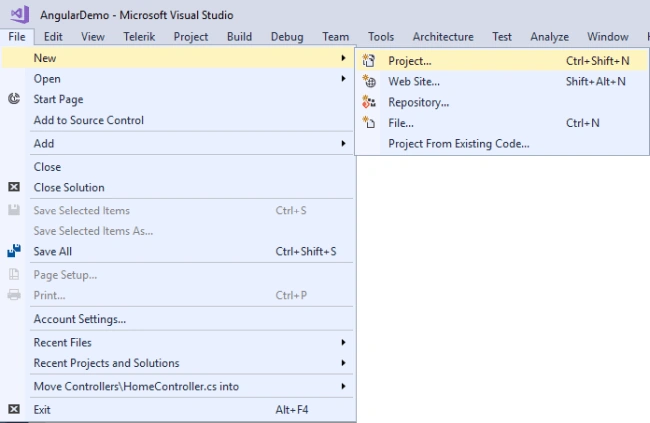
Open VS and create the project from File -> New -> Project menu.
Select ASP.NET Web Application (.NET Framework) to create MVC application and set the name and location of the project.

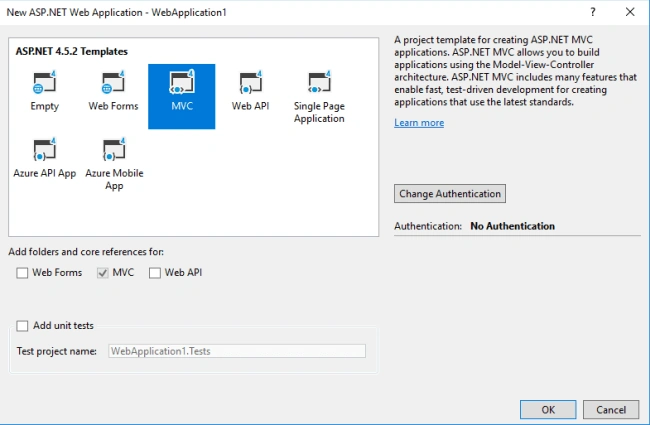
After setting the name and location of the project, it opens another dialog box. From this dialog, select MVC project and click OK.
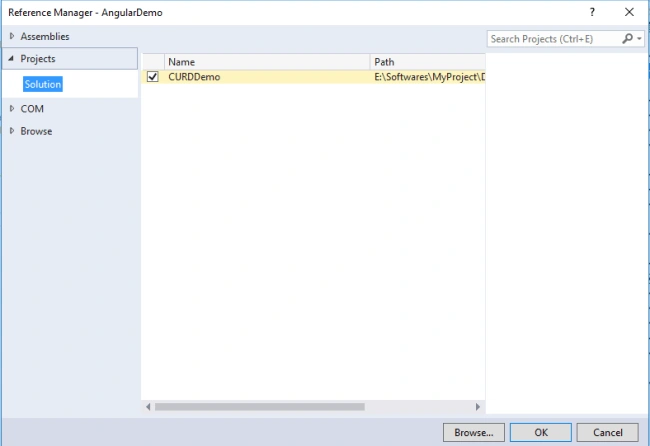
After completing all the above steps, add CRUD Demo library reference in Angular JS MVC Project.
Step 5
Go to Angular JS MVC project Web.config file and add the Connection string.
- <connectionStrings>
- <add name="DefaultConnection" connectionString="Data source=ServerName;Database=DataBase;Uid=UserName;Password=Password" providerName="System.Data.SqlClient" />
- </connectionStrings>
Controller
After adding ConnectionString in Web.Config file, now, go to Controllers -> HomeController. Inside Home, the controller adds the below namespace for accessing classes of JSON, CRUD etc.

- using CURDDemo;
- using System.Data;
- using Newtonsoft.Json;
After doing all the above pieces of stuff, let's start creating methods for CRUD operation.
Method 1
Save employee record in the employee table.
- public JsonResult Save(EmployeeClass modal)
- {
- MEMBERS.SQLReturnMessageNValue mRes = new EmployeeLogic().Employee_Insert(modal);
- return Json(mRes, JsonRequestBehavior.AllowGet);
- }
The input parameter is: EmployeeClass
The above function returns MEMBERS.SQLReturnMessageNValue. This class contains code and message returned from SQL Stored Procedure. This method inserts the record in the employee table.
Update employee record in employee table.
- public JsonResult Update(EmployeeClass modal)
- {
- MEMBERS.SQLReturnMessageNValue mRes = new EmployeeLogic().Employee_Update(modal);
- return Json(mRes, JsonRequestBehavior.AllowGet);
- }
The input parameter is: EmployeeClass
Above function return MEMBERS.SQLReturnMessageNValue this class contains code and message return from SQL Store procedure. This method updates record in the employee table.
Get the Single record of the employee by employee ID.
- public JsonResult Get(Int32 ID)
- {
- DataTable dt = new EmployeeLogic().Employee_Get(ID);
- string convertDataTableToJson = JsonConvert.SerializeObject(dt);
- return Json(convertDataTableToJson, JsonRequestBehavior.AllowGet);
- }
An input parameter is: ID (Unique ID of Employee Table)
Above function returns a JSON result. First get employee record in DataTable and convert DataTable to JSON using Newtonsoft.Json then return to view.
Get the Single record of the employee by employee ID.
- public JsonResult GetAll()
- {
- DataTable dt = new EmployeeLogic().Employee_GetAll();
- string convertDataTableToJson = JsonConvert.SerializeObject(dt);
- return Json(convertDataTableToJson, JsonRequestBehavior.AllowGet);
- }
Above function returns JSON result. This function gets all the employee records in the DataTable and converts DataTable to JSON and returns to view.



Join the conversation! Your thoughts help the community grow.