

Introduction
The example shown below exhibits how to create a very simple registration form in ASP.NET Web forms.
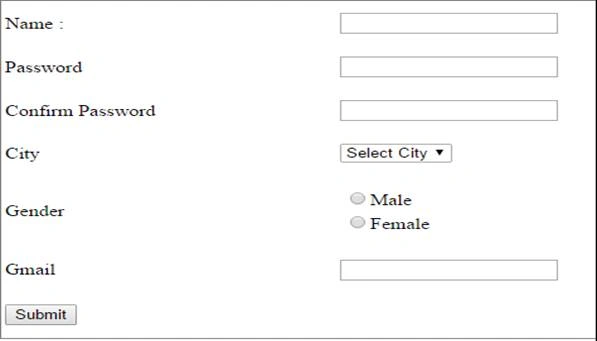
1. Create a table in the database (SQL Server 2012)
- Create a database and name it as Login.
- Add the table (here table name: tbllogin)
- Set primary key to Id column.
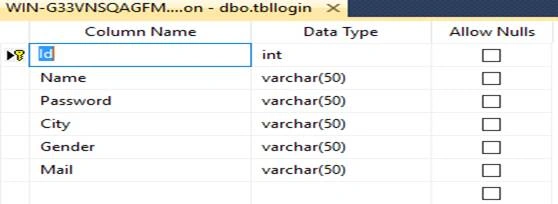
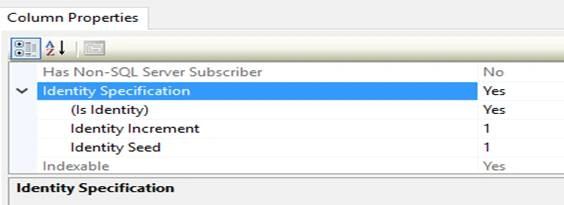
Note. In this example, I set the ID to auto-increment so that the ID will be automatically generated for every newly added row. To do this, select the column name Id and, in the column properties, set the Identity Specification to yes.
2. Create a new project in Visual Studio 2015
- Go to File-> New-> WebSite-> Visual C#->ASP.NET Empty Website-> Entry Application Name-> OK.
3. Create a new web form for the website
- Right-click on Website-> Add-> Add New Item->Visual C#->Web Form->write Web form name with .aspx extension->Add.
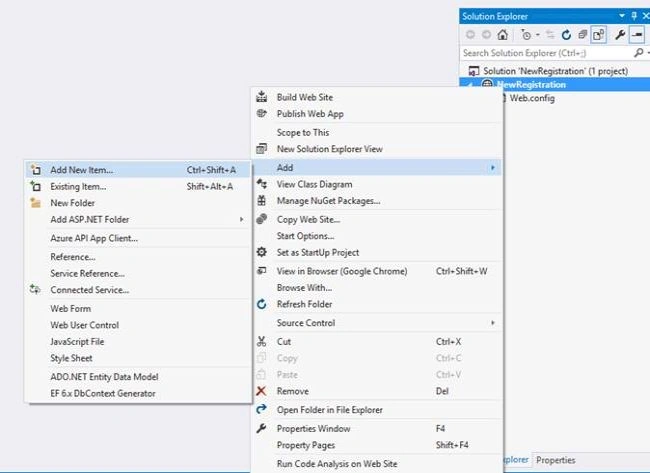
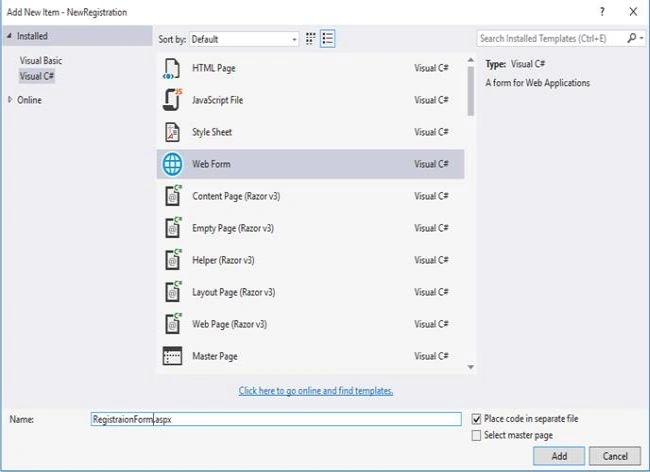
- RegistrationForm.aspx created ( RegistrationForm is a Web form name).
The HTML Source code of the registration form is mentioned below.<%@ Page Language="C#" AutoEventWireup="true" CodeFile="RegistraionForm.aspx.cs" Inherits="RegistraionForm" %> <!DOCTYPE html> <html xmlns="http://www.w3.org/1999/xhtml"> <head runat="server"> <title></title> </head> <body> <form id="form1" runat="server"> <p> <table class="auto-style1"> <tr> <td>Name :</td> <td> <asp:TextBox ID="TextBox1" runat="server"></asp:TextBox> </td> </tr> <tr> <td>Password</td> <td> <asp:TextBox ID="TextBox2" runat="server"></asp:TextBox> </td> </tr> <tr> <td>Confirm Password</td> <td> <asp:TextBox ID="TextBox3" runat="server" TextMode="Password"></asp:TextBox> </td> </tr> <tr> <td>City</td> <td> <asp:DropDownList ID="DropDownList1" runat="server"> <asp:ListItem Text="Select City" Value="select" Selected="True"></asp:ListItem> <asp:ListItem Text="Bangalore" Value="Bangalore"></asp:ListItem> <asp:ListItem Text="Mysore" Value="Mysore"></asp:ListItem> <asp:ListItem Text="Hubli" Value="hubli"></asp:ListItem> </asp:DropDownList> </td> </tr> <tr> <td>Gender</td> <td> <asp:RadioButtonList ID="RadioButtonList1" runat="server"> <asp:ListItem>Male</asp:ListItem> <asp:ListItem>Female</asp:ListItem> </asp:RadioButtonList> </td> </tr> <tr> <td>Gmail</td> <td> <asp:TextBox ID="TextBox4" runat="server"></asp:TextBox> </td> </tr> <tr> <td> <asp:Button ID="Button1" runat="server" Text="Button" /> </td> </tr> </table> </p> </form> </body> </html> - HTML Source code is created following the registration form.
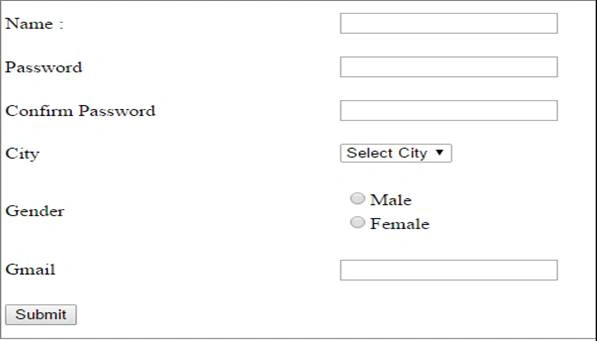
- Click the Submit button. You will see the code mentioned below. (code at the back end).
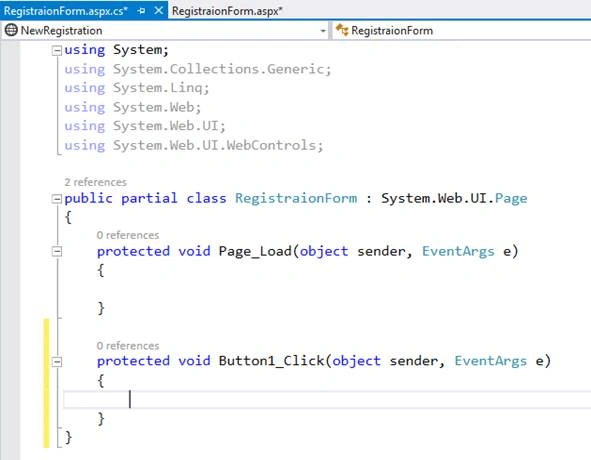
- C# code is in the void button click event, as shown below.
Add Namespaces, mentioned below, at the code back-end page.
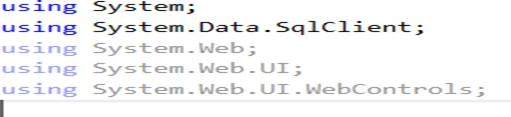
Write Insert code in Button1_Click Event.
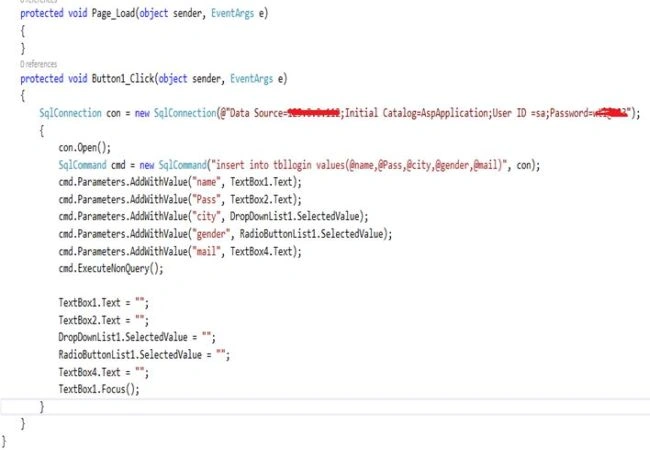
That’s it. I hope you will find this example useful.
venkatesh kanamarlapudiPosted Mar 29, 2023, 7:02 AM
Dearfrnd please help on that how to get submit buttion
Chris HsiehPosted May 6, 2022, 1:45 AM
Does it need any SQL store procedure to execute its connection order between front-end and back-end? if so, that'll be helpful. Thanks
Remedy PotPosted Aug 3, 2021, 1:10 PM
That is what I was actually looking for. Thanks for this detailed information. Only facing one issue which is how to get registered records from the database?
Mahesh ShetePosted Dec 5, 2020, 1:04 PM
Not insert record in database
Pramod JpPosted Jan 6, 2020, 9:19 AM
Hi sir...i need some information about creating a chat box in asp.net. with c#
Sakshi KaulPosted Mar 27, 2019, 5:04 AM
EmpIdTxt.Txt is giving an error Cmd.Parameters.AddWithValue("EmpId",EmpIdTxt.txt); cmd.Parameters.AddWithValue("Religion", ReligionTxt.Text);
J porkodiPosted Mar 24, 2019, 9:39 AM
Sir, if i give the details in registration form and click submit button its not working whereas if i dont type the details and click submit button its displaying registered successfully. i need a solution.
A MonPosted Nov 14, 2018, 3:22 AM
"An exception of type 'System.InvalidOperationException' occurred in System.Data.dll but was not handled in user codeAdditional information: Instance failure." I got this error while connection open. plz help me
srisaiphaniharsha dasariPosted Jan 25, 2018, 2:53 AM
Protected void Button1_Click(object sender, EventArgs e) { SqlConnection con = new SqlConnection(@"Data Source=(local) ; Initial Catalog=XXX ; User ID =sa;Password=XXXXXX"); { con.Open(); SqlCommand cmd = new SqlCommand("insert into SaRegistration values(@Name, @Password, @City, @Gender)", con); cmd.Parameters.AddWithValue("Name", TextBox1.Text); cmd.Parameters.AddWithValue("Password", TextBox2.Text); cmd.Parameters.AddWithValue("City", DropDownList1.SelectedValue); cmd.Parameters.AddWithValue("Gender", RadioButtonList1.SelectedValue); cmd.ExecuteNonQuery(); con.Close(); TextBox1.Text = ""; TextBox2.Text = ""; DropDownList1.SelectedValue = ""; RadioButtonList1.SelectedValue = ""; } }
srisaiphaniharsha dasariPosted Jan 25, 2018, 2:51 AM
There is no connection close statement in connection string. If u run that code u may get exception.
Marc RubinPosted Dec 9, 2016, 10:45 PM
In step 5, you could instead to use the loop iteration when inserting the data into SQL parameters which makes a fewer lines in a method.
Pedro SierraPosted Dec 6, 2016, 5:41 PM
You should try ASP.NET MVC instead of WebForms; MVC it's so much trendy nowadays ;)