

Introduction
For most businesses, data is the backbone of their operations. Data can be used for analysis, decision making, and communication between staff members. Without strong understanding of what data integrity means, businesses may not be able to effectively manage their data or protect it in case something happens to it. DBAs and data developers must pay close attention to data integrity. This article is for DBAs and data developers who work with SQL Server. In this article we'll discuss what Data Integrity is, why it's important, and how we can make sure to maintain and implement Data Integrity in SQL Server.
Data Integrity in SQL
Data Integrity is used to maintain the accuracy and consistency of data in a table.
Classification of Data Integrity
- System/Pre-Defined Integrity
- User-Defined Integrity
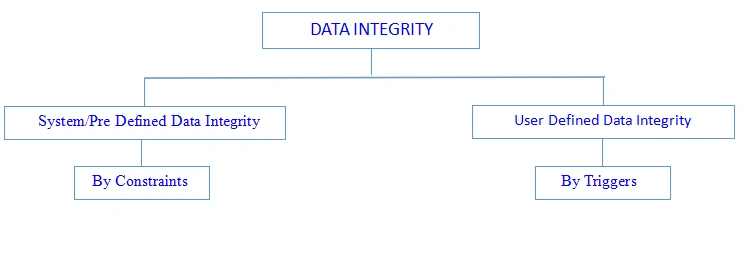
System/Pre-Defined Integrity
We can implement this using constraint. This is divided into three categories.
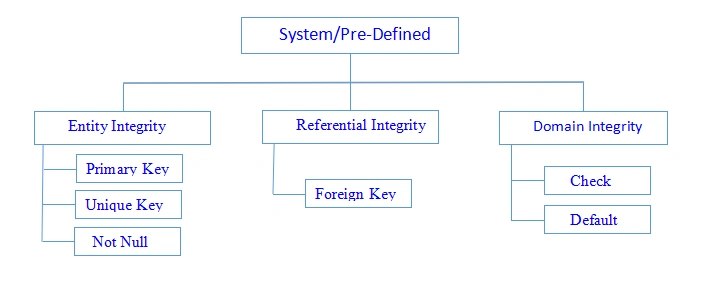
Entity Integrity
Entity integrity ensures each row in a table is a uniquely identifiable entity. We can apply Entity integrity to the Table by specifying a primary key, a unique key, and not null.
Referential Integrity
Referential integrity ensures the relationship between the Tables.
We can apply this using a Foreign Key constraint.
Domain Integrity
Domain integrity ensures the data values in a database follow defined rules for values, range, and format. A database can enforce these rules using Check and Default constraints.
Constraints
Constraints are used for enforcing, validating, or restricting data. Constraints are used to restrict data in a Table.
Constraints in SQL Server
Default
Default Constraint is used to assign the default value to a particular column in the Table.
By using this constraint we can avoid the system-defined value from a column while the user inserts values in the Table.
A Table can contain any number of default constraints.
Default constraints can be applied to any datatypes.
Example
Create table Demo(Id int,name varchar(50),Salary int default 15000)
Unique
Unique constraints are used to avoid duplicate data in a column but accept null values in the column.
It also applies to any data type.
A Table can contain any number of unique constraints.
Create table demo1(id int unique,name varchar(50),price int unique)
Not Null
It avoids null values from column-accepted duplicate values.
It can apply to any data type.
A Table can contain any number of not null constraints.
Example
Create table Demo2(id int not null, age int)
Important Points to Remember
Unique and Not Null constraints have their own disadvantage, that is accepting null and duplicate values into the Table. So to overcome the above drawbacks we write the combination of Unique and Not Null on a column.
Example
Create table demo 3
Check
It is used to verify or check the values with the user-defined conditions on a column.
It can apply to any data type.
A Table can contain any number of Not Null constraints.
Example
Create table demo4(id int, Age int check(Age between 18 and 24))
Primary key
The primary key adds features of unique and not null constraints.
By using the primary key we can avoid duplicate and null values for the column.
It can apply to any datatype like int, char, etc.
A table can contain one primary key only.
Example
Create table demo5(id int primary key, salary money)
Composite primary key
If a primary key is created on multiple columns the composite key can apply to a maximum of 16 columns in a table.
Example
- We can apply only a single primary key in a Table.
- We can apply the primary key constraint on multiple columns in a Table.
- The primary key is also called the composite key and candidate key.
Foreign Key
The most important part of the database is to create the relationship between the database Table.
The relationship provides a method for linking data stored in two or more Tables so that we can retrieve data in an efficient way and verify the dependency of one table's data on another Table.
Important Rules to Create Foreign Key Constraints
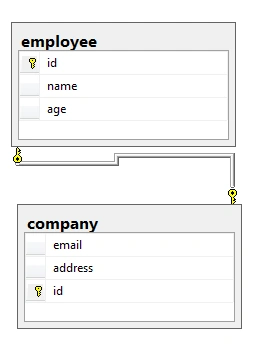
In order to create a relation between multiple tables, we must specify a Foreign key in a Table that references a column in another Table which is the primary key column.
We require two tables for binding with each other and those two tables have a common column name and those columns should be the same data type.
- If a table contains a primary key then it can be called a parent Table.
- If a Table contains a foreign key reference then it can be called a Child Table.
We can apply the foreign key reference on any datatypes.
Vishal JoshiPosted Sep 13, 2021, 3:47 PM
Nice. Clear and understandable.
Rajesh KumarPosted Sep 5, 2018, 12:24 AM
Nice article thanks for sharing.........
Hadshana KamalanathanPosted Sep 4, 2018, 7:47 PM
Thanks for sharing...