

Step 1
To Create the comment box, we need to add some tables and stored procedures.
Create a UserTable:
To Create the comment box, we need to add some tables and stored procedures.
Create a UserTable:
- CREATE TABLE [dbo].[UserTable](
- [UserName] [varchar](50) NOT NULL,
- [Password] [varchar](50) NULL,
- CONSTRAINT [PK_UserTable] PRIMARY KEY CLUSTERED
- (
- [UserName] ASC
- )WITH (PAD_INDEX = OFF, STATISTICS_NORECOMPUTE = OFF, IGNORE_DUP_KEY = OFF, ALLOW_ROW_LOCKS = ON, ALLOW_PAGE_LOCKS = ON) ON [PRIMARY]
- ) ON [PRIMARY]
- GO
Create a ParentComment Table:
- CREATE TABLE [dbo].[ParentComment](
- [CommentID] [int] IDENTITY(1,1) NOT NULL,
- [UserName] [varchar](50) NULL,
- [CommentMessage] [varchar](300) NULL,
- [CommentDate] [date] NULL,
- CONSTRAINT [PK_ParentComment] PRIMARY KEY CLUSTERED
- (
- [CommentID] ASC
- )WITH (PAD_INDEX = OFF, STATISTICS_NORECOMPUTE = OFF, IGNORE_DUP_KEY = OFF, ALLOW_ROW_LOCKS = ON, ALLOW_PAGE_LOCKS = ON) ON [PRIMARY]
- ) ON [PRIMARY]
- GO
- SET ANSI_PADDING OFF
- GO
- ALTER TABLE [dbo].[ParentComment] WITH CHECK ADD CONSTRAINT [FK_ParentComment_UserTable] FOREIGN KEY([UserName])
- REFERENCES [dbo].[UserTable] ([UserName])
- GO
- ALTER TABLE [dbo].[ParentComment] CHECK CONSTRAINT [FK_ParentComment_UserTable]
- GO
Create a ChildComment Table:
- CREATE TABLE [dbo].[ChildComment](
- [CommentID] [int] IDENTITY(1,1) NOT NULL,
- [UserName] [varchar](50) NULL,
- [CommentMessage] [varchar](300) NULL,
- [CommentDate] [date] NULL,
- [ParebCommentID] [int] NULL,
- CONSTRAINT [PK_ChildComment] PRIMARY KEY CLUSTERED
- (
- [CommentID] ASC
- )WITH (PAD_INDEX = OFF, STATISTICS_NORECOMPUTE = OFF, IGNORE_DUP_KEY = OFF, ALLOW_ROW_LOCKS = ON, ALLOW_PAGE_LOCKS = ON) ON [PRIMARY]
- ) ON [PRIMARY]
- GO
- SET ANSI_PADDING OFF
- GO
- ALTER TABLE [dbo].[ChildComment] WITH CHECK ADD CONSTRAINT [FK_ChildComment_ParentComment] FOREIGN KEY([UserName])
- REFERENCES [dbo].[UserTable] ([UserName])
- GO
- ALTER TABLE [dbo].[ChildComment] CHECK CONSTRAINT [FK_ChildComment_ParentComment]
- GO
- ALTER TABLE [dbo].[ChildComment] WITH CHECK ADD CONSTRAINT [FK_ChildCommentID_ChildCommentID] FOREIGN KEY([ParebCommentID])
- REFERENCES [dbo].[ParentComment] ([CommentID])
- GO
- ALTER TABLE [dbo].[ChildComment] CHECK CONSTRAINT [FK_ChildCommentID_ChildCommentID]
- GO
Step 2
Create a stored procedure for comments session so as to check credentials of the User.
Create a stored procedure for comments session so as to check credentials of the User.
- create proc spCheckUserCredentials
- (@UserName varchar(25))
- as
- Begin
- Select *from UserTable where UserName=@UserName
- End
Insert comment for ParentComment.
- create proc spCommentInsert
- (@UserName varchar(25),
- @CommanetMessage varchar(300))
- as
- Begin
- Insert into ParentComment(UserName,CommentMessage,CommentDate)values(@UserName,@CommanetMessage,GETDATE())
- End
Insert reply comment for ChildComment.
- create proc spCommentReplyInsert(@UserName varchar(25),
- @CommentMessage varchar(300),
- @ParentCommentID int)
- as
- Begin
- Insert into ChildComment(UserName,CommentMessage,CommentDate,ParebCommentID)
- values(@UserName,@CommentMessage,GETDATE(),@ParentCommentID)
- End
Get Data Comment from database.
- create Proc spGetParetComment
- as
- Begin
- Select *from ParentComment
- End
- create proc spGetParentCommentByParentCommnetID(@ParentCommnetID int)
- as
- Begin
- select *from ChildComment where ParebCommentID=@ParentCommnetID
- End
Step 3
Create a webform for UserLogin.
Create a webform for UserLogin.
- <body>
- <form id="form1" runat="server">
- <div>
- <table class="auto-style1">
- <tr>
- <td class="auto-style2">Login Page</td>
- <td> </td>
- </tr>
- <tr>
- <td class="auto-style2">UserName</td>
- <td>
- <asp:TextBox ID="TextBox2" runat="server"></asp:TextBox>
- </td>
- </tr>
- <tr>
- <td class="auto-style2">Password</td>
- <td>
- <asp:TextBox ID="TextBox1" TextMode="Password" runat="server"></asp:TextBox>
- </td>
- </tr>
- <tr>
- <td class="auto-style2">
- <asp:Button ID="Button1" runat="server" Height="31px" Text="LOGIN" Width="115px" OnClick="Button1_Click" />
- </td>
- <td> </td>
- </tr>
- </table>
- <asp:Label ID="Label1" runat="server" ></asp:Label>
- <asp:LinkButton runat="server" ID="lnkRegistor" Text="Registration" PostBackUrl="~/Default3.aspx"></asp:LinkButton>
- </div>
- </form>
- </body>
Codebehind File
- using System;
- using System.Collections.Generic;
- using System.Linq;
- using System.Web;
- using System.Web.UI;
- using System.Web.UI.WebControls;
- using System.Data;
- using System.Data.SqlClient;
- public partial class _Default : System.Web.UI.Page
- {
- protected void Page_Load(object sender, EventArgs e)
- {
- }
- protected void Button1_Click(object sender, EventArgs e)
- {
- SqlConnection con = new SqlConnection("Data Source=DEEPAK-PC;Initial Catalog=comment;Integrated Security=True");
- using (SqlCommand cmd = new SqlCommand("spCheckUserCredentials", con))
- {
- cmd.CommandType = CommandType.StoredProcedure;
- cmd.Parameters.AddWithValue("@UserName", TextBox2.Text);
- SqlDataAdapter da = new SqlDataAdapter(cmd);
- DataSet ds = new DataSet();
- da.Fill(ds);
- if (ds.Tables[0].Rows.Count > 0)
- {
- if (ds.Tables[0].Rows[0]["Password"].ToString() == TextBox1.Text)
- {
- Response.Redirect("Default2.aspx?User_name=" + TextBox2.Text);
- }
- else
- {
- Label1.Text = "Invailid password and Username";
- }
- }
- else
- {
- Label1.Text = "Invailid password and Username";
- }
- }
- }
- }
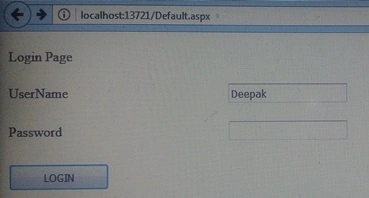
Step 4
Create a comment session webform.
Create a comment session webform.
Head section
- <link rel="stylesheet" href="https://maxcdn.bootstrapcdn.com/bootstrap/4.0.0/css/bootstrap.min.css"/>
- <script src="https://ajax.googleapis.com/ajax/libs/jquery/3.3.1/jquery.min.js"></script>
Body section
- <body>
- <form id="form1" runat="server">
- <div >
- <div class="container" style=" padding:15px 20px; width:auto; ">
- <div class="row">
- <div class="col-md-6">
- <asp:TextBox ID="textComment" runat="server" CssClass="input-group" TextMode="MultiLine" Width="300px" Height="60px" Rows="15" ></asp:TextBox>
- <%-- <asp:Image ID="Image1" runat="server" ImageUrl="~/Image/h.jpg" Width="30px" Height="30px" style="border:1px solid #4800ff;" />--%>
- <br/> <asp:Button ID="btnCommentpublilsh" CssClass="btn-sm btn-default" Text="Comment" runat="server" OnClick="btnCommentPublish_Click" />
- </div>
- <div class="col-md-6"></div>
- </div>
- </div>
- <%--Comment Session--%>
- <asp:GridView ID="GridView1" BorderStyle="None" CssClass="table-responsive" Width="100%" GridLines="None" runat="server" AutoGenerateColumns="False" ShowHeader="False">
- <Columns>
- <asp:BoundField DataField="ParentCommentID" Visible="false" HeaderText="ParentCommentID" />
- <asp:TemplateField HeaderText="ParentMessage">
- <ItemTemplate>
- <div class="container">
- <div class="row">
- <div class="col-lg-12">
- <table>
- <tr>
- <td style="width:55px;vertical-align:top;padding-top:10px">
- <asp:Label ID="lblParentDate" runat="server" Text='<%#Bind("ParanetCommentDate") %>'></asp:Label>
- <br />
- <asp:Image ID="ImageParent" runat="server" style="width:25px;height:25px;" ImageUrl="~/Image/student-512.png" />
- <asp:Label ID="Label4" Font-Bold="true" ForeColor="#cc0066" runat="server" Text='<%# Bind("ParentUserName") %>'></asp:Label>
- </td>
- </tr>
- <tr>
- <td><asp:Label ID="Label1" runat="server" Text='<%# Bind("ParentCommentMessage") %>'></asp:Label></td>
- </tr>
- <tr >
- <td><asp:Label ID="lb1COmmenId" runat="server" Visible="false" Text='<%#Eval("ParentCommentID") %>'></asp:Label>
- <a class="link" id='lnkReplyParent<%#Eval("ParentCommentID") %>' href="javascript:void(0)" onclick="showReply(<%#Eval("ParentCommentID") %>);return false;">Reply</a>
- <a class="link" id="lnkCancle" href="javascript:void(0)" onclick="closeReply(<%#Eval("ParentCommentID") %>);return false;">Cancle</a>
- <div id='divReply<%#Eval("ParentCommentID") %>' style="display:none;margin-top:5px;">
- <asp:TextBox ID="textCommentReplyParent" CssClass="input-group" runat="server" Width="300px" TextMode="MultiLine" ></asp:TextBox>
- <br />
- <asp:Button ID="btnReplyParent" runat="server" Text="Reply" CssClass="input-group btn" OnClick="btnReplyParent_Click" /></div>
- </td>
- </tr>
- <tr >
- <td style="padding-left:100px;border-bottom:1px solid #4cff00; ">
- <br />
- <asp:GridView ID="GridView2" BorderStyle="None" GridLines="None" runat="server" AutoGenerateColumns="False" DataSource='<%# Bind("Empl") %>' ShowHeader="False">
- <Columns>
- <asp:TemplateField HeaderText="UserName">
- <ItemTemplate>
- <asp:Label ID="lblChildDate" runat="server" Text='<%#Bind("ChilCommentDate") %>'></asp:Label>
- <br />
- <asp:Image ID="ImageParent" runat="server" style="width:25px;height:25px;" ImageUrl="~/Image/student-512.png" />
- <asp:Label ID="Label2" runat="server" Font-Bold="true" ForeColor="#ff0066" Text='<%#Bind("UserName") %>'></asp:Label>
- <br />
- <asp:Label ID="Label3" runat="server" Text='<%# Bind("ChildcommentMessage") %>'></asp:Label>
- <hr />
- </ItemTemplate>
- </asp:TemplateField>
- </Columns>
- </asp:GridView>
- <br />
- </td>
- </tr>
- </table>
- </div>
- </div>
- </div>
- </ItemTemplate>
- </asp:TemplateField>
- </Columns>
- </asp:GridView>
- <br />
- <asp:ObjectDataSource ID="ObjectDataSource1" runat="server" SelectMethod="GetAllDepartmentsandEmployee" TypeName="ParentCommentIDAcess"></asp:ObjectDataSource>
- <br />
- </div>
- <script type="text/javascript">
- //GridView Comment
- function showReply(n) {
- $("#divReply" + n).show();
- return false;
- }
- function closeReply(n) {
- $("#divReply" + n).hide();
- return false;
- }
- </script>
- </form>
- </body>
Code Behind File
- using System;
- using System.Collections.Generic;
- using System.Linq;
- using System.Web;
- using System.Web.UI;
- using System.Web.UI.WebControls;
- using System.Data;
- using System.Data.SqlClient;
- using System.Configuration;
- public partial class Default2 : System.Web.UI.Page
- {
- SqlConnection con = new SqlConnection("Data Source=DEEPAK-PC;Initial Catalog=comment;Integrated Security=True");
- protected void Page_Load(object sender, EventArgs e)
- {
- GridView1.DataSource = ParentCommentIDAcess.GetAllDepartmentsandEmployee();
- GridView1.DataBind();
- }
- protected void btnCommentPublish_Click(object sender, EventArgs e)
- {
- SqlCommand cmd = new SqlCommand("spCommentInsert", con);
- cmd.CommandType = CommandType.StoredProcedure;
- cmd.Parameters.AddWithValue("@UserName", Request.QueryString["User_name"].ToString());
- cmd.Parameters.AddWithValue("@CommanetMessage", textComment.Text);
- con.Open();
- cmd.ExecuteNonQuery();
- con.Close();
- GridView1.DataSource = ParentCommentIDAcess.GetAllDepartmentsandEmployee();
- GridView1.DataBind();
- }
- protected void btnReplyParent_Click(object sender, EventArgs e)
- {
- GridViewRow row = (sender as Button).NamingContainer as GridViewRow;
- Label lblchildCommentid = (Label)row.FindControl("lb1COmmenId");
- TextBox txtCommentParent = (TextBox)row.FindControl("textCommentReplyParent");
- SqlCommand cmd = new SqlCommand("spCommentReplyInsert", con);
- cmd.CommandType = CommandType.StoredProcedure;
- cmd.Parameters.AddWithValue("@UserName", Request.QueryString["User_name"].ToString());
- cmd.Parameters.AddWithValue("@CommentMessage", txtCommentParent.Text);
- cmd.Parameters.AddWithValue("@ParentCommentID", lblchildCommentid.Text);
- con.Open();
- cmd.ExecuteNonQuery();
- con.Close();
- GridView1.DataSource = ParentCommentIDAcess.GetAllDepartmentsandEmployee();
- GridView1.DataBind();
- }
- }
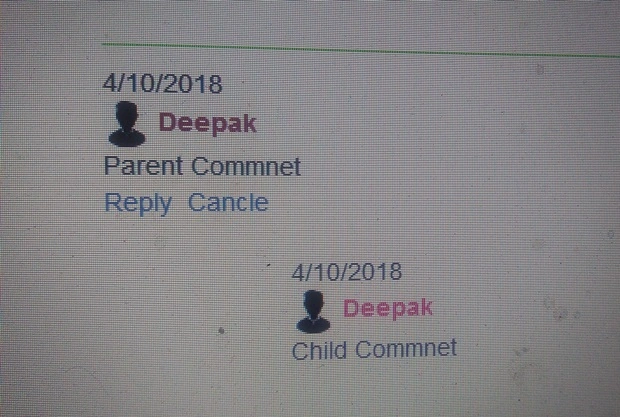
Parent Comment is a message in the comment box
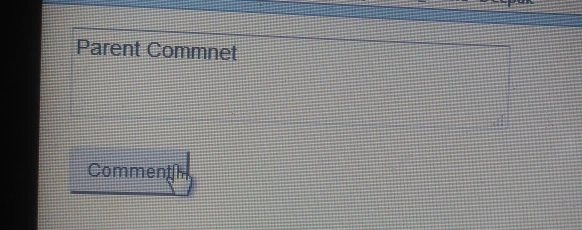

Reply to a parent comment with a child comment.
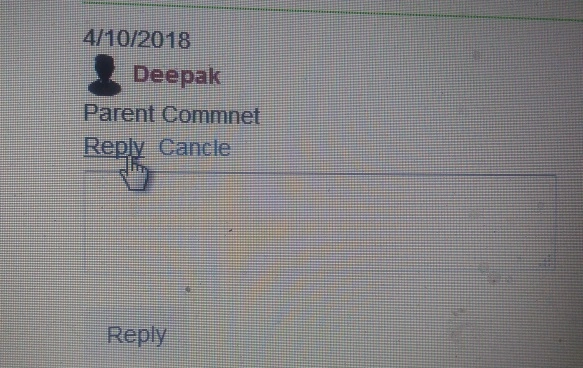
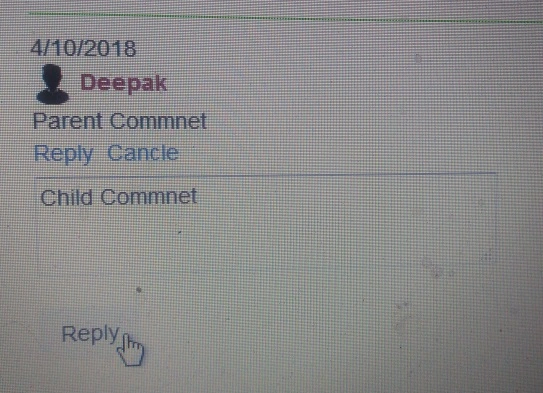
Show Parent and Child Comment:
Thank you for you reading this blog.
Join the conversation! Your thoughts help the community grow.