

In this blog, you will see how to get announcements from a specific Yammer group using PowerShell.
Prerequisites
Go to https://www.yammer.com/client_applications and register an app.
Once the app is registered, generate a developer token.
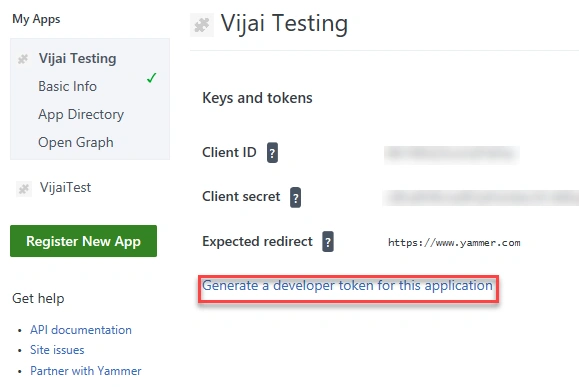
Copy the below script and paste it in a notepad. Save the file as GetAnnouncements.ps1.
- # Input Parameters
- $developerToken = "12240-******PR2NWpZVtnbXYw"
- $groupID="15653442"
- $uri="https://www.yammer.com/api/v1/messages/in_group/"+$groupID+".json"
- $headers = @{ Authorization=("Bearer " + $developerToken) }
- Function GetAnnouncements($pageNo)
- {
- # Invoke Web Request
- $webRequest = Invoke-WebRequest –Uri $uri –Method Get -Headers $headers
- # Check whether the status code is 200
- if ($webRequest.StatusCode -eq 200) {
- # Converts a JSON-formatted string to a custom object or a hash table.
- $results = $webRequest.Content | ConvertFrom-Json
- # Loop through all the messages
- $results.messages | ForEach-Object {
- $message = $_
- # Check if the message type is announcement
- if($message.message_type -eq "announcement")
- {
- # Display the announcement title
- Write-Host -ForegroundColor Green $message.title
- }
- }
- # Check if there are more items available
- if($results.more_available)
- {
- GetUsers($pageNo+1)
- }
- }
- else {
- Write-Host -ForegroundColor Yellow "An error has occurred: " + $webRequest.StatusCode + " Description " + $webRequest.Status
- }
- }
- # Call the function
- GetAnnouncements(1)
Open PowerShell window and run the following command.
- >cd "<folderlocation>"
folderlocation – GetAnnouncements.ps1 file location
Run the following command,
- >.\GetAnnouncements.ps1
Thus in this blog, you saw how to get announcements from a specific Yammer group using PowerShell.
Join the conversation! Your thoughts help the community grow.