

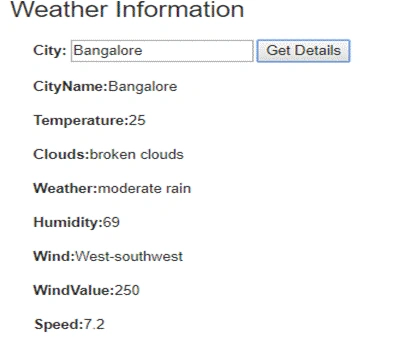
First we need to add html code. Below, we have one text box and one button. Once you enter the city name and press the button you will the get that corresponding city's weather details.
You have to use an angularjs application with MVC controller.
HTML Code
- <div class="col-md-4">
- <div class="whetherad">
- <b> City:</b> <input type="text" ng-model="cityName" placeholder="Enter City Name" />
- <button ng-click="getWeatherInformation()">Get Details</button><br /><br />
- <b>CityName:</b>{{city}}<br /><br />
- <b>Temperature:</b>{{temprature}}<br /><br />
- <b>Clouds:</b>{{clouds}}<br /><br />
- <b>Weather:</b>{{weather}}<br /><br />
- <b>Humidity:</b>{{humidity}}<br /><br />
- <b>Wind:</b>{{wind}}<br /><br />
- <b>WindValue:</b>{{windValue}}<br /><br />
- <b>Speed:</b>{{speed}}
- </div>
- </div>
You will get the JSON response from your controller. From that json you can extract the required information using AngularJS code below.
JS Code
- //get weather information
- //
- $scope.getWeatherInformation = function () {
- if ($scope.cityName == undefined || $scope.cityName == null || $scope.cityName == "") {
- alert("Please enter city name");
- return false;
- }
- $http.get("/Registration/GetWeatherReport?cityName=" + $scope.cityName).then(
- function (response) {
- $scope.temprature = response.data.current.temperature.value;
- $scope.humidity = response.data.current.humidity.value;
- $scope.wind = response.data.current.wind.direction.name;
- $scope.windValue = response.data.current.wind.direction.value;
- $scope.speed = response.data.current.wind.speed.value;
- $scope.weather = response.data.current.weather.value;
- $scope.clouds = response.data.current.clouds.name;
- $scope.city = response.data.current.city.name;
- },
- function (error) {
- })
- }
First LastPosted Oct 8, 2018, 1:16 PM
You have to use an angularjs application with MVC controller. What are the steps? Create an empty MVC project and then add in a html file?
Viknaraj ManogararajahPosted Jul 26, 2018, 11:33 AM
nice one..
ishaq shaikPosted Jul 26, 2018, 7:05 AM
Nice vijay it is very simple and usefull thanks its helped me alot
gouse mohiddinPosted Jul 26, 2018, 7:03 AM
Good Article Vijay
Jignesh KumarPosted Jul 24, 2018, 5:18 AM
Nice one ...
Karthik ChintalaPosted Jul 20, 2018, 8:12 PM
Good share vijay