

Recently, one of my clients needed to copy a file from one document library to another document library. Previously, I thought to go with content organizer rule as it doesn't work if I drag and drop files to drop off the library through the UI.
So, I developed a flow which will copy the files from one document library and put them to a folder inside document library based on the condition.
Steps
Log in to the MS Flow using your Office 365 credential and create a flow from the blank.
Then select a template when a file is created.
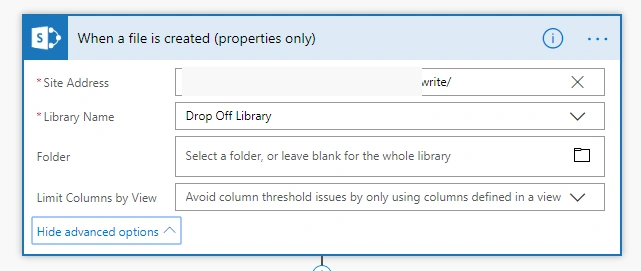
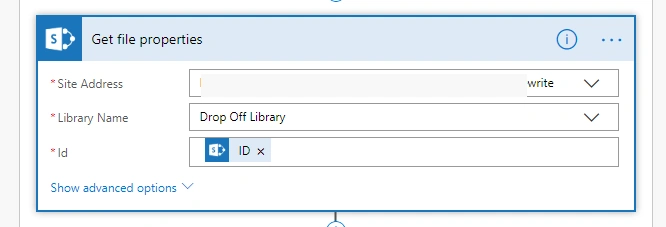
Add Get file properties action, as I need it to get the metadata of the file.
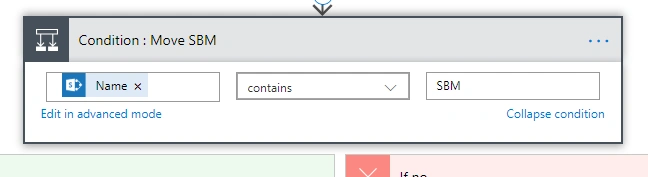
Add Condition then give condition criteria based on your requirement.
Add copied file and provide parameter as displayed below.
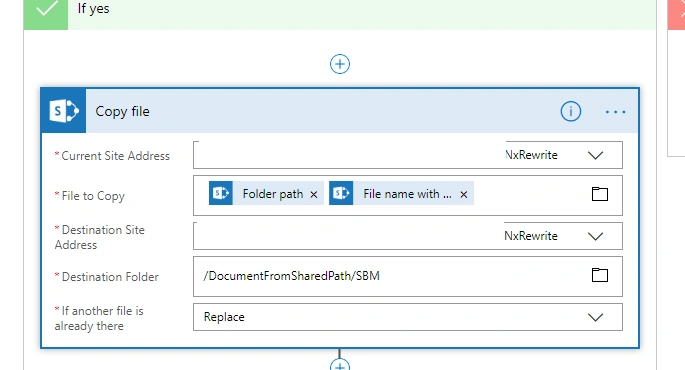
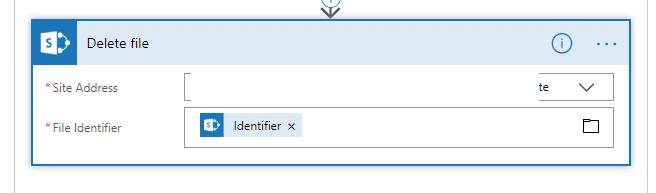
After "Copy File" action and add "Delete file" action.
As we can see the file is getting copied to a folder inside another document library.
Cheers!!
BijayKumar AcharyaPosted Sep 6, 2019, 7:30 AM
Many thanks for sharing this article. Just one info how do we get Folder PAth and File Name with?
BijayKumar AcharyaPosted Sep 6, 2019, 4:52 AM
Is there any automated process which can copy file and its content from one Document Library of a Site Collection (A) to another Document Library of Site Collection (B) on Item Creation using MS FLOW? Not looking for a Solution where I need to Select an Item run the Flow. Without any Manual Intervention.
sheik ibrahimPosted Aug 2, 2019, 1:30 AM
I am new to this technology bro
sheik ibrahimPosted Aug 2, 2019, 1:30 AM
Hi Bro,Can you please share me the entire ms flow action for moving one document set from one library to another library
Mahesh ChandPosted Oct 22, 2018, 6:10 AM
Thanks Suman. We also have a category, Microsoft 365 if this post belongs there. Cheers!
Rushi MehtaPosted Oct 21, 2018, 10:53 PM
Nice AArticle