

In this blog, I will explain about the collection and what interfaces are involved in the collection. Basically, we will learn
- What is the collection?
- What is the hierarchy of collection interfaces?
- Properties and methods owned by an interface?
- What is the main purpose of bringing the collection?
- What are the pros and cons of collection ?
What is the collection?
- ArrayList
It represents an ordered collection that can be indexed automatically. It is like an array but it has some advanced features for adding and removing an item. - HashTable
Hash table stores the data in key/value pair. We can use the key to access the value. - Sorted List
Sorted list is the combination of both arrayList and Hash table. The element of Hash table can be accessed by index and both the keys. - Stack
It represents Last-In-First-Out Collection. - Queue
It represents first come first serve collections.
Before going to depth of collection, we need to understand the hierarchy of interfaces, which plays main role in collection. Please see the diagram. There are four Interfaces, which helps collection to be more dynamic and powerful.
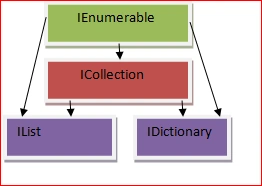
IEnumerable is the base interface of all collections. It provides an enumerator for simple iteration. It has a method GetEnumerator() that returns an enumerator that iterates through a collection.
Properties
- Count
It helps in getting the number of the element that a collection has. - IsSynchronized
It helps in getting the value, which indicates that helps in access of Icollection, which is synchronized or not.(thread safe) - Synroot
Gets an object that can be used to synchronized access of Icollection or not.
Methods
- CopyTo(Array,Int32) - It copies all the data of collection to an array.
- GetEnumerator() - It returns the enumerator that iterates the collection.
It reperesents a non generic collection or an object that can be easily accessed by an Index. It extends the IEnumerable and ICollection Interface further. Now, it has all the properties and methods, which ICollection and IEnumerable must have. It has some more properties and methods, which are listed here.
Properties
IsFixedSize,IsReadOnly,Item[int32], Methods:Add(Object), Clear(), IndexOf(Object),Contains(Object), Remove(Object), RemoveAt()
- Add() is for adding an element in a collection.
- Clear() is for deleting all the data from collection.
- IndexOf() is for getting the index of the particular object.
- Contains(Object) returns Boolean value, which indicates that collection contains the value or not.
- Remove(Object) removes the first occurrence of an object from the collection
- RemoveAt(int32) removes the element of the specified index.
Main purpose of collection
If we want to create and manage groups of the related objects, then we have two options; where one is we can use an array of an object and other is a collection. In case of an array; it has a limit of size, it basically works with the fixed number, which strongly types objects, because we need to create the array of the objects, which are required to be stored into it. In this case, we have to define the size of an array and then perform any operation but it might have worked properly in the case of limited data but what about the data, which is unknown by us such as, if we are fetching lacks of records from the database and had set the size of an array something like 10000 etc. then what would happen? It would give the exception of an index out of range.
I hope, you must have understand the problem, the problem is limited size of an array. To overcome this problem , Microsoft provides collection, where no need to define the size of an array. It can grow and shrink dynamically then it does not matter, how many records are coming from the database. In the array, we have to declare the type of the array but in case of collection, we only need to create the instance of the class and add the items. Please see the given example here, where I created an array of the string and size of this array, which is 2, if I would assign the value on third position, it would fire an exception.
Now, I am creating one more object and that is the ArrayList object. I created it simply and added the two string values and one integer value, but it would not fire any exception because it can grow dynamically and support an object type value due to which it accepts any type of value easily. In case of an array, if we would like to pass any value, then we have to create an object array explicitly. It means collection supports objects implicitly. If we want a collection that can store only one data type object, then please use generic collections. I will explain these collections into my new article, which are similar as collection but supports generics and the namespace is System.Collections.Generics.- using System;
- using System.Collections;
- using System.Collections.Generic;
- using System.Linq;
- using System.Text;
- namespace ConsoleApplication15 {
- class Program {
- static void Main(string[] args) {
- string[] nameList = new string[2];
- nameList[0] = "raj";
- nameList[0] = "raju";
- ArrayList obArrayList = new ArrayList();
- obArrayList.Add("raj");
- obArrayList.Add("raju");
- obArrayList.Add(1);
- }
- }
- }
Problem with collections
The main problem in collections is boxing and unboxing.
When value type converts into reference type, then it is called boxing and vice- versa is unboxing. In case of boxing, the object moves from stack to manage heap and in unboxing, an object moves from heap to stack, so it consumes unnecessary memory. Boxing is implicit at the time of adding the items into Collections because collections can have only object data type item. Unboxing happens at the time of getting the values. Suppose I have an ArrayList, which has lacks of records and I want to perform an iterative operation on every item, then first of all, I need to add lacks of records and each record would be converted into an object automatically (boxing) and then we are performing an iterative operation on every element, so we will have to convert it into the required type ; which we added (unboxing).
Please see the given example. In this example, I am adding integer items into a array list but when I am going to get the value of an arraylist[index], it shows an error and says ‘cannot implicit convert type object to int’, so we are performing unboxing explicitly in the other exdoes not show an error.
- using System;
- using System.Collections;
- using System.Collections.Generic;
- using System.Linq;
- using System.Text;
- namespace ConsoleApplication15 {
- class Program {
- static void Main(string[] args) {
- ArrayList obj = new ArrayList();
- for (int i = 0; i <= 100; i++) {
- obj.Add(i); // this is impicitly boxing
- }
- // this code will perform the operation on each items
- for (int j = 0; j <= 100; j++) {
- int result = obj[j]; // unboxing
- }
- }
- }
- }
- ArrayList obj = new ArrayList();
- for (int i = 0; i <= 100; i++) {
- obj.Add(i); // this is impicitly boxing
- }
- // this code will perform the operation on each items
- for (int j = 0; j <= 100; j++) {
- int result = (int) obj[j]; // unboxing
- }
Note
“Generics provide a way to define a class and method, whose data type can be defined at the time of class instantiation. It means that we can provide data type of a class at the time of instantiation of that class”. Thus, we will use generics in the collections in our next article.
SubashPosted Mar 6, 2017, 1:53 AM
Very useful article please share more
Shravan yadavPosted Mar 5, 2017, 11:00 PM
when u send generics overview