Hello SharePointers,
I am writing this article for fellow SharePointers about my new challenge which I fixed a couple of days back (September 17) in my SharePoint 2013 Production Farm.
On a fine Monday morning, I was bit relaxed and focusing on a new proposal in the project activity. Suddenly we received loads of emails from our business users and stakeholders stating that the workflows were not triggering to the users.
Then I checked the workflow services in our PROD app server, and all the services were running perfectly and the server's CPU utilization and health were in good state. After enormous Googling for a couple of hours we were not able to get the workflows up and running.
Here is the error which we got once the workflow triggered,
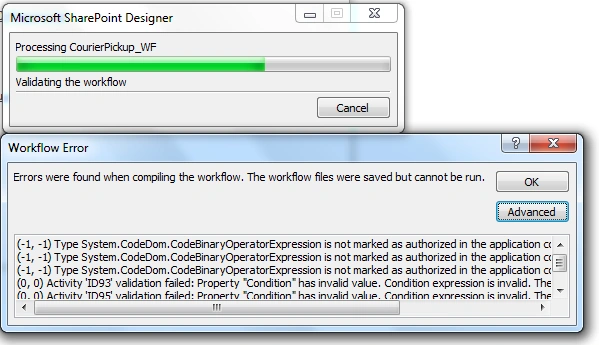
Once you open SharePoint designer and try to publish the workflow, you get this error irrespective of republishing the Workflow n number of times.
We have tried the below troubleshooting steps and nothing worked out,
- Restarting the servers.
- IISRESET.
- Cleared SharePoint Designer Cache.
- Increased httpRuntime executionTimeout in the WebApplication web.config.
- <httpRuntime executionTimeout = "3000" />
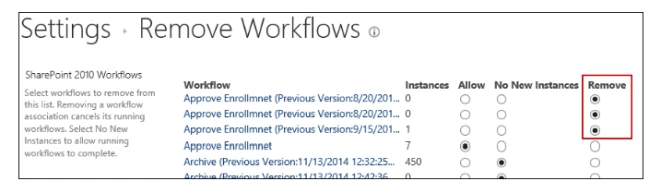
- Removed the older version instances of the workflows.
- Updated the UserDefinedWorkflowMaximumComplexity = 50000 via PowerShell
- $app = get-spwebapplication "http://WEBAPP-URL"
- $app.UserDefinedWorkflowMaximumComplexity = 50000
- $app.Update()
Then finally we got this below solution from Microsoft Developer blog released on September 13, which worked like a charm and saved the day!
Root Cause of the Issue
On the second Saturday of every month our IT team installs the latest OS Security Patch from Microsoft to all our Windows Servers, which had actually caused the issue.
As part of the patch, the .NET Security Only patch to resolve CVE-2018-8421 (Remote Code Execution Vulnerability) also got applied, as a result all SharePoint out of the box Workflow failed to execute.
Once you publish the workflow through SharePoint Designer, you get this error.
The error suggests that System.CodeDom.CodeBinaryOperatorExpression is not in the authorized types.
Workflow Foundation (WF) will only run workflows when all the dependent types and assemblies are authorized in the .NET config file (or added explicitly via code) under this tree:
- <configuration>
- <System.Workflow.ComponentModel.WorkflowCompiler>
- <authorizedTypes>
- <targetFx>
Solution
Go to the web.config file of the Web Application and add the below authorization tag under this tree:
- <configuration>
- <System.Workflow.ComponentModel.WorkflowCompiler>
- <authorizedTypes>
- <targetFx>
For SharePoint 2013 Workflows,
- <authorizedType Assembly="System, Version=4.0.0.0, Culture=neutral, PublicKeyToken=b77a5c561934e089" Namespace="System.CodeDom" TypeName="*" Authorized="True"/>
For SharePoint 2010 Workflows,
- <authorizedType Assembly="System, Version=2.0.0.0, Culture=neutral, PublicKeyToken=b77a5c561934e089" Namespace="System.CodeDom" TypeName="*" Authorized="True"/>
Once it’s done, perform an IISRESET and open the site. Your workflows will be up and running!
If you want to add the web.config files you can use the below PowerShell script hosted in GitHub
here.
Note
Microsoft is aware of this issue and patches for SharePoint 2010, 2013 and 2016 are being worked on as of 9/17/2018 and they are working on a permanent fix for their next patch release.
Reference Microsoft blog posts to follow up for the future here.



Jignesh JoshiPosted Oct 23, 2019, 4:35 AM
Hello, We have tried this but this not working. We are still getting the same error. What else can be missing? We have checked on the server, there is no update installed (KB4457916/KB4457035). Still we are facing this issue.
Plsh PlshPosted Mar 29, 2019, 2:47 AM
Good day. We have been battling this problem for months and some how only now realised the cause, as per above. Are there future patch releases that resolve this issue which does not require manual .config file changes or uninstalling KB's?
Palani KPosted Sep 22, 2018, 8:15 PM
For more information, click the below link https://blogs.msdn.microsoft.com/rodneyviana/2018/09/13/after-installing-net-security-patches-to-address-cve-2018-8421-sharepoint-workflows-stop-working/. There is a powershell script to perform this update update in web.config file. Also IIS reset is required.