

In this blog, you will see how to use "Weather" webpart in a Modern SharePoint site page.
Weather webpart – Display the weather for a particular location.
Steps Involved,
- Navigate to the Modern SharePoint Site Page.
- Edit the page.
- Click + sign to add the web part and then click "Weather" webpart.

- Add a location.
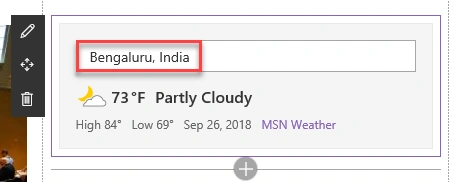
- Edit the webpart to choose whether you want to display the temperature in Fahrenheit or Celsius.

- Publish the page.

Thus in this blog, you saw how to use Weather webpart in a Modern SharePoint site page.
Join the conversation! Your thoughts help the community grow.