
Azure Logic Apps
Azure Logic Apps is a cloud service that helps you automate business processes, tasks, and workflows when you need to integrate apps, data, and services across organizations.
Create a list in your SharePoint site.
Create a logic app for SharePoint
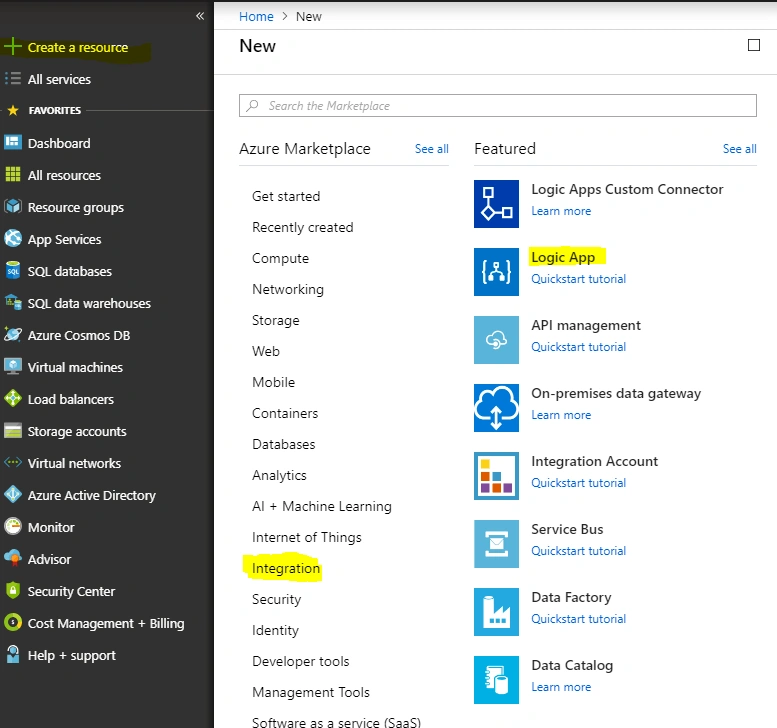
Inside the Azure portal, click on "Create a resource" >> "Integration" and then, click "Logic App".
Next, give a name to your logic app, create or select a resource group, and confirm the location.

Then, "Create" the app.

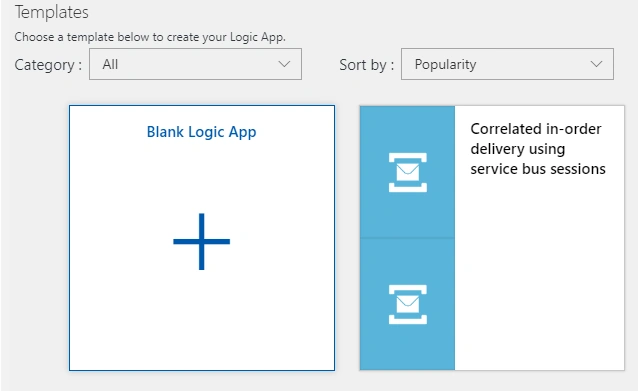
After Azure deploys your app, the Logic Apps Designer opens and shows a page with an introduction video and commonly used triggers. Under Templates, choose Blank Logic App Templates.
I chose ‘SharePoint'.

Next, sign in to Sharepoint. For the trigger, I chose ‘When an item is created or modified'.

Next, add a new step and select an action. I selected the action ‘Office 365 Outlook – Send an email’.
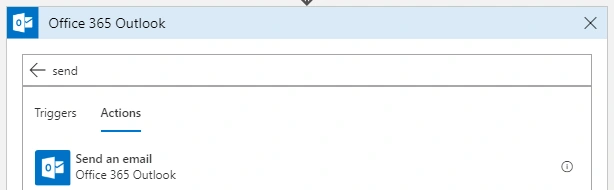
Next, I signed in to the Outlook connection; then I filled out the send email card with "To", "Subject", and "Body".
In this example, I just put in the email of the new item in the To section of the email. (Instead of giving direct email addresses, I am using the email column of SharePoint list as the To recipients.)

Save the Logic App. One thing to note with logic apps is that the "Save" action basically makes the app ‘go-live’, so as soon as I save, it will start to run once every 2 minutes to pull my SharePoint list.

Let's test the logic app by adding a new SharePoint list item to my test list (a blank custom list).

And, if I check my inbox, I can see that my test email was generated and I can see the test title that I entered for my new item.

shailesh gangrPosted Jan 22, 2022, 2:54 PM
I have requirement where I want name and email who is uploading file in sharepoint folder. How can i get and send email to that?
Bhushan BhasmePosted Nov 19, 2021, 10:57 AM
I want to identify the file/folder name which is modified and then I want the name of file which is modified/updated in sharepoint with the help of that file name i want to fetch the data from database/How can i do that?
Ashish VermaPosted May 20, 2019, 2:15 AM
Hi Vidhi, we are trying to extract the data from sharepoint using logic app, few lists we are able to extract and for other few we are struggling a lot. We dont know where are are going wrong. Can you please help us with it?
tharak nadhPosted Nov 9, 2018, 11:34 PM
Can you share the article how to integrate the SharePoint with Azure
Rushi MehtaPosted Oct 15, 2018, 4:46 AM
Nice hard work did for preparing this article
Prabhu NehruPosted Oct 15, 2018, 1:06 AM
Hi Vidhi, the same solution can be achieved via Microsoft Flow in Office 365. Why do we need to go with Azure Logic Apps? It could be also an alternative solution as well right.