

As we know, the SharePoint Online team is changing the portal and other views. We noticed a change in the look and navigation of our document, list, and site content. This new experience is phenomenal and has added phone and tablet features and simple navigation.
As a document library or the list owner, site owner, or an administrator, we can switch the default experience back to the previous (classic) view for a time. We have some steps to configure the new look for site contents, list and library.
This option sets the experience as whatever your site administrator has set.
- Default experience set by administrator: This will always indicate and show us the default feature update from the online team. This option sets the experience as whatever your site administrator has set.
- New experience: This option sets the experience to the new experience. This experience is on by default, so you would choose it only if you are switching back from classic.
- Classic experience: This option sets the experience to classic, which is the previous, older experience for the document libraries.
New look or experience for Doc List or Library is similar to One Drive view, we have seen document Navigation page will be the same on one drive. List or Library Navigation are set on the top page view.
Configure the new look for Document List and Library.
- On the List or Document Library, choose setting button from the right side of the screen and select library or list setting.
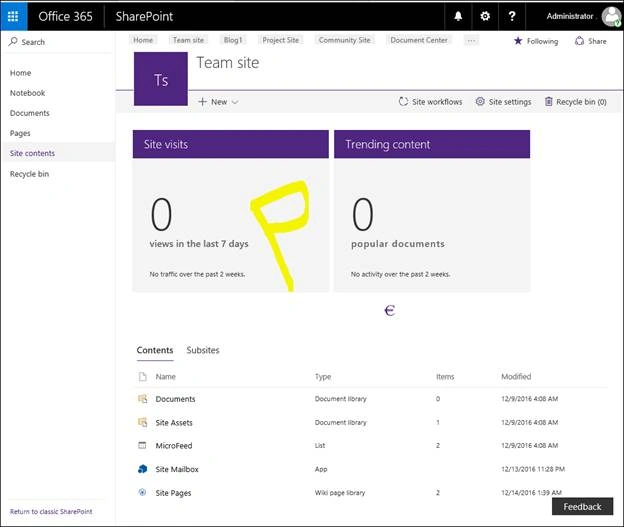
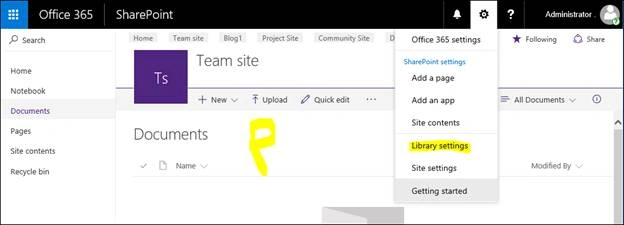
- It will make use of settings page of List or Document Library. Here, select Advanced settings, as shown below.
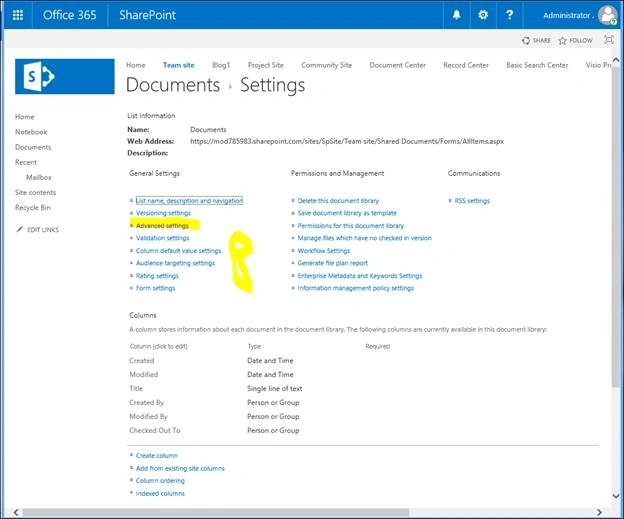
- Now, scroll down the advanced page and select List Experience option. Here, we need to select your required option and click OK.
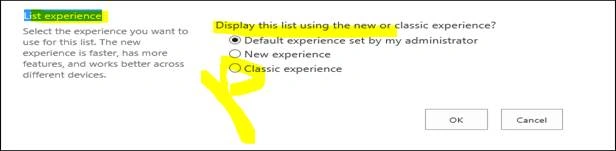
- After selecting any of the options mentioned above for List view, they will be shown by default.
Join the conversation! Your thoughts help the community grow.