
The Tuple<T> class was introduced in .NET Framework 4.0. A tuple is a data structure that contains a sequence of elements of different data types. It can be used where you want to have a data structure to hold an object with properties, but you don't want to create a separate type for it. For example:
- Tuple<int,string,string> P = new Tuple<int,string,string>(1,'sid','test');
In the above example, we've created an instance of the Tuple, which holds a record of a person. We specified a type for each element and passed values to the constructor. Specifying the type of each element is cumbersome.
- var person=Tuple.Create(1,'sid','test');
- person.item1 // this will return the 1.
- person.item2 // this will return the 'Sid' string.
A tuple can only include maximum eight elements. The compiler throws an error when you try to include more than eight elements.
In C# 7.0, Microsoft introduces the ValueTuple. it can contains more than eight elements.
ValueTuple is a structure which is a value type representation of Tuple.
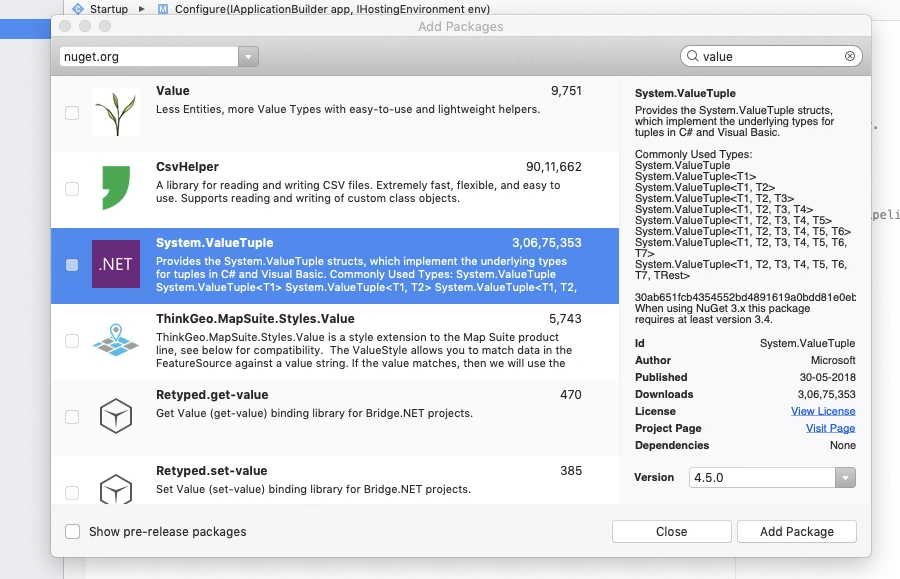
To install the ValueTuple package, right click on the project in the solution explorer and select Manage NuGet Packages.
- var p=(1,'Sid','test');
We can access these values like:
- p.item1 // return 1
- p.item2 // return 'Sid'
We can write a method like this:
- public (int,string,string) GetValues()
- {
- return (1,'Sid','Test');
- }
We can assign names to a ValueTuple properties instead of having the default property names Item1, Item2 and so on
- (int Id,string FName,string LName) p=(1,'Sid','Test');
In this case, we can access properties like below:
- p.Id; // it will return 1.
- p.FName; // it will return 'Sid'
Conclusion
Join the conversation! Your thoughts help the community grow.