

Introduction:
According to Microsoft, Visual Studio LightSwitch is "the simplest way to create business applications for the desktop or the cloud". Visual Studio LightSwitch is a rapid application development (RAD) tool. Which is used to help write data-centric line of business (LOB) applications. Unlike previous Visual Studio products, LightSwitch emphasizes minimizing the amount of code that must be explicitly written in order to develop an application. Using LightSwitch one can easy-to-use GUI Designers to design data structures and the user interface for working with the data.
Lifecycle management of Visual Studio LightSwitch
A lifecycle is description of progression of any application. The development process of any application is known as Lifecycle of that application. A lifecycle divide the progression into many stages so we can be smart about dealing.. Life Cycle Management is a framework for business planning and management. Life Cycle has been developed as a business approach for managing the total life cycle of products and services. The real life example of lifecycle our own from child, to young adult, to middle age, to old age.
Feature Of Lifecycle :
- Which products to manufacture
- Design of the product or service
- Sources of energy to use
- Type and amount of packaging
- Management of manufacturing wastes
- Recycling considerations
Phase Of Lifecycle
There are four phase of the lifecycle in a LightSwitch Application, which are as follows
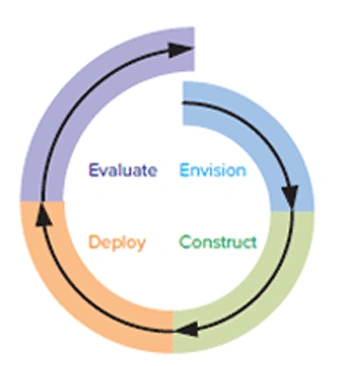
Envision Phase : Envision phase is first phase of lifecycle in LightSwitch Application. In the Envision phase we can find scope and features of the application.
Construct Phase : Construct phase is the second phase of Lifecycle. In the construction phase we produces the features according to the imagined scope of the project, including the necessary design and tests.
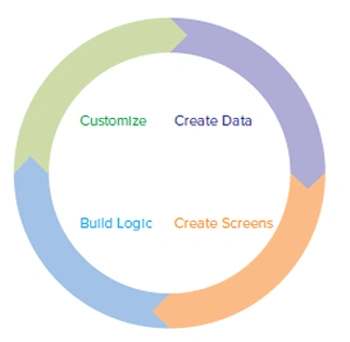
- Create data : Design and create your data structures, including new entities, those are based on existing data. Then you can establish the relationships between them.
- Create screens : Create screens based on the data.
- Build logic : Declare simple rules characterizing the business logic of your application, and write code for complex business rules
- Customize : Perform some visual tuning to enhance the user experience, and, if necessary, make slight modifications to data structures and related business logic.
Deploy Phase : Deploy phase is the third
phase of lifecycle in LightSwitch Application. Deployment starts after the code
is appropriately tested. In the Deploy phase we delivers the features to
end-users so that they can seize the product. In the LightSwitch you do not need
to manually write installation tools or scripts. With the help of the deployment
function built into the integrated development environment (IDE), you can choose
from client and application server topology.
There are two client topology options:
- Desktop client : The application runs on the end-user's desktop.
- Browser client : The application runs in the end-user's browser
There are three server topology options:
- Client machine : The application services run on the end-user's machine. The database can be put on any remote computer in the network, including the client machine.
- Internet Information Services (IIS) : The application services run on a separate server machine, hosted in IIS. The database can be put on any remote computer in the network,including the application server machine.
- Windows Azure : The application services and the database are hosted in Windows Azure.
Evaluate Phase : Evaluate phase, wishes and future directions come to light, which can influence the scope and features in the next iteration.
Summary
So the lifecycle is a framework for business planning and management. Using the lifecycle we can get full information about process of any application.
James VeronicaeditedPosted Dec 6, 2011, 4:18 AMEdited Dec 6, 2011, 4:19 AM
very nice. Keep going up. I also found some link which tells the basics of LightSwith 2011(who are new to subject) http://www.codinghub.net/2011/11/lightswitchvisual-studio-lightswitch.html