

Introduction
Today we are using an Accordion control in a Metro Style Application that will be implemented using jQuery. It contains multiple panels and each panel has its own header and content area. Here we will implement it for a header <h3> tag and for the content area <p> tag. An Accordion control has the visual facility to display one panel at a time from multiple panels.
In the following we are including the entire code of the HTML file and the JavaScript file to create this mini application.
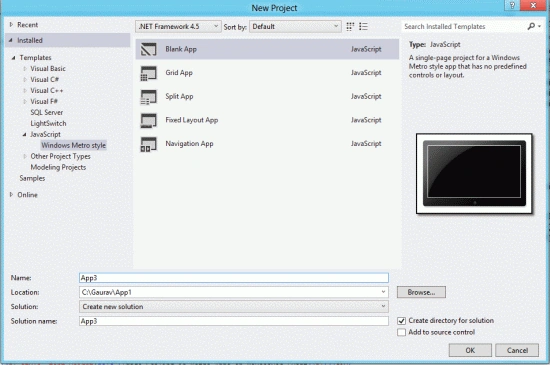
Step 1 : First, you will create a new Metro Style Application. Let us see the description with images of how to create it.
- Open Visual Studio 2012
- File -> New -> Project
- Choose Template -> JavaScript -> Metro Style Application
- Rename the application
Step 2 : In the Solution Explorer there are two files that we will primarily work with; the Default.Html file:
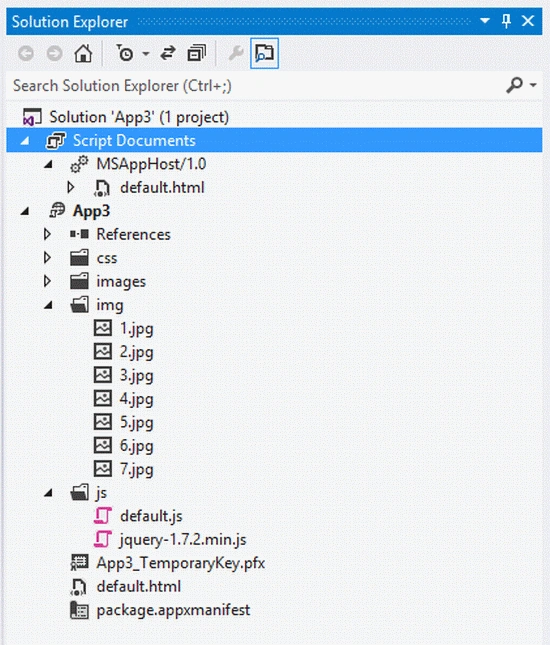
Step 3 : First of all we add a jQuery library to our project. The JavaScript code and the style sheet code is written in the header section. The following are the contents of the project:
-
JavaScript Code
-
Style Sheet Code
Code :
<script src="/js/default.js"></script>
<script type="text/javascript" src="jquery-1.7.2.min.js"></script>
<script type="text/javascript">
$(document).ready(function () {
$(".accordion h3:first").addClass("active");
$(".accordion p:not(:first)").hide();
$(".accordion h3").click(function () {
$(this).next("p").slideToggle("slow")
.siblings("p:visible").slideUp("slow");
$(this).toggleClass("active");
$(this).siblings("h3").removeClass("active");
});
});
</script>
Code :
<style type="text/css">
body {
margin: 10px auto;
width: 570px;
font: 75%/120% Arial, Helvetica, sans-serif;
}
.accordion {
margin-top:50px;
width: 680px;
border-bottom: solid 5px #f00;
}
.accordion h3 {
background: #0026ff url(images/arrow-square.gif) no-repeat right -51px;
padding: 7px 15px;
margin: 0;
font: bold 120%/100% Arial, Helvetica, sans-serif;
border: solid 5px #c4c4c4;
border-bottom: none;
cursor: pointer;
}
.accordion h3:hover {
background-color: #0094ff;
}
.accordion h3.active {
background-position: right 5px;
}
.accordion p {
background: #fff;
margin: 0;
padding: 10px 15px 20px;
border-left: solid 1px #c4c4c4;
border-right: solid 1px #c4c4c4;
color:#f00;
}
</style>
Step 4 : The complete code of this application is written below. It contains the code of the HTML file code and JavaScript file code.
Code :
<!DOCTYPE html>
<html>
<head>
<meta charset="utf-8" />
<title>App14</title>
<!-- WinJS references -->
<link href="//Microsoft.WinJS.1.0.RC/css/ui-dark.css" rel="stylesheet" />
<script src="//Microsoft.WinJS.1.0.RC/js/base.js"></script>
<script src="//Microsoft.WinJS.1.0.RC/js/ui.js"></script>
<!-- App14 references -->
<link href="/css/default.css" rel="stylesheet" />
<script src="/js/default.js"></script>
<script type="text/javascript" src="jquery-1.7.2.min.js"></script>
<script type="text/javascript">
$(document).ready(function () {
$(".accordion h3:first").addClass("active");
$(".accordion p:not(:first)").hide();
$(".accordion h3").click(function () {
$(this).next("p").slideToggle("slow")
.siblings("p:visible").slideUp("slow");
$(this).toggleClass("active");
$(this).siblings("h3").removeClass("active");
});
});
</script>
<style type="text/css">
body {
margin: 10px auto;
width: 570px;
font: 75%/120% Arial, Helvetica, sans-serif;
}
.accordion {
margin-top:50px;
width: 680px;
border-bottom: solid 5px #f00;
}
.accordion h3 {
background: #0026ff url(images/arrow-square.gif) no-repeat right -51px;
padding: 7px 15px;
margin: 0;
font: bold 120%/100% Arial, Helvetica, sans-serif;
border: solid 5px #c4c4c4;
border-bottom: none;
cursor: pointer;
}
.accordion h3:hover {
background-color: #0094ff;
}
.accordion h3.active {
background-position: right 5px;
}
.accordion p {
background: #fff;
margin: 0;
padding: 10px 15px 20px;
border-left: solid 1px #c4c4c4;
border-right: solid 1px #c4c4c4;
color:#f00;
}
</style>
</head>
<body>
<div>
<h1 style="font-size:30px;font-weight:bolder; margin-top:45px">Accordion Control in Metro Apps </h1>
</div>
<div class="accordion">
<h3>Personal Detail</h3>
<p>Name: Shubham Srivastava<br /> Date of Birth: 22 Sep 1987<br />Eyes Color- Black<br />Status- Single</p>
<h3>Qualification Detail</h3>
<p>I have completed MCA in 2010 from Institute of Management Studies Ghaziabad(UP) with 70%. My schooling education completed from GIC Sultanpur in 2001 and 2003 and graduate in Math streem</p>
<h3>Working Profile</h3>
<p>I have done my industrial training in SAP technology in Shiv-vani Oil & Gas Corporation. Currently i am working in MCN Solution Noida as Jr. Software Engineer in .Net Profile</p>
<h3>Current Address</h3>
<p>M.NO: C-31 Sashi Garden Pocket-5 Opposite Bala ji Bhawan Mayur Vihar Phase -1 New Delhi (Delhi)</p>
<h3>Parmanent Address</h3>
<p>Vill- Pratappur Post- Kurwar Block- Kurwar Dist. Sultanpur (UP)</p>
</div>
</body>
</html>
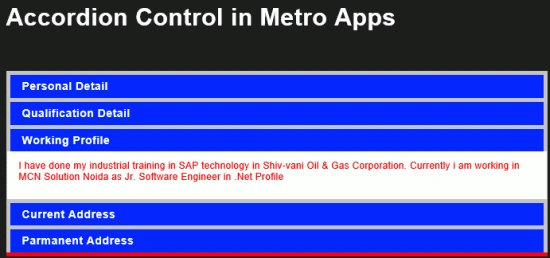
Step 5 : After running this code the output looks like this:
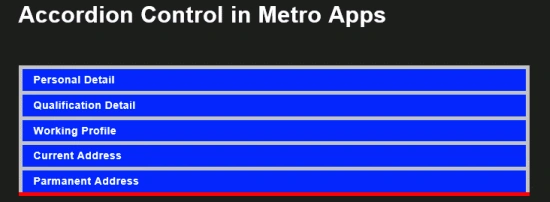
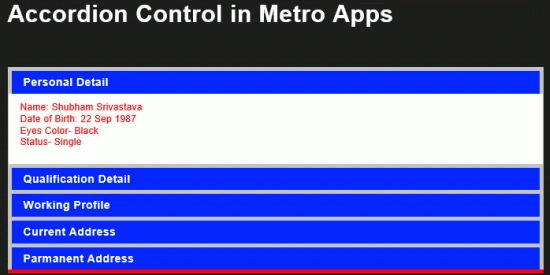
Click on different- 2 panel you can get different -2 information.
Join the conversation! Your thoughts help the community grow.