

Introduction
Today we will discuss animated banners in Metro Style Applications. To create animation in an application we will use a Double Animation control. There are two ways to apply animation; the first one we can do from a code behind file and the second one directly from design XAML page. Here we will use second one, animation through design page coding in XAML.
In this article we will make animations on TextBlock content. There are two animations on TextBlock Text that will be shown in this article; Color animation on text and text rotation animation. In text color animation the color of text will be changed automatically and the second in rotation animation text will be rotated 360 degrees from a fixed origin.
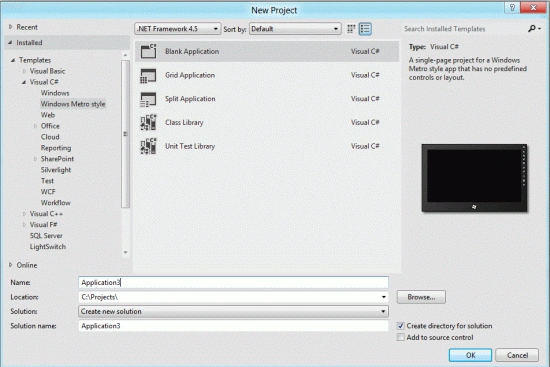
Step 1 : First, you will create a new Metro Style Application. Let us see the description with images of how you will create it.
- Open Visual Studio 2011
- File -> New -> Project
- Choose Template -> Visual C# ->Metro Style Application
- Rename the application
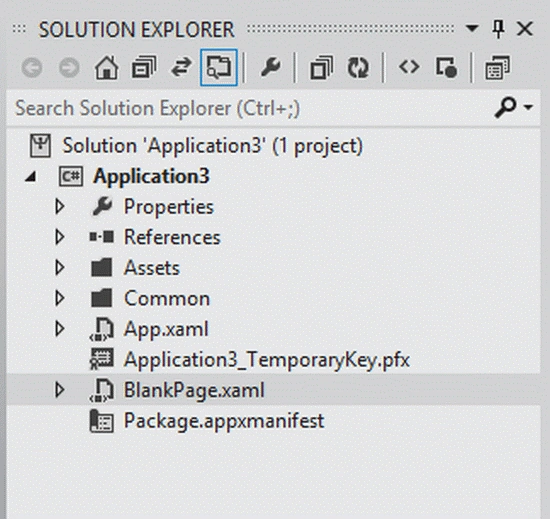
Step 2 : In the Solution Explorer there are two files that we will primarily work with; the BlankPage.xaml and BlankPage.xaml.cs files.
Step 3 : The BlankPage.xaml file is as in the following code:
Code :
<Page
x:Class="Application3.BlankPage"
xmlns="http://schemas.microsoft.com/winfx/2006/xaml/presentation"
xmlns:x="http://schemas.microsoft.com/winfx/2006/xaml"
xmlns:local="using:Application3"
xmlns:d="http://schemas.microsoft.com/expression/blend/2008"
xmlns:mc="http://schemas.openxmlformats.org/markup-compatibility/2006"
mc:Ignorable="d">
<Grid x:Name="LayoutRoot">
<Rectangle Margin="66,42,152,20" Stroke="#FF000000" RadiusX="0" RadiusY="0">
<Rectangle.Fill>
<LinearGradientBrush x:Name="MRGB" EndPoint="0.5,1" StartPoint="0.5,0">
<GradientStop Color="YellowGreen" Offset="0"/>
<GradientStop Color="Yellow" Offset="0.478"/>
</LinearGradientBrush>
</Rectangle.Fill>
</Rectangle>
<TextBlock x:Name="TB" Margin="75,49,161,0" FontFamily="Book Antiqua" FontSize="24" FontWeight="Bold" TextWrapping="Wrap" Foreground="Red"
TextAlignment="Center" Height="56" VerticalAlignment="Top" >
<TextBlock.Triggers>
<EventTrigger RoutedEvent="FrameworkElement.Loaded">
<BeginStoryboard>
<Storyboard>
<DoubleAnimation
Storyboard.TargetName="TB"
Storyboard.TargetProperty="Opacity"
From="1.0" To="0.0" Duration="0:0:5"
AutoReverse="True" RepeatBehavior="Forever" />
</Storyboard>
</BeginStoryboard>
</EventTrigger>
</TextBlock.Triggers><Run FontFamily="Cambria" FontSize="30"
Text="Mind Cracker Network Solution "/></TextBlock>
<TextBlock x:Name="TB2" Margin="75,225,161,131" FontFamily="Book Antiqua" FontSize="24" FontWeight="Bold" TextWrapping="Wrap" Foreground="Blue" TextAlignment="Center">
<LineBreak/><Run FontFamily="Cambria" FontSize="48" Foreground="Brown"
Text="Join us for a optimize solution"/>
<TextBlock.Triggers>
<EventTrigger RoutedEvent="FrameworkElement.Loaded">
<BeginStoryboard>
<Storyboard/>
</BeginStoryboard>
</EventTrigger>
</TextBlock.Triggers>
</TextBlock>
<TextBlock
x:Name="TB4"
Margin="75,120,161,0" FontSize="36" FontWeight="Bold" VerticalAlignment="Top"
Height="100" Text="C# Corner- A complete solution for .Net technolgy"
TextWrapping="Wrap" TextAlignment="Center">
<TextBlock.Foreground>
<SolidColorBrush x:Name="SB" Color="Pink" />
</TextBlock.Foreground>
<TextBlock.Triggers>
<EventTrigger RoutedEvent="FrameworkElement.Loaded">
<BeginStoryboard>
<Storyboard>
<ColorAnimation
Storyboard.TargetName="SB"
Storyboard.TargetProperty="Color"
From="Pink" To="SteelBlue" Duration="0:0:5"
AutoReverse="True" RepeatBehavior="Forever" />
</Storyboard>
</BeginStoryboard>
</EventTrigger>
</TextBlock.Triggers>
</TextBlock>
<TextBlock
x:Name="TB5"
Margin="300,300,183,41"
FontSize="30" FontWeight="Bold" Foreground="Green" VerticalAlignment="Center" Height="60">
<TextBlock.RenderTransform>
<RotateTransform x:Name="MyRT" Angle="0" CenterX="30" CenterY="25"/>
</TextBlock.RenderTransform><!-- Animates the text block's rotation. --><TextBlock.Triggers>
<EventTrigger RoutedEvent="FrameworkElement.Loaded">
<BeginStoryboard>
<Storyboard>
<DoubleAnimation
Storyboard.TargetName="MyRT"
Storyboard.TargetProperty="(RotateTransform.Angle)"
From="0.0" To="360" Duration="0:0:10"
RepeatBehavior="Forever" />
</Storyboard>
</BeginStoryboard>
</EventTrigger>
</TextBlock.Triggers><Run FontSize="48" Text="Breaking News"/></TextBlock>
</Grid>
</Page>
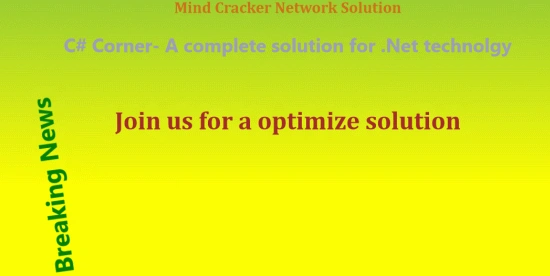
Code 4 : After running this code the output looks like this:

Join the conversation! Your thoughts help the community grow.