

We know that we can navigate from one page to another page by using "Navigation
window " class. Another way to do so is by using user controls. Here I explained
how to navigate from one user control to another from Master Page.
Go to visual studio and open new project as shown below: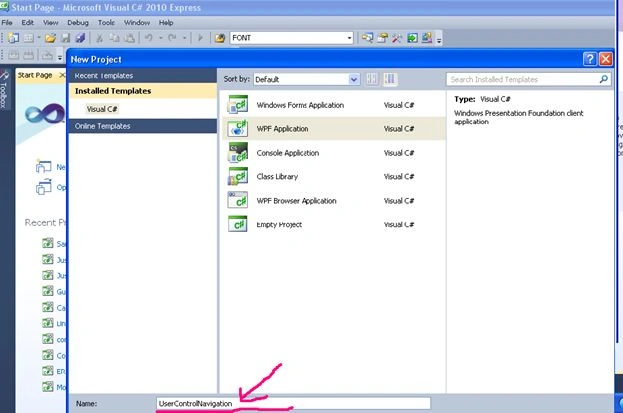
When we open a new project in wpf we will get Mainwindow.xaml for design and
Mainwindow.cs to write code.
In xaml section by default we will get one grid.Inside that grid insert one
UserControl as Shown below.
<Window x:Class="UserControlNavigation.MainWindow"
xmlns="http://schemas.microsoft.com/winfx/2006/xaml/presentation"
xmlns:x="http://schemas.microsoft.com/winfx/2006/xaml"
Title="MainWindow" Height="558" Width="718" Background="AliceBlue">
<Grid Name="grid1">
<UserControl Margin="74,184,118,133" Background="Aqua" Height="190" Width="490">
<Grid Name="grid2" Height="185" Width="485" Background="Bisque">
<TextBlock Height="30" HorizontalAlignment="Left" Margin="78,31,0,0" Name="textBlock1"
Text="Home Page" VerticalAlignment="Top" FontFamily="Times New Roman" FontSize="22"
Background="#FFFFCD00" Width="112" />
</Grid>
</UserControl>
<Image Height="80" HorizontalAlignment="Left" Margin="12,12,0,0" Name="image1" Stretch="Fill"
VerticalAlignment="Top" Width="654" Source="/UserControlNavigation;component/Images/images.jpg" />
<Image Height="83" HorizontalAlignment="Left" Margin="111,404,0,0" Name="image2" Stretch="Fill"
VerticalAlignment="Top" Width="420" Source="/UserControlNavigation;component/Images/imagesCAKWLCYT.jpg" />
<Menu Height="33" HorizontalAlignment="Left" Margin="76,110,0,0" Name="menu1"
VerticalAlignment="Top" Width="343" FontFamily="Times New Roman" FontSize="20" Background="#FF00F500">
<MenuItem Header="Home" Click="MenuItem_Click_1" />
<MenuItem Header="AboutUs" Click="MenuItem_Click" />
<MenuItem Header="Partners" Click="MenuItem_Click_3" />
<MenuItem FontFamily="Times New Roman" FontSize="20" Header="Contact Us" Click="MenuItem_Click_4" />
</Menu>
</Grid>
</Window>
Content which is present outside of
UserControl is Master Page Content we can navigate it to any pages. In this
example I have taken One Menu Bar and two images as masterpage content. Inside
User control we have to take one grid which will replace with usercontrol during
navigation.
Below picture shows the design part of Main Window.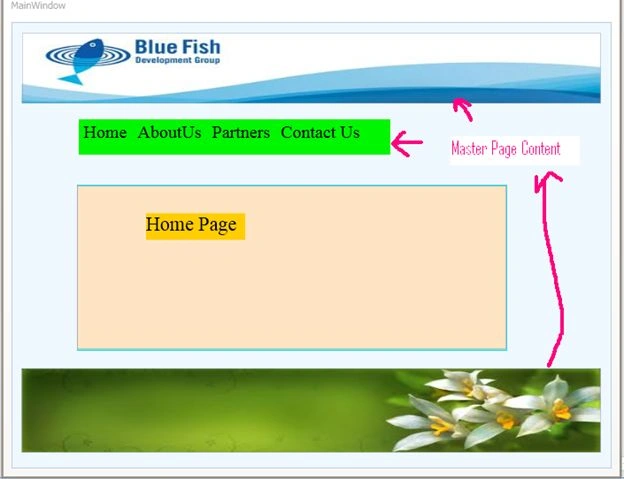
This is home page and we have one user control for it. Now For Each Menu Item
Add one User Control as shown Below.
Solutionexplorer-> add -> usercontrol.
Double click on each item which is present in Menu Bar and we will get menuitem
click events as shown below in mainwindow.cs file as shown Below.
Code Bihind
private void MenuItem_Click(object sender, RoutedEventArgs e) //For About Us User Control
{
}
private void MenuItem_Click_3object sender, RoutedEventArgs e)//For partners User Control
{
}
private void MenuItem_Click_4(object sender,RoutedEventArgs e)/For ContactUs User Control
{
}
private void MenuItem_Click_5(object sender,RoutedEventArgs e)/For Home Page UserControl
{
}
Now we just want to replace the grid which is present inside Home Page
Usercontrol with required usercontrols as shown below.
namespace UserControlNavigation
{
/// <summary>
/// Interaction logic for MainWindow.xaml
/// </summary>
public partial class MainWindow : Window
{
public MainWindow()
{
InitializeComponent();
}
private void MenuItem_Click(object sender, RoutedEventArgs e)// For About Us UserControl
{
AboutUs aboutus = new AboutUs();
grid2.Children.Clear();
grid2.Children.Add(aboutus);
}
private void MenuItem_Click_3(object sender, RoutedEventArgs e)//For Partners User Control
{
Partners partners = new Partners();
grid2.Children.Clear();
grid2.Children.Add(partners);
}
private void MenuItem_Click_4(object sender, RoutedEventArgs e)//For Contact Us User Control
{
ContactUs contactus = new ContactUs();
grid2.Children.Clear();
grid2.Children.Add(contactus);
}
private void MenuItem_Click_1(object sender, RoutedEventArgs e)//For HomePage UserControl
{
MainWindow main = new MainWindow();
main.Show();
this.Close();
}
}
}
Run the program and we can observe navigation property of user control.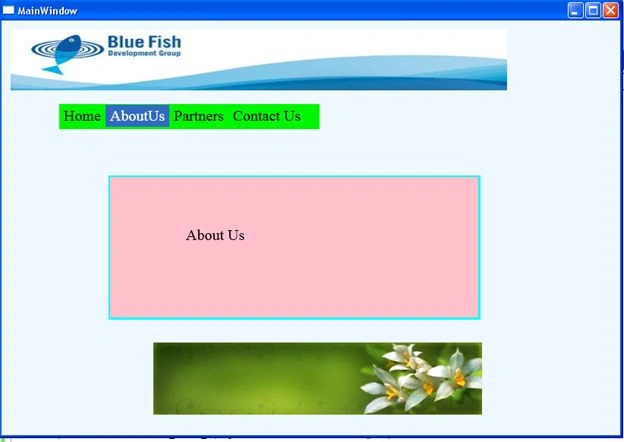
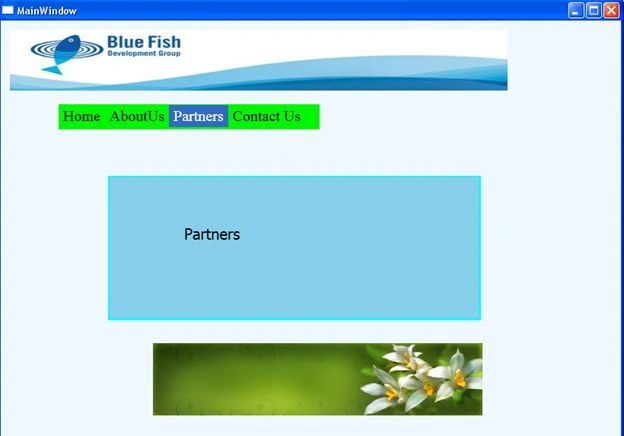
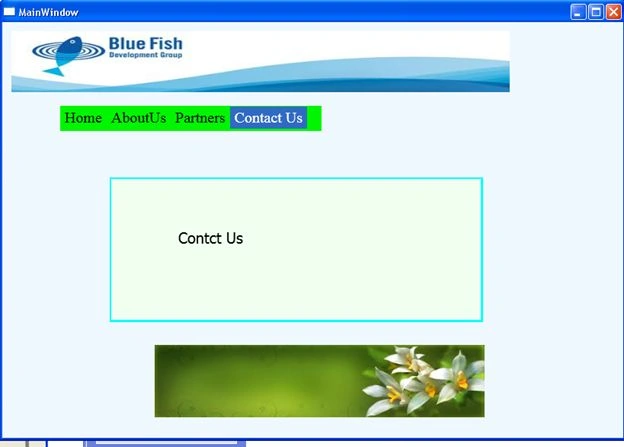
Here we can observe that only the content inside usercontrol is changing and
master page content is not changing.
Kiran Kumar TalikotiPosted Oct 16, 2013, 2:57 AM
Good one Murali :)
Pavan RamamurthyPosted Oct 16, 2013, 2:47 AM
good...