

Introduction
In this article we will learn about the Maven tool in the NetBeans IDE. A maven is someone or thing with dazzling skills in any field. Maven is a tool used for creating and maintaining a Java based project. It was started as an attempt to clarify the build process. There was a need for a standard way to create the projects, that consist of:
- Description of the entire project
- A way to publish information, must it be easy.
- Sharing JAR files across various projects should be efficient
Goals of Maven
- rendering a consistent build system
- make the build process simple
- project information should be of good quality
- no restriction of new features for any transparent migration
The types of Maven Projects that can be used in the NetBeans IDE
Any kind of Maven project can be opened in the NetBeans IDE. Normal code completion is performed on the Java code in the Maven project.
Creating a Maven Project in the NetBeans IDE
Creating a Maven project is done as usual as in the following:
- Select "File" -> "New Project".
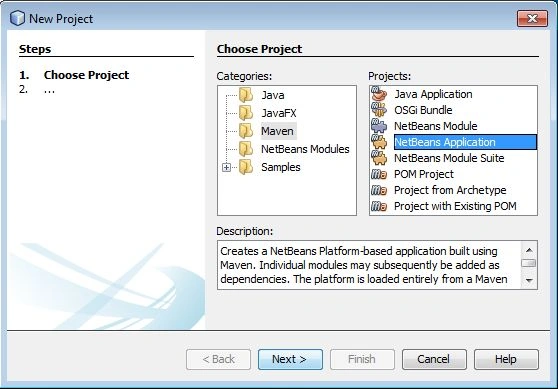
- Then select "Maven" in the categories and "NetBeans Application" in projects and press the "Next" button.
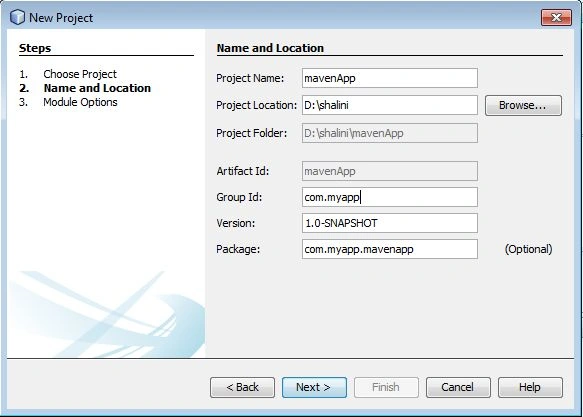
- After clicking on the "Next>" button write the Project Name, select specific project location in your system, GroupID and then click on the "Next>" button.
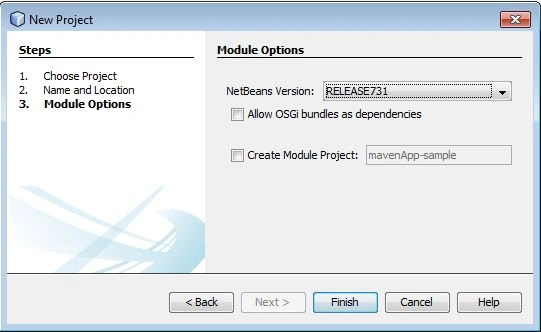
- And finally click on the "Finish" button.
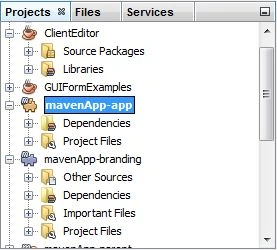
After the project is created the project window shows the folders, it's appeast as in the following screenshot:
Dependency Graph
In the project window, right-click on the project node and from the popup menu select "Show Dependency Graph". After clicking on it the IDE starts the process of creating the dependancy graph.
The following is a screenshot for the dependency graph:
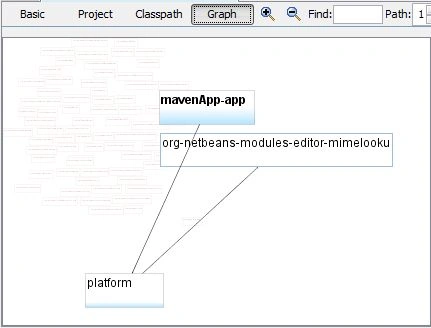
The project dependencies can be studied using this dependency graph. This graphical view can identify and solve many conflicts.
Features
The features of the Maven Tool are:
- It is able to create any number of projects into pre defined outputs like:
- JAR
- WAR
- It is a simple project setup that follows best practices like:
- get new project
- module gets started in 1 second
- No ramp-up time for new developers coming into the project
- Multiple projects can be worked upon at the same time.
Join the conversation! Your thoughts help the community grow.