

ApplicationData class used to store the app package data within same device or multiple devices or cloud based on the user needs. In this article I will explain about basic of the class.
ApplicationData allows user to store the data in three different locations and storing method into two different ways.
Package to store the data in three different locations,
- Temporary
- Local
- Roaming
Way of the storage,
- Settings
- Storage Folder
Storage Locations
- Temporary: Store the data in the temporary location, its unsafe location because OS delete this folder contents any time without notice to the user even though application is running. User also can delete these folder contents.
- Local: Local storage is a permanent storage location data, within app & there is no size limit. Data automatically will delete if application uninstalled.
- Roaming: If the application allows to store the data outside of the application, it may be PC or SD Card or cloud and size of the data storage is limit based on the RoamingStorageQuota.
Storage ways
- Settings: Store the data into container via key & value relationship, Settings are used to the ApplicationDataContainerSettings container to store the data.
Key name maximum handle 255-character length & size of the settings 8K bytes and maximum container size is 64 bytes in size.
Local and Roaming settings allow to store the values in the ApplicationDataContainerSettings.
- Temporary: Temporary folder does not support to store the values in the ApplicationDataContainerSettings.
ApplicationDataContainerSettings
ApplicationDataContainerSettings class used to store the values in the local or roaming setting (In details of ApplicationDataContainerSettings class we will see upcoming articles).
ApplicationDataContainerSettings handles in dictionary format (Key, value format) and two ways of handle.
Key: Must be unique
- Directly store the key, value format in local or roaming settings.
- Create a new container and store the value into the local or roaming settings.
Directly store the value in the Local Settings,
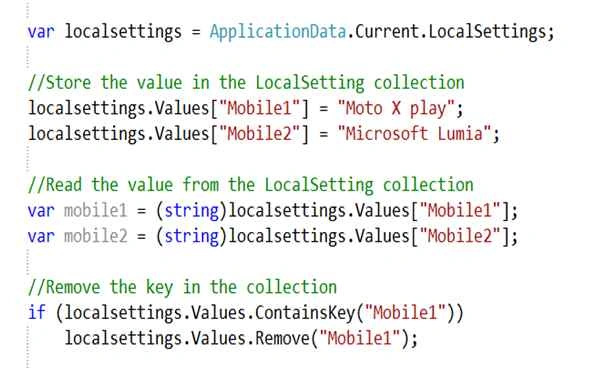
Note: Store the value in the container is an object only, to get the value from the container we need to type cast the application.
Create a new container
Example
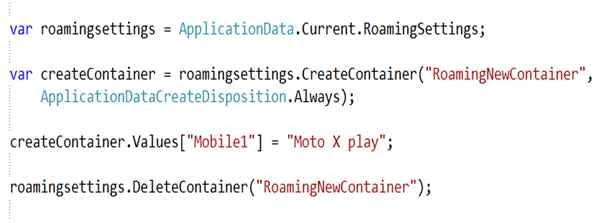
Get the request to the roaming or local settings to call the CreateContainer function, must pass the Key (first arguments) and second value ApplicationDataCreateDisposition.Always or ApplicationDataCreateDisposition.Existing value.
- ApplicationDataCreateDisposition.Always : Create a new container.
- ApplicationDataCreateDisposition.Existing : Return the container based on the Key.
In the next article we will see the storage location concept.
Join the conversation! Your thoughts help the community grow.