

Sometimes we need to load a list of items to a ComboBox or DropDownList for the user to select a value to be processed. Items are loaded in the ComboBox generally to be bound to a data source of the ComboBox. The data source is bound to a ComboBox using the "DataSource" property.
As per MSDN documentation, DataSource can be an object that implements the IList interface (such as a DataSet, DataTable, List, Array, and DataView). The default is null. When the DataSource property is set, the items collection cannot be modified.
To explain data source binding with various objects I created a demo project that demonstrates the following kind of bindings:
- Binding DataSource with Array
- Binding DataSource with List
- Binding DataSource with DataSet
- Binding DataSource with DataTable
- Binding DataSource with DataView
- Binding DataSource with Enumeration Values
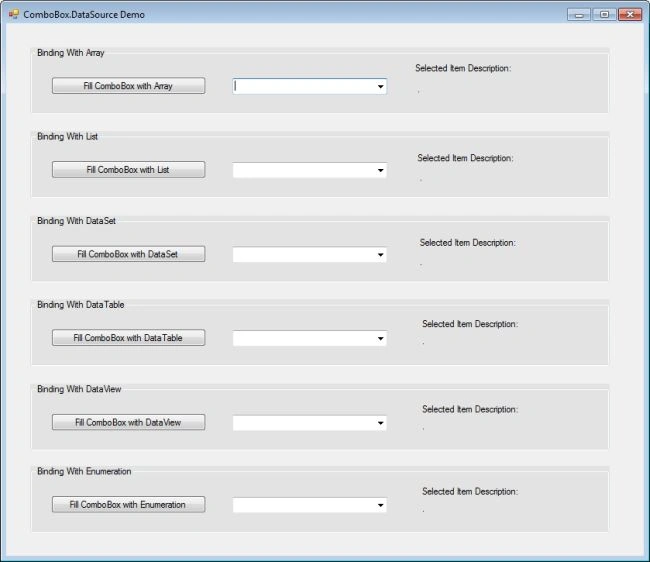
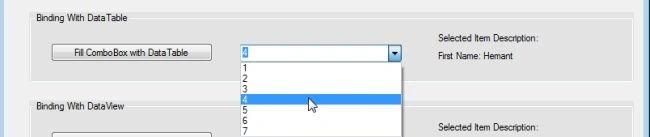
For our understanding, a sample project is also attached with this article. Here is a screenshot of the main form of the project:
Binding with Array
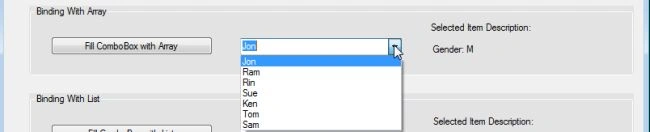
We know that any object implementing the IList interface can be bound to a "ComboBox.DataSource". Array is one of them. Suppose we have a class "Person" with the properties: Name, Rank and Gender. Now we want to populate a ComboBox with the person's name and when the user selects a name on the list, his/her corresponding gender is displayed. Here is the related code
class Person {
    public string Name {
        get;
        set;
    }
    public int Rank {
        get;
        set;
    }
    public string Gender {
        get;
        set;
    }
    public Person(int r, string n, string g) {
        Rank = r;
        Name = n;
        Gender = g;
    }
}
private void btn_FillWithArray_Click(object sender, EventArgs e) {
    try {
        Person[] list = new Person[] {
            new Person(1, "Jon", "M"),
                new Person(2, "Ram", "M"),
                new Person(3, "Rin", "F"),
                new Person(4, "Sue", "F"),
                new Person(5, "Ken", "M"),
                new Person(6, "Tom", "M"),
                new Person(7, "Sam", "M")
        };
        comBox_FilledWithArray.DataSource = list;
        comBox_FilledWithArray.DisplayMember = "Name";
        comBox_FilledWithArray.ValueMember = "Gender";
    } catch (Exception exc) {
        MessageBox.Show(exc.Message);
    }
}
private void comBox_FilledWithArray_SelectionChangeCommitted(object sender, EventArgs e) {
    lbl_ArrayValue.Text = "Gender: " + comBox_FilledWithArray.SelectedValue.ToString();
}
Binding with List
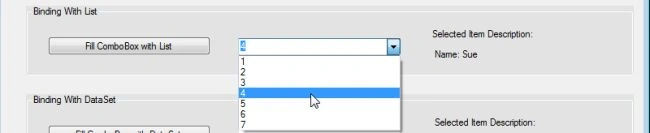
A List collection in .Net also implements the IList interface so it can be bound to a ComboBox's DataSource too. Here we want to display a person's rank in the list and when the user selects a rank from the ComboBox items, the corresponding name is displayed.
private void btn_FillWithList_Click(object sender, EventArgs e) {
    try {
        List < Person > list = new List < Person > () {
            new Person(1, "Jon", "M"),
                new Person(2, "Ram", "M"),
                new Person(3, "Rin", "F"),
                new Person(4, "Sue", "F"),
                new Person(5, "Ken", "M"),
                new Person(6, "Tom", "M"),
                new Person(7, "Sam", "M")
        };
        comBox_FilledWithList.DataSource = list;
        comBox_FilledWithList.DisplayMember = "Rank";
        comBox_FilledWithList.ValueMember = "Name";
    } catch (Exception exc) {
        MessageBox.Show(exc.Message);
    }
}
private void comBox_FilledWithList_SelectionChangeCommitted(object sender, EventArgs e) {
    lbl_ListValue.Text = "Name: " + comBox_FilledWithList.SelectedValue.ToString();
}
Binding with DataSet
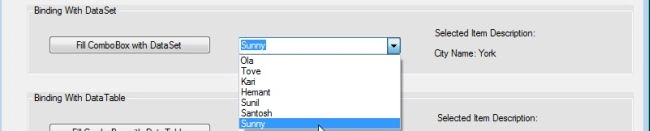
Since DataSet implements the IList interface too, it can be bound to a ComboBox's DataSource. Now let us see how to bind a DataSet as a Data Source. Assume you get the data from a database into a DataSet using a Stored Procedure "usp_GetAllAddresses" (refer to the "GetDataFromDatabaseinDataSet()" method and the following Stored Procedure). Here we can see that the columns names are ID, LastName, FirstName and City. Out of these columns any two columns that can be chosen as DispalyMember and as ValueMember respectively while binding with DataSet.


Jason WoolfPosted May 9, 2022, 1:07 PM
What a Brilliant set of examples!!!! - Thank you
Shehroz ImranPosted Feb 25, 2020, 4:09 AM
Hi Mr Hemant, After filling combo box with dataset, How to assign that to class object for other uses, specially when i want to make insert funcation using class objects.
Mukul MohalPosted Jun 4, 2019, 9:13 AM
I was getting an exception that "DataGridViewComboBoxCell value is not valid." then follwed this with DataError event and now i am getting error "Items collection cannot be modified when the DataSource property is set." can you please help me
inlay mamunPosted Oct 1, 2018, 3:08 AM
This is very helpfull
inlay mamunPosted Oct 1, 2018, 3:08 AM
Very Nice thanks
Reza MoghayadNiaPosted Aug 17, 2018, 3:35 AM
I set DataSource = myDataTable and ValueMember = "ID" and DisplayMember = "SubDefineName". both columns are available in myDataTable. but myComboBox display "ID" values and don't display "SubDefineName".
SHENYAUNG WANGPosted May 21, 2018, 12:49 AM
My combobox datasource is from SQL Server.I want to add an value to server and then combobox's display member and value will also update.But it need to restart fourm again.Can it update synchronously?
Hercules OberholzerPosted Feb 18, 2018, 4:38 AM
I have tried binding ComboBox Datasource to DataTable but when I use ComboBox.SelectedValue.ToString() I get "System.Data.DataRowView"
Mitul ahirPosted Aug 22, 2017, 6:14 AM
How to add default value in combo box after binding it with database directly
J NPosted Oct 17, 2015, 2:14 AM
Sorry but you're data set, data table and data viewer crash. Where do you write that stored procedure, please? In a C# class, I don't exactly follow?