

Introduction

The format of a JSON file looks like this:
Where firstName and lastName are names and John and Doe are the value of the respective names.
- {
- "employees": [
- { "firstName":"John" , "lastName":"Doe" },
- { "firstName":"Anna" , "lastName":"Smith" },
- { "firstName":"Peter" , "lastName":"Jones" }
- ]
(You can download the reference file from http://json.codeplex.com/)

|
Name
|
Values
|
|
ip
|
117.214.61.178
|
|
country_code
|
IN
|
|
country_name
|
India
|
|
region_code
|
|
|
City
|
|
|
zipcode
|
|
|
latitude
|
20
|
|
longitude
|
77
|
Step 2
So, until now we have covered all the basics of establishing the demo. So, let's start the code.
Open a new Console Project under the C# section.
Add the following few namespaces to it:
The third one is within the Newtonsoft.Json.dll file that you have included in your project.
- using System.Net;
- using System.IO;
- using Newtonsoft.Json;
- using Newtonsoft.Json.Linq;
- //User Input
- string IPAddress = "117.201.110.42";
Or, you may go with this:
- Console.WriteLine("Your IP Address is : ");
- IPAddress = Console.ReadLine();
Set a URI for the web request as in the following:
- string apiUrl = "http://freegeoip.net/json/" + IPAddress;
We will now send a web request to apiUri as in the following:
- //Send webRequest
- HttpWebRequest request = (HttpWebRequest)WebRequest.Create(apiUrl);
- //Get the Web Response
- HttpWebResponse response = (HttpWebResponse)request.GetResponse();
- //Now, create the Stream
- Stream responseStream = response.GetResponseStream();
- //Seting Up the Stream Reader
- StreamReader readerStream = new StreamReader(responseStream, System.Text.Encoding.GetEncoding("utf-8"));
- //Get in a STring
- string json = readerStream.ReadToEnd();
Store the entire JSON text (web response) in a string type.
- //Close the Stream
- readerStream.Close();
It's time to extract the data from the JSON file.
For that, we must convert it into a JObject.
- var jo = JObject.Parse(json);
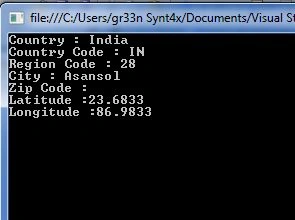
- Console.WriteLine("Country : "+(string)jo["country_name"]);
- Console.WriteLine("Country Code : " + (string)jo["country_code"]);
- Console.WriteLine("Region Code : " + (string)jo["region_code"]);
- Console.WriteLine("City : " + (string)jo["city"]);
- Console.WriteLine("Zip Code :"+(string)jo["zipcode"]);
- Console.WriteLine("Latitude :"+(string)jo["latitude"]);
- Console.WriteLine("Longitude :" + (string)jo["longitude"]);
- Console.ReadKey();
- http://pincodr.abhinav.co/pin/<PIN-Number>
- https://www.mashape.com/
Join the conversation! Your thoughts help the community grow.