

This article is an extension of my previous article. If you have not taken a look at it kindly click the following link.
http://www.c-sharpcorner.com/UploadFile/17e8f6/nested-repeater-control-in-Asp-Net-4-0/
Well in the preceding article we have nested a repeater control inside one another, but the scenario changes every time, you might want to display data in a more standardized and sophisticated way than just displaying it inside a table control or something like that. Now in this article we will basically learn how to display a GridView control inside a repeater control.
For demonstrating this article we will use a scenario of members placing orders in an online shopping website. Let's say we have a member who place orders for 7 different items respective to the quantity. Now for displaying that member's private data (such as their mailing address, any member instruction given for dispatching data, orderDate, OrderID, Member Name, Membership_ID etc.) along with the products that he/she has added to the cart (details such as productName,Quantities of the product, MRP's of the products etc.) to the administrator of the website. Now from the preceding scenario we will try to create a front end for the administrator who will learn the latest order details placed by the member.
The final output of what we will display will be like the following:
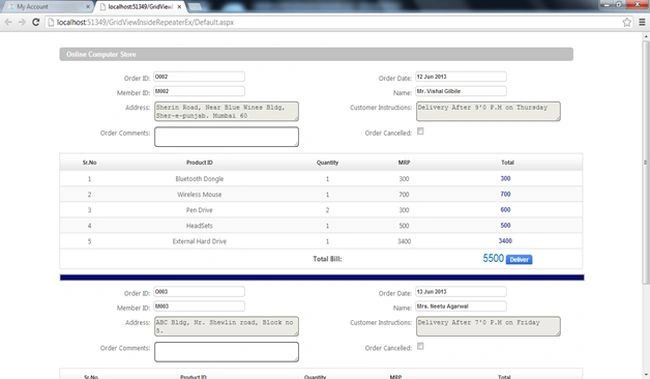
OK now let's start with the code. For demonstrating the preceding I've used an Oracle Database. The script for it has been included in the article folder.
The following is it:
- CREATE TABLE HQM_ADMIN.MEMBERSHIP
- (
- MEMBERSHIP_ID VARCHAR2(30 BYTE),
- MEMBERTITLE VARCHAR2(6 BYTE),
- MEMBERNAME VARCHAR2(30 BYTE),
- USERNAME VARCHAR2(100 BYTE) NOT NULL,
- WORD VARCHAR2(20 BYTE) NOT NULL,
- ADDRESS VARCHAR2(500 BYTE)
- )
- CREATE SEQUENCE HQM_ADMIN.MEMBERSHIP_SEQ
- START WITH 5
- MAXVALUE 9999999999999999999999999999
- MINVALUE 1
- NOCYCLE
- NOCACHE
- NOORDER;
- CREATE OR REPLACE PROCEDURE HQM_ADMIN.prc_addmember (
- v_title VARCHAR2,
- v_name VARCHAR2,
- v_address VARCHAR2,
- v_username VARCHAR2,
- v_word VARCHAR2
- )
- AS
- v_memid VARCHAR (20) := '';
- n_memid NUMBER := 0;
- BEGIN
- n_memid := membership_seq.NEXTVAL;
- IF (n_memid < 10)
- THEN
- v_memid := 'M00' || n_memid;
- ELSE
- v_memid := 'M0' || n_memid;
- END IF;
- INSERT INTO membership
- (membership_id, membertitle, membername, username, WORD, address)
- VALUES (v_memid, v_title, v_name, v_username, v_word,
- v_address
- );
- END;
- select * from Membership
- CREATE TABLE HQM_ADMIN.TBL_MST_ORDERS
- (
- ORDERID VARCHAR2(30 BYTE),
- MEM_ID VARCHAR2(30 BYTE) NOT NULL,
- ORDER_VALUE FLOAT(126) NOT NULL,
- CUSTOMER_INSTRUCTION VARCHAR2(2000 BYTE),
- ORDER_COMMENTS VARCHAR2(2000 BYTE),
- ORDER_DATE DATE DEFAULT sysdate,
- ORDER_DELIVEREDSTATUS INTEGER DEFAULT 0,
- ORDER_DELIVERYDATE DATE DEFAULT null,
- ORDER_CANCELLEDFLAG INTEGER DEFAULT 0
- )
- CREATE SEQUENCE HQM_ADMIN.ORDER_SEQ
- START WITH 5
- MAXVALUE 9999999999999999999999999999
- MINVALUE 1
- NOCYCLE
- NOCACHE
- NOORDER;
- CREATE OR REPLACE PROCEDURE HQM_ADMIN.prc_addorder (
- v_memberid VARCHAR,
- f_ordervalue FLOAT,
- v_custinfo VARCHAR
- )
- AS
- n_orderid NUMBER;
- v_orderid VARCHAR (30);
- BEGIN
- n_orderid := order_seq.NEXTVAL;
- IF (n_orderid < 10)
- THEN
- v_orderid := 'O00' || n_orderid;
- ELSE
- v_orderid := 'O0' || n_orderid;
- END IF;
- INSERT INTO tbl_mst_orders
- (orderid, mem_id, order_value, customer_instruction
- )
- VALUES (v_orderid, v_memberid, f_ordervalue, v_custinfo
- );
- END;
NOTE: here you could use the Lpad function of Oracle for appending the O00 or O0 with the v_orderID variable.
- CREATE TABLE HQM_ADMIN.TBL_MST_ORDERDESCRIPTION
- (
- ORDERID VARCHAR2(30 BYTE) NOT NULL,
- PRODNAME VARCHAR2(30 BYTE) NOT NULL,
- QUANTITY INTEGER NOT NULL,
- MRP FLOAT(126) DEFAULT 0,
- ITEM_CANCELLEDFLAG INTEGER DEFAULT 0,
- ITEM_COMMENTS VARCHAR2(4000 BYTE) DEFAULT 'No Comments'
- )
- Insert into TBL_MST_ORDERDESCRIPTION
- (ORDERID, PRODNAME, QUANTITY, MRP, ITEM_CANCELLEDFLAG, ITEM_COMMENTS)
- Values
- ('O002', 'Bluetooth Dongle', 1, 300, 0, 'No Comments');
- Insert into TBL_MST_ORDERDESCRIPTION
- (ORDERID, PRODNAME, QUANTITY, MRP, ITEM_CANCELLEDFLAG, ITEM_COMMENTS)
- Values
- ('O002', 'Wireless Mouse', 1, 700, 0, 'No Comments');
- Insert into TBL_MST_ORDERDESCRIPTION
- (ORDERID, PRODNAME, QUANTITY, MRP, ITEM_CANCELLEDFLAG, ITEM_COMMENTS)
- Values
- ('O002', 'Pen Drive', 2, 300, 0, 'No Comments');
- Insert into TBL_MST_ORDERDESCRIPTION
- (ORDERID, PRODNAME, QUANTITY, MRP, ITEM_CANCELLEDFLAG, ITEM_COMMENTS)
- Values
- ('O002', 'HeadSets', 1, 500, 0, 'No Comments');
- Insert into TBL_MST_ORDERDESCRIPTION
- (ORDERID, PRODNAME, QUANTITY, MRP, ITEM_CANCELLEDFLAG, ITEM_COMMENTS)
- Values
- ('O002', 'External Hard Drive', 1, 3400, 0, 'No Comments');
- COMMIT;
- Insert into TBL_MST_ORDERDESCRIPTION
- (ORDERID, PRODNAME, QUANTITY, MRP, ITEM_CANCELLEDFLAG, ITEM_COMMENTS)
- Values
- ('O003', 'LCD Monitor', 4, 3500, 0, 'No Comments');
- Insert into TBL_MST_ORDERDESCRIPTION
- (ORDERID, PRODNAME, QUANTITY, MRP, ITEM_CANCELLEDFLAG, ITEM_COMMENTS)
- Values
- ('O003', 'Wireless Mouse', 1, 700, 0, 'No Comments');
- Insert into TBL_MST_ORDERDESCRIPTION
- (ORDERID, PRODNAME, QUANTITY, MRP, ITEM_CANCELLEDFLAG, ITEM_COMMENTS)
- Values
- ('O003', 'KeyBoard', 1, 1300, 0, 'No Comments');
- Insert into TBL_MST_ORDERDESCRIPTION
- (ORDERID, PRODNAME, QUANTITY, MRP, ITEM_CANCELLEDFLAG, ITEM_COMMENTS)
- Values
- ('O004', 'CPU', 1,8000 , 0, 'No Comments');
- Insert into TBL_MST_ORDERDESCRIPTION
- (ORDERID, PRODNAME, QUANTITY, MRP, ITEM_CANCELLEDFLAG, ITEM_COMMENTS)
- Values
- ('O004', 'Wireless Mouse', 1, 700, 0, 'No Comments');
- Insert into TBL_MST_ORDERDESCRIPTION
- (ORDERID, PRODNAME, QUANTITY, MRP, ITEM_CANCELLEDFLAG, ITEM_COMMENTS)
- Values
- ('O004', 'KeyBoard', 1, 1300, 0, 'No Comments');
- CREATE OR REPLACE PROCEDURE HQM_ADMIN.prc_getallmemberorders (
- tempcursor OUT sys_refcursor
- )
- AS
- BEGIN
- OPEN tempcursor FOR
- SELECT a.orderid, b.membership_id, membertitle, membername, address,
- order_value, customer_instruction, prodname, quantity, mrp,
- a.order_date, a.order_comments,Address
- FROM tbl_mst_orders a INNER JOIN membership b
- ON a.mem_id = b.membership_id
- INNER JOIN tbl_mst_orderdescription c ON a.orderid = c.orderid
- WHERE a.order_cancelledflag = 0
- AND a.order_deliveredstatus = 0
- AND c.item_cancelledflag = 0;
- END;
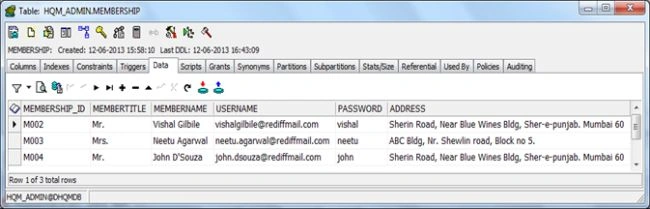
Our Membership Table contains 3 records like the following with some dummy data:
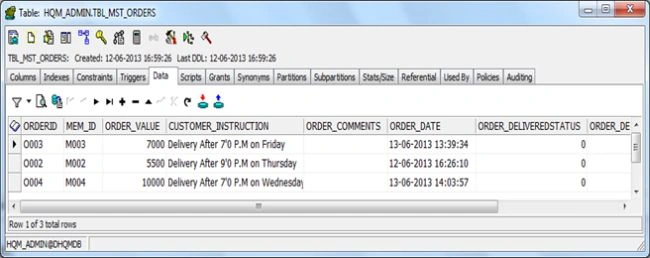
Our tbl_mst_Orders table contains 3 records with some dummy data; see:
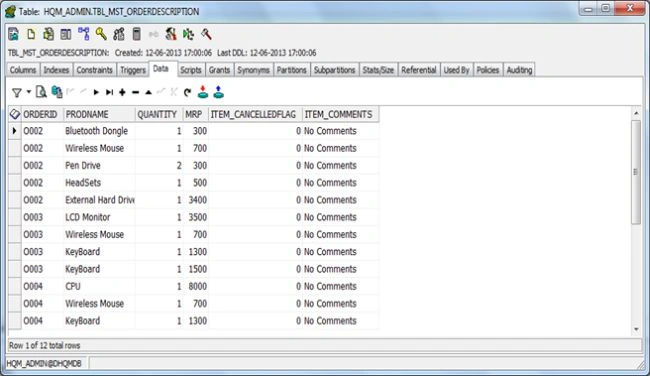
Our tbl_mst_orderDescription contains the following dummy data:
We've used some CSS. The following is the CSS file for that:
- body {
- /* background: #e5e5e5;*/
- background: white;
- font-size: .80em;
- font-family: "Helvetica Neue", "Lucida Grande", "Segoe UI", Arial, Helvetica, Verdana, sans-serif;
- margin: 10px auto;
- padding: 0px;
- /*color: #696969;*/
- color: #3f3f3f;
- }
- a:visited a:link {
- color: #FFFFFF;
- }
- a:hover {
- color: #08D1D5;
- text-decoration: none;
- }
- a:active {
- color: #08F990;
- }
- p {
- margin-bottom: 10px;
- line-height: 1.6em;
- color: black;
- }
- /* PRIMARY LAYOUT ELEMENTS ----------------------------*/
- .page {
- width: 1100px;
- background-color: #fff;
- margin: 20px auto 0px auto;
- }
- .footer {
- color: #4e5766;
- padding: 8px 0px 0px 0px;
- margin: 0px auto;
- width: 1250px;
- text-align: center;
- line-height: normal;
- }
- .floatRight {
- display: block;
- float: right;
- vertical-align: top;
- width: 220px;
- }
- .center {
- margin-left: 350px;
- margin-right: auto;
- }
- #main {
- /*to display the block level elements to the center of the page such as the <p> <div> or <h1> tags*/
- margin-left: auto;
- margin-right: auto;
- width: 960px;
- }
- /* MISC -------------------------------*/
- .clear {
- clear: both;
- }
- .title {
- display: block;
- float: left;
- text-align: left;
- width: auto;
- }
- .title a {
- color: #778899;
- }
- /***********Page Div, TextBox,Dropdownlist,GridView Styling********/
- /************Button Styling*************/
- .addbtn {
- background: url(image/btnbg.png) no-repeat;
- padding: 2px 0px;
- color: #FFFFFF;
- font-weight: bold;
- border: 0;
- width: 56px;
- font-size: 12px;
- text-align: center;
- cursor: pointer;
- }
- .addbtn:hover {
- background: url(image/btnbg.png) no-repeat bottom;
- }
- .plainButton {
- border: 1px solid #777777;
- /*background: #6e9e2d;*/
- background: silver;
- color: white;
- font: bold 11px 'Trebuchet MS';
- padding: 4px;
- cursor: pointer;
- -moz-border-radius: 4px;
- -webkit-border-radius: 4px;
- }
- .blueButton {
- background: #5B74A8;
- background: -moz-linear-gradient(top, #5B74A8 0%, #5B74A8 100%);
- background: -webkit-gradient(linear, left top, left bottom, color-stop(0%, #5B74A8), color-stop(100%, #5B74A8));
- background: -webkit-linear-gradient(top, #5B74A8 0%, #5B74A8 100%);
- background: -o-linear-gradient(top, #5B74A8 0%, #5B74A8 100%);
- background: -ms-linear-gradient(top, #5B74A8 0%, #5B74A8 100%);
- background: linear-gradient(top, #5B74A8 0%, #5B74A8 100%);
- filter: progid:DXImageTransform.Microsoft.gradient(startColorstr='#5B74A8', endColorstr='#5B74A8', GradientType=0);
- padding: 2px 6px;
- color: #fff;
- font-family: 'Helvetica', sans-serif;
- font-size: 11px;
- cursor: hand;
- border-radius: 0;
- -moz-border-radius: 0;
- -webkit-border-radius: 0;
- border: 1px solid #1A356E;
- }
- /************End of Button Styling*************/
- /********GridView********/
- .fortd .grid1 th.txtgreen2 {
- color: #009315;
- }
- .fortd .grid1 th.txtblue2 {
- color: #326BD2;
- }
- .backGround02 {
- background: #f9f9f9;
- }
- .grid1 {
- margin: 0;
- width: 100%;
- height: auto;
- border: 1px solid #d4d4d4 !important;
- border-bottom: 0px !important;
- }
- .grid1 th {
- background: url(image/thbg.png) repeat-x bottom;
- font-size: 11px;
- font-weight: bold;
- color: #333;
- padding: 10px 10px;
- border: 0px !important;
- }
- .grid1 td {
- border: 0px !important;
- border-bottom: 1px solid #d4d4d4 !important;
- color: #666;
- padding: 6px 10px 6px 10px;
- text-align: center;
- vertical-align: middle;
- }
- .grid1 td a {
- font-size: 11px;
- font-weight: bold;
- color: #3c94dc;
- text-decoration: underline;
- }
- .grid1 td a:hover {
- color: #333;
- }
- /***************End of GridView**************/
- /***********Tabular Div Styling**************/
- .parentDiv {
- width: 100%;
- float: left;
- }
- .gqmn03 {
- float: left;
- width: 100%;
- padding-bottom: 3px;
- display: none;
- }
- .divDivider {
- float: left;
- width: 100%;
- padding-bottom: 3px;
- margin-bottom: 0px;
- }
- .gqmn01sub {
- float: left;
- width: 100%;
- padding-bottom: 7px;
- }
- .gqmn01_lt {
- float: left;
- font-size: 11px;
- padding: 3px 10px 0 8px;
- padding-bottom: 10px;
- }
- .gqmn01_lt label {
- padding: 0 10px 0 0;
- }
- .gqmn01_rt {
- float: left;
- }
- .additionalInfo .gqmn01sub {
- width: 470px;
- float: left;
- padding: 0 0 0 0;
- }
- .subElements {
- width: 550px;
- float: left;
- padding: 0 0 0 0;
- }
- .gqmn03sub {
- width: 100%;
- float: left;
- padding: 0 0 0 0;
- }
- .additionalInfo .subText {
- width: 100%;
- padding-bottom: 7px;
- }
- .additionalInfo .subTextLabel {
- width: 190px;
- }
- .additionalInfo .txtbg02 {
- float: left;
- }
- .biggerTxt {
- width: 100%;
- padding-bottom: 7px;
- height: 30px;
- }
- .subText {
- float: left;
- }
- .subText label b {
- color: #CC0000;
- font-size: 10px;
- font-weight: normal;
- }
- .subTextLabel {
- width: 128px;
- padding-left: 8px;
- font-weight: normal;
- float: left;
- text-align: right;
- color: #666666;
- padding: 4px 8px 0 0;
- }
- /******End Of Tabular Div Styling*************/
- /************Form Elements TextBox Styles*************/
- .txtArea {
- border-radius: 5px;
- }
- .txtbg3 {
- border: 1px solid #c6c6c6;
- color: #333333;
- font-size: 11px;
- font-family: Arial, Helvetica, sans-serif;
- padding: 2px;
- width: 186px;
- float: left;
- border-radius: 5px;
- }
- .txtbg02 {
- width: 217px;
- height: 23px;
- border: 0;
- padding: 0 5px;
- line-height: 21px;
- border-radius: 5px;
- }
- /******End Of TextBox Styling***********/
- /***End of Page Div, TextBox,Dropdownlist,GridView Styling*****/
- /*************Width Section*************/
- .w100 {
- width: 100%;
- height: 35px;
- }
- .w100>p {
- width: 30%;
- float: left;
- text-align: center;
- }
- .w90 {
- width: 90%;
- }
- .w80 {
- width: 80%;
- }
- .w60 {
- width: 60%;
- }
- .w45 {
- width: 45%;
- }
- .w30 {
- width: 30%;
- }
- .w10 {
- width: 10%;
- }
- /*************Box Styling************/
- .h2txt {
- font-family: Arial, Helvetica, sans-serif;
- color: #333333;
- font-size: 13px;
- font-weight: bold;
- }
- .h2txt img {
- vertical-align: middle;
- cursor: pointer;
- float: left;
- margin-right: 8px;
- }
- .box1 {
- width: 1050px;
- padding: 5px 15px;
- background-color: Silver;
- color: white;
- margin-bottom: 20px;
- margin-top: 10px;
- border-radius: 5px;
- }
- .box2 {
- width: 790px;
- padding: 4px 15px;
- margin: 4px auto auto 5px;
- height: 20px;
- background-color: silver;
- /*#ED8029*/
- color: white;
- border-radius: 5px;
- }
- .transitionColor {
- -webkit-transition: background-color 5s;
- -moz-transition: background-color 5s;
- -o-transition: background-color 5s;
- -ms-transition: background-color 5s;
- transition: background-color 5s;
- background-color: #A7B526;
- }
- /**************End of Box Styling**********/
- /*************Height Section***************/
- .h100 {
- height: 100%;
- }
- .h50 {
- height: 50%;
- }
- .h30 {
- height: 30%;
- }
- /**************End of Height Section********************/
- /*******************Margin Section********************/
- .mt30 {
- margin-top: 30px;
- }
- .mt5 {
- margin-top: 5px;
- }
- .mtp5 {
- margin-top: 5%;
- }
- .w100 p {
- float: left;
- width: 30%;
- text-align: center;
- }
- .mtp10 {
- margin-top: 10%;
- }
- .mtp30 {
- margin-top: 30%;
- }
- .mlf5 {
- margin-left: 5%;
- }
- .mlf10 {
- margin-left: 10%;
- }
- .mlf25 {
- margin-left: 25%;
- }
- .left5 {
- float: left;
- margin-left: 5%;
- }
- /************End Of Margin Section****************/
- .amount {
- font-family: Arial, Helvetica, sans-serif;
- font-size: 20px;
- font-weight: normal;
- color: #006BB2;
- padding: 0px;
- }
- .amount A {
- color: #006BB2;
- text-decoration: none;
- }
- .PRICE A:hover {
- color: #006BB2;
- text-decoration: underline;
- }
- .amount2 {
- font-family: Arial, Helvetica, sans-serif;
- font-size: 12px;
- font-weight: normal;
- color: #1F1F99;
- padding: 0px;
- padding-right: 5px;
- vertical-align: bottom;
- margin-right: 5px;
- font-weight: bold;
- }
- .amount2 A {
- color: #1F1F99;
- text-decoration: none;
- }
- .amount2 A:hover {
- color: #1F1F99;
- text-decoration: underline;
- }
The following is the Markup file for it:
- <%@ Page Language="C#" AutoEventWireup="true" CodeFile="Default.aspx.cs" Inherits="_Default" %>
- <!DOCTYPE html PUBLIC "-//W3C//DTD XHTML 1.0 Transitional//EN" "http://www.w3.org/TR/xhtml1/DTD/xhtml1-transitional.dtd">
- <html xmlns="http://www.w3.org/1999/xhtml">
- <head runat="server">
- <title></title>
- <link rel="Stylesheet" type="text/css" href="Style.css" />
- <script type="text/javascript">
- function confirmCancellOrder(chkObj) {
- var checkBoxObj = chkObj;
- if (checkBoxObj.checked == true) {
- var x = confirm("Do you want to Cancelled Order?");
- if (x == true) {
- __doPostBack('<%=udpOrderDescription.ClientID %>', "");
- }
- else
- return false;
- }
- else {
- chkObj.checked = false;
- return false;
- }
- }
- function changeDeliveredQuantity(txtObj) {
- var textBoxObj = txtObj;
- if (textBoxObj.value == "") {
- textBoxObj.value = 0;
- alert('Enter a value');
- __doPostBack('<%=udpOrderDescription.ClientID %>', "");
- }
- else if (!isNaN(textBoxObj.value)) {
- __doPostBack('<%=udpOrderDescription.ClientID %>', "");
- }
- else {
- textBoxObj.value = 0;
- alert('Only Numeric values are allowed');
- }
- }
- </script>
- </head>
- <body>
- <form id="form1" runat="server">
- <div class="page">
- <asp:ScriptManager ID="ScriptManager1" runat="server">
- </asp:ScriptManager>
- <asp:UpdatePanel ID="udpOrderDescription" runat="server">
- <ContentTemplate>
- <asp:Repeater ID="parentRepeater" runat="server" OnItemDataBound="parentRepeater_ItemDataBound">
- <HeaderTemplate>
- <div class="parentDiv additionalInfo">
- <h2 class="h2txt box1">
- <asp:Label ID="Label1" Font-Bold="true" runat="server" Text="Online Computer Store"></asp:Label>
- </h2>
- </HeaderTemplate>
- <ItemTemplate>
- <div class="divDivider" id="divDetail1">
- <div class="subElements">
- <div class="subText">
- <label class="subTextLabel">
- Order ID:
- </label>
- <asp:Label ID="lblOrderID" runat="server" CssClass="txtbg3" Font-Bold="true" Text='<%#Eval("OrderID") %>'></asp:Label>
- </div>
- <div class="subText">
- <label class="subTextLabel">
- Member ID:
- </label>
- <asp:Label ID="lblMemberID" Font-Bold="true" runat="server" CssClass="txtbg3" Text='<%#Eval("Membership_ID") %>'></asp:Label>
- </div>
- <div class="subText">
- <label class="subTextLabel">
- Address:
- </label>
- <asp:TextBox ID="txtAddress" Text='<%#Eval("Address") %>' runat="server" Enabled="false"
- CssClass="txtArea" TextMode="MultiLine" Rows="2" Columns="35"></asp:TextBox>
- </div>
- <div class="subText">
- <label class="subTextLabel">
- Order Comments:
- </label>
- <asp:TextBox ID="txtOrderComments" Text='<%#Eval("order_comments") %>' runat="server"
- CssClass="txtArea" TextMode="MultiLine" Rows="2" Columns="35"></asp:TextBox>
- </div>
- </div>
- <div class="subElements">
- <div class="subText">
- <label class="subTextLabel">
- Order Date:
- </label>
- <asp:Label ID="lblOrderDate" runat="server" CssClass="txtbg3" Font-Bold="true" Text='<%#Convert.ToDateTime(Eval("Order_Date")).ToString("dd MMM yyyy") %>'></asp:Label>
- </div>
- <div class="subText">
- <label class="subTextLabel">
- Name:
- </label>
- <asp:Label ID="lblName" runat="server" CssClass="txtbg3" Font-Bold="true" Text='<%#Eval("MemberName") %>'></asp:Label>
- </div>
- <div class="subText">
- <label class="subTextLabel">
- Customer Instructions:
- </label>
- <asp:TextBox ID="txtCustInstruction" Enabled="false" runat="server" TextMode="MultiLine"
- CssClass="txtArea" Rows="2" Columns="35" Text='<%#Eval("Customer_Instruction") %>'></asp:TextBox>
- </div>
- <div class="subText">
- <label class="subTextLabel">
- Order Cancelled:<asp:HiddenField ID="hdnOrderID" runat="server" Value='<%#Eval("OrderID") %>' />
- </label>
- <asp:CheckBox ID="chkOrderCancelled" runat="server" AutoPostBack="true" onClick="javascript:return confirmCancellOrder(this);" />
- </div>
- </div>
- </div>
- <div class="divDivider" id="divDetail2">
- <asp:GridView ID="gvwProductDescription" runat="server" AutoGenerateColumns="false"
- CssClass="grid1" AlternatingRowStyle-CssClass="backGround02" ShowFooter="true"
- OnRowDataBound="gvwProductDescription_RowDataBound">
- <Columns>
- <asp:TemplateField HeaderText="Sr.No">
- <ItemTemplate>
- <asp:Label ID="lblSrNo" runat="server" Text='<%#Container.DataItemIndex + 1%>'></asp:Label>
- <asp:HiddenField ID="hdnGridOrderId" runat="server" Value='<%#Bind("OrderID") %>' />
- </ItemTemplate>
- </asp:TemplateField>
- <asp:BoundField DataField="ProdName" HeaderText="Product ID" />
- <asp:TemplateField HeaderText="Quantity">
- <ItemTemplate>
- <asp:Label ID="lblQuantity" runat="server" Text='<%#Bind("Quantity") %>'></asp:Label>
- </ItemTemplate>
- <FooterTemplate>
- <asp:Label ID="lblLabel" runat="server" Text="<b>Total Bill:</b>"></asp:Label>
- </FooterTemplate>
- </asp:TemplateField>
- <asp:BoundField DataField="MRP" HeaderText="MRP" />
- <asp:TemplateField HeaderText="Total">
- <ItemTemplate>
- <asp:Label ID="lblTotal" CssClass="amount2" runat="server" Text='<%#Bind("Total") %>'></asp:Label>
- </ItemTemplate>
- <FooterTemplate>
- <asp:Label ID="lblGrandTotal" CssClass="amount" runat="server"></asp:Label>
- <asp:Button ID="btnDelivered" runat="server" Text="Deliver" CommandName="Delivered"
- CssClass="addbtn" />
- </FooterTemplate>
- </asp:TemplateField>
- </Columns>
- </asp:GridView>
- </div>
- <div class="divDivider" id="divDetail3">
- <hr style="width: 100%; height: 10px; background-color: #0e0e6c; border: 2px solid silver;" />
- </div>
- </ItemTemplate>
- <FooterTemplate>
- <div class="divDivider">
- <asp:Button ID="btnFirst" runat="server" Text="<<" CssClass="left5" OnClick="CommonButton_Click" />
- <asp:Button ID="btnPrevious" runat="server" Text="<" CssClass="left5" OnClick="CommonButton_Click" />
- <asp:Button ID="btnNext" runat="server" Text=">" CssClass="left5" OnClick="CommonButton_Click" />
- <asp:Button ID="btnLast" runat="server" Text=">>" CssClass="left5" OnClick="CommonButton_Click" />
- </div>
- </div>
- </FooterTemplate>
- </asp:Repeater>
- </ContentTemplate>
- </asp:UpdatePanel>
- </div>
- </form>
- </body>
- </html>
The following is the source code for it:
- using System;
- using System.Collections.Generic;
- using System.Linq;
- using System.Web;
- using System.Web.UI;
- using System.Web.UI.WebControls;
- using System.Data;
- using System.Data.OracleClient;
- public partial class _Default : System.Web.UI.Page
- {
- OracleConnection con;
- OracleDataAdapter da;
- DataSet ds;
- DataTable dtRepeaterTable;
- OracleCommand cmd;
- PagedDataSource pageDataSource = new PagedDataSource();
- private const string _dbCon = "DATA SOURCE=DHQMDB;WORD=hqm321;PERSIST SECURITY INFO=True;USER ID=HQM_ADMIN";
- public int CurrentPage
- {
- get
- {
- // look for current page in ViewState
- object o = this.ViewState["_CurrentPage"];
- if (o == null)
- return 0; // default to showing the first page
- else
- return (int)o;
- }
- set
- {
- this.ViewState["_CurrentPage"] = value;
- }
- }
- protected void Page_Load(object sender, EventArgs e)
- {
- if (!IsPostBack)
- LoadAllCurrentOrders();
- }
- /// <summary>
- /// This function is used for loading all the current and active order which
- /// needs to be delivered
- /// </summary>
- private void LoadAllCurrentOrders()
- {
- if (ViewState["repeaterData"] == null)
- {
- con = new OracleConnection(_dbCon);
- da = new OracleDataAdapter("prc_getallmemberorders", con);
- da.SelectCommand.CommandType = CommandType.StoredProcedure;
- OracleParameter outPara = new OracleParameter("tempcursor", OracleType.Cursor);
- outPara.Direction = ParameterDirection.Output;
- da.SelectCommand.Parameters.Add(outPara);
- ds = new DataSet();
- da.Fill(ds);
- if (ds.Tables[0].Rows.Count > 0)
- {
- ViewState["currentOrders"] = ds;
- dtRepeaterTable = new DataTable();
- string[] parentCols = { "OrderId", "Membership_Id", "Order_Date", "MemberName", "Customer_Instruction", "OrderValue", "Order_Comments", "Address" };
- foreach (string str in parentCols)
- {
- dtRepeaterTable.Columns.Add(str);
- }
- var varHeadingTable = ds.Tables[0].AsEnumerable().GroupBy(x => x["OrderID"].ToString()).Select(grp => grp.First()).Distinct();
- foreach (var res in varHeadingTable)
- {
- DataRow dr = dtRepeaterTable.NewRow();
- dr[0] = res["OrderID"];
- dr[1] = res["Membership_ID"];
- dr[2] = res["Order_Date"];
- dr[3] = res["MemberTitle"] + " " + res["MemberName"];
- dr[4] = res["Customer_Instruction"];
- dr[5] = res["Order_Value"];
- dr[6] = res["order_comments"];
- dr[7] = res["Address"];
- dtRepeaterTable.Rows.Add(dr);
- }
- ViewState["repeaterData"] = dtRepeaterTable;
- }
- }
- else
- dtRepeaterTable = (DataTable)ViewState["repeaterData"];
- if (dtRepeaterTable.Rows.Count > 0)
- {
- pageDataSource.DataSource = dtRepeaterTable.DefaultView;
- pageDataSource.PageSize = 2;
- pageDataSource.AllowPaging = true;
- pageDataSource.CurrentPageIndex = CurrentPage;
- ViewState["totalCount"] = pageDataSource.PageCount;
- parentRepeater.DataSource = pageDataSource;
- parentRepeater.DataBind();
- RepeaterItem footerRepeaterItem = (RepeaterItem)parentRepeater.Controls[parentRepeater.Controls.Count - 1];
- Button btnFirst = (Button)footerRepeaterItem.FindControl("btnFirst");
- Button btnPrevious = (Button)footerRepeaterItem.FindControl("btnPrevious");
- Button btnNext = (Button)footerRepeaterItem.FindControl("btnNext");
- Button btnLast = (Button)footerRepeaterItem.FindControl("btnLast");
- btnFirst.Enabled = !pageDataSource.IsFirstPage;
- btnPrevious.Enabled = !pageDataSource.IsFirstPage;
- btnNext.Enabled = !pageDataSource.IsLastPage;
- btnLast.Enabled = !pageDataSource.IsLastPage;
- }
- }
- private DataTable LoadOrderDetails(string orderID)
- {
- ds = (DataSet)ViewState["currentOrders"];
- DataTable dtGridTable = new DataTable();
- var varGridTable = ds.Tables[0].AsEnumerable().Where(x => x["OrderID"].ToString() == orderID).Select(d => d);
- string[] gridCols = { "OrderID", "ProdName", "Quantity", "MRP", "Total" };
- foreach (string str in gridCols)
- dtGridTable.Columns.Add(str);
- foreach (var res in varGridTable)
- {
- DataRow dr = dtGridTable.NewRow();
- dr[0] = res["OrderID"];
- dr[1] = res["ProdName"];
- dr[2] = res["Quantity"];
- dr[3] = res["MRP"];
- dr[4] = float.Parse(res["Quantity"].ToString()) * float.Parse(res["MRP"].ToString());
- dtGridTable.Rows.Add(dr);
- }
- return dtGridTable;
- }
- protected void parentRepeater_ItemDataBound(object sender, RepeaterItemEventArgs e)
- {
- if (e.Item.ItemType == ListItemType.Item || e.Item.ItemType == ListItemType.AlternatingItem)
- {
- Label lblOrderID = (Label)e.Item.FindControl("lblOrderID");
- GridView gvwProducts = (GridView)e.Item.FindControl("gvwProductDescription");
- DataTable dt = LoadOrderDetails(lblOrderID.Text);
- ViewState["gridTable"] = dt;
- gvwProducts.DataSource = dt;
- gvwProducts.DataBind();
- }
- }
- protected void gvwProductDescription_RowDataBound(object sender, GridViewRowEventArgs e)
- {
- if (e.Row.RowType == DataControlRowType.Footer)
- {
- GridView gvwProduct = (GridView)sender;
- Label lblGrandTotal = (Label)e.Row.FindControl("lblGrandTotal"); ;
- if (ViewState["gridTable"] != null)
- {
- DataTable dt = (DataTable)ViewState["gridTable"];
- float total = dt.AsEnumerable().Sum(x => float.Parse(x["Total"].ToString()));
- lblGrandTotal.Text = total.ToString();
- }
- }
- }
- #region Pagination Events
- protected void CommonButton_Click(object sender, EventArgs e)
- {
- Button b = (Button)sender;
- if (b.ID == "btnFirst")
- {
- CurrentPage = 0;
- LoadAllCurrentOrders();
- }
- else if (b.ID == "btnPrevious")
- {
- CurrentPage -= 1;
- LoadAllCurrentOrders();
- }
- else if (b.ID == "btnNext")
- {
- CurrentPage += 1;
- LoadAllCurrentOrders();
- }
- else if (b.ID == "btnLast")
- {
- CurrentPage = Convert.ToInt32(ViewState["totalCount"].ToString()) - 1;
- LoadAllCurrentOrders();
- }
- }
- #endregion
- }
Here I've used ViewState but of course there are multiple ways to maintain the state of the application. You could go for session or any way you prefer the most. This is just a dummy application for demonstration purpose.
Hope you liked the article.
Join the conversation! Your thoughts help the community grow.