

Introduction
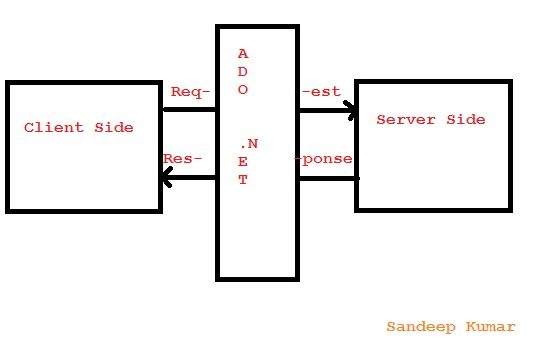
Connection-Oriented in ADO.NET
- Connection
- Command
- Datareader
- DataAdapter
- Dataset
Connection
- SqlConnection con=new SqlConnection(“Integrated security=true;initial catalog=Student;Data source=.”);
- SqlConnection Con=new SqlConnection(“User id=sa;Password=sa123;Database=Student;Server=.”);
Command
- SqlCommand cmd=new SqlCommand(“Query which has to perform”,Connection Object);
- DataReader: DataReader used to read the data from the source.
- Dataset: DataSet contains the table and relation.
- DataAdapter: DataAdapter behaves as a mediator between the back end and front end. But it does not have features to contains the data. So there is a dataset that contains the data of the result set.

- <%@PageLanguage="C#"AutoEventWireup="true"CodeBehind="Student.aspx.cs"Inherits="Iare.Student"%>
- <!DOCTYPE html>
- <html
- xmlns="http://www.w3.org/1999/xhtml">
- <head runat="server">
- <title></title>
- <styletype="text/css">
- .auto-style1 {
- width: 100%;
- }
- </style>
- </head>
- <body style="height: 198px; width: 364px">
- <form id="form1"runat="server">
- <table class="auto-style1">
- <tr>
- <tdcolspan="2">
- <asp:DropDownListID="DropDownList1"runat="server"DataSourceID="Iare"DataTextField="SId"DataValueField="SId">
- </asp:DropDownList>
- <asp:SqlDataSourceID="Iare"runat="server"ConnectionString="<%$ ConnectionStrings:IareConnectionString %>"SelectCommand="SELECT [SId] FROM [Library]">
- </asp:SqlDataSource>
- </td>
- </tr>
- <tr>
- <td>
- <asp:LabelID="Label1"runat="server"Text="Student First Name Is :">
- </asp:Label>
- </td>
- <td>
- <asp:TextBoxID="TextFName"runat="server">
- </asp:TextBox>
- </td>
- </tr>
- <tr>
- <td>
- <asp:LabelID="Label2"runat="server"Text="Student Last Name Is :">
- </asp:Label>
- </td>
- <td>
- <asp:TextBoxID="TextLName"runat="server">
- </asp:TextBox>
- </td>
- </tr>
- <tr>
- <td>
- <asp:LabelID="Label3"runat="server"Text="Student Is Study :">
- </asp:Label>
- </td>
- <td>
- <asp:TextBoxID="TextCourse"runat="server">
- </asp:TextBox>
- </td>
- </tr>
- <tr>
- <td>
- <asp:LabelID="Lbldsply"runat="server">
- </asp:Label>
- </td>
- <td>
- <asp:ButtonID="Button1"runat="server"OnClick="Button1_Click"Text="Save"/>
- </td>
- </tr>
- </table>
- <div></div>
- </form>
- </body>
- </html>

- using System;
- using System.Collections.Generic;
- using System.Linq;
- using System.Web;
- using System.Web.UI;
- using System.Web.UI.WebControls;
- using System.Data;
- using System.Data.SqlClient;
- namespace Iare {
- public partial classStudent: System.Web.UI.Page {
- SqlConnection con = newSqlConnection("integrated security=true;Initial Catalog=Iare;Data Source=.");
- SqlCommand cmd;
- protected void Page_Load(object sender, EventArgs e) {
- }
- protected void Button1_Click(object sender, EventArgs e) {
- string s = "insert into Student values(@p1,@p2,@p3,@p4)";
- con.Open();
- cmd = newSqlCommand(s, con);
- cmd.CommandType = CommandType.Text;
- cmd.Parameters.AddWithValue("@p1", TextFName.Text);
- cmd.Parameters.AddWithValue("@p2", TextLName.Text);
- cmd.Parameters.AddWithValue("@p3", TextCourse.Text);
- cmd.Parameters.AddWithValue("@p4", DropDownList1.SelectedItem.Value);
- cmd.ExecuteNonQuery();
- con.Close();
- Lbldsply.Text = "Student Details Has Saved";
- }
- }
- }
Now run the application and check.
Read more articles on ADO.NET:
KOTRA RAGHAVENDRAPosted Nov 8, 2018, 7:22 AM
How to use blur event for ado.net
Gowtham RajamanickamPosted Apr 12, 2016, 2:26 AM
ncieshare..
Sibeesh VenuPosted Feb 8, 2016, 12:05 AM
Nice Share
Debasis SahaPosted Feb 7, 2016, 11:58 PM
Good One..
Santhakumar MunuswamyPosted Feb 7, 2016, 12:49 PM
Connection oriented architecture means?
Ehsan SajjadPosted Feb 7, 2016, 12:12 PM
Nice
Abhay ShankerPosted Feb 7, 2016, 11:21 AM
Nice One..