

Creating a 3D Canvas Hexagon in HTML5
In this article, we will learn how to create a 3D object in HTML5. In this article, we will learn how to make a hexagon that will rotate around its axis.
Before creating our own 3D engine, we should first understand how the illusion of 3D space is created on a 2D screen. These illusions are called 3D projections. 3D projections map points onto a two-dimensional plane. In our case, the three-dimensional points define an object we wish to render, and the two-dimensional plane is the computer screen.
If we are defining the rotation of the plane with an angle, theta, the 3D projection calculations suddenly become quite simple!
Any point on our three-dimensional plane can be defined with the following two equations that describe a point along the edges of an ellipse:
x = A * cos(theta) y = B * sin(theta)
where A is half of the ellipse width, and B is half of the ellipse height.
We do all this in JavaScript. In this we first draw the front bottom of the Hexagon with the following:
- c.beginPath();
- c.moveTo(myShape.centerPlane.topLeftX, myShape.centerPlane.topLeftY); // top left
- c.lineTo(myShape.centerPlane.topRightX, myShape.centerPlane.topRightY); // top right
- c.lineTo(myShape.bottomPlane.topRightX, myShape.bottomPlane.topRightY); // bottom right
- c.lineTo(myShape.bottomPlane.topLeftX, myShape.bottomPlane.topLeftY); // bottom left
- c.closePath();
- c.lineJoin = "round";
- c.strokeStyle = "black";
- c.lineWidth = lineWidth;
- c.stroke();
- c.fillStyle = "blue";
- c.fill();
Then we draw the back bottom of the Hexagon with the following:
- c.beginPath();
- c.moveTo(myShape.centerPlane.bottomLeftX, myShape.centerPlane.bottomLeftY); // top left
- c.lineTo(myShape.centerPlane.bottomRightX, myShape.centerPlane.bottomRightY); // top right
- c.lineTo(myShape.bottomPlane.bottomRightX, myShape.bottomPlane.bottomRightY); // bottom right
- c.lineTo(myShape.bottomPlane.bottomLeftX, myShape.bottomPlane.bottomLeftY); // bottom left
- c.closePath();
- c.lineJoin = "round";
- c.strokeStyle = "black";
- c.lineWidth = lineWidth;
- c.stroke();
- c.fillStyle = "blue";
- c.fill();
After that we draw the front top of the Hexagon with the following:
- c.beginPath();
- c.moveTo(myShape.topPlane.topLeftX, myShape.topPlane.topLeftY); // top left
- c.lineTo(myShape.topPlane.topRightX, myShape.topPlane.topRightY); // top right
- c.lineTo(myShape.centerPlane.topRightX, myShape.centerPlane.topRightY); // bottom right
- c.lineTo(myShape.centerPlane.topLeftX, myShape.centerPlane.topLeftY); // bottom left
- c.closePath();
- c.lineJoin = "round";
- c.strokeStyle = "black";
- c.lineWidth = lineWidth;
- c.stroke();
- c.fillStyle = "green";
- c.fill();
Then we draw the back top of the Hexagon with the following:
- c.beginPath();
- c.moveTo(myShape.topPlane.bottomLeftX, myShape.topPlane.bottomLeftY); // top left
- c.lineTo(myShape.topPlane.bottomRightX, myShape.topPlane.bottomRightY); // top right
- c.lineTo(myShape.centerPlane.bottomRightX, myShape.centerPlane.bottomRightY); // bottom right
- c.lineTo(myShape.centerPlane.bottomLeftX, myShape.centerPlane.bottomLeftY); // bottom left
- c.closePath();
- c.lineJoin = "round";
- c.strokeStyle = "black";
- c.lineWidth = lineWidth;
- c.stroke();
- c.fillStyle = "blue";
- c.fill();
Finally draw the top of the Hexagon with the following:
- c.beginPath();
- c.moveTo(myShape.topPlane.topLeftX, myShape.topPlane.topLeftY); // top left
- c.lineTo(myShape.topPlane.topRightX, myShape.topPlane.topRightY); // top right
- c.lineTo(myShape.topPlane.bottomRightX, myShape.topPlane.bottomRightY); // bottom right
- c.lineTo(myShape.topPlane.bottomLeftX, myShape.topPlane.bottomLeftY); // bottom left
- c.closePath();
- c.strokeStyle = "black";
- c.lineWidth = lineWidth;
- c.stroke();
- c.fillStyle = "green";
- c.fill();
Similarily we draw the left and right side of the hexagon.
We generate the hexagon and rotate it using the "generate()" and "rotate()" methods, as in the following:
- function Shape(topPlane, centerPlane, bottomPlane)
- {
- this.topPlane = topPlane;
- this.centerPlane = centerPlane;
- this.bottomPlane = bottomPlane;
- this.rotate = function (newTheta)
- {
- topPlane.rotate(newTheta);
- centerPlane.rotate(newTheta);
- bottomPlane.rotate(newTheta);
- }
- this.generatePlanes = function ()
- {
- topPlane.generate();
- centerPlane.generate();
- bottomPlane.generate();
- }
- }
Example:
- <!DOCTYPE html>
- <html lang="en" xmlns="http://www.w3.org/1999/xhtml">
- <head>
- <meta charset="utf-8" />
- <title>ThreeD HTML5</title>
- <style>
- body {
- margin: 0px;
- padding: 0px;
- }
- #myCanvas
- {
- border: 1px solid black;
- }
- </style>
- <script>
- var canvas = null;
- var c = null;
- var canvasWidth = 576;
- var canvasHeight = 400;
- var t = 0;
- var myShape = null;
- function Shape(topPlane, centerPlane, bottomPlane) {
- this.topPlane = topPlane;
- this.centerPlane = centerPlane;
- this.bottomPlane = bottomPlane;
- this.rotate = function (newTheta) {
- topPlane.rotate(newTheta);
- centerPlane.rotate(newTheta);
- bottomPlane.rotate(newTheta);
- }
- this.generatePlanes = function () {
- topPlane.generate();
- centerPlane.generate();
- bottomPlane.generate();
- }
- }
- function Plane(centerX, centerY, planeLength, planeWidth, planeTilt, planeTheta) {
- this.centerX = centerX;
- this.centerY = centerY;
- this.planeLength = planeLength;
- this.planeTheta = planeTheta;
- var lastPerspectiveX = null;
- var lastPerspectiveX2 = null;
- var planeNextCornerAngle = 2 * Math.asin(planeWidth / planeLength);
- this.rotate = function (newTheta) {
- planeTheta = newTheta - planeNextCornerAngle / 2;
- }
- this.translate = function (newCenterX, newCenterY) {
- centerX = newCenterX;
- centerY = newCenterY;
- }
- this.generate = function () {
- var ovalLength = planeLength;
- var ovalWidth = ovalLength * planeTilt;
- var perspectiveX = (ovalLength / 2) * Math.cos(planeTheta);
- var perspectiveY = (ovalWidth / 2) * Math.sin(planeTheta);
- var perspectiveX2 = (ovalLength / 2) * Math.cos(planeTheta + planeNextCornerAngle);
- var perspectiveY2 = (ovalWidth / 2) * Math.sin(planeTheta + planeNextCornerAngle);
- this.topLeftX = (perspectiveX * 1) + centerX;
- this.topLeftY = (perspectiveY * -1) + centerY;
- this.bottomRightX = (perspectiveX * -1) + centerX;
- this.bottomRightY = (perspectiveY * 1) + centerY
- this.topRightX = (perspectiveX2 * 1) + centerX;
- this.topRightY = (perspectiveY2 * -1) + centerY;
- this.bottomLeftX = (perspectiveX2 * -1) + centerX;
- this.bottomLeftY = (perspectiveY2 * 1) + centerY;
- }
- }
- function clearCanvas() {
- canvas.width = 1;
- canvas.width = canvasWidth;
- }
- function init() {
- canvas = document.getElementById("myCanvas");
- c = canvas.getContext("2d");
- canvas.width = canvasWidth;
- canvas.height = canvasHeight;
- var topPlane = new Plane(288, 150, 100, 70, 0.5, theta);
- var centerPlane = new Plane(288, 200, 600, 70, 0.5, theta);
- var bottomPlane = new Plane(288, 250, 100, 70, 0.5, theta);
- myShape = new Shape(topPlane, centerPlane, bottomPlane);
- //drawScreen();
- updateScreen();
- }
- var theta = 0; // top left
- function drawScreen() {
- var lineWidth = 2;
- myShape.rotate(theta);
- //myPlane.translate(tankX, 100);
- myShape.generatePlanes();
- // draw front bottom of Hexagon
- c.beginPath();
- c.moveTo(myShape.centerPlane.topLeftX, myShape.centerPlane.topLeftY); // top left
- c.lineTo(myShape.centerPlane.topRightX, myShape.centerPlane.topRightY); // top right
- c.lineTo(myShape.bottomPlane.topRightX, myShape.bottomPlane.topRightY); // bottom right
- c.lineTo(myShape.bottomPlane.topLeftX, myShape.bottomPlane.topLeftY); // bottom left
- c.closePath();
- c.lineJoin = "round";
- c.strokeStyle = "black";
- c.lineWidth = lineWidth;
- c.stroke();
- c.fillStyle = "blue";
- c.fill();
- // draw back bottom of Hexagon
- c.beginPath();
- c.moveTo(myShape.centerPlane.bottomLeftX, myShape.centerPlane.bottomLeftY); // top left
- c.lineTo(myShape.centerPlane.bottomRightX, myShape.centerPlane.bottomRightY); // top right
- c.lineTo(myShape.bottomPlane.bottomRightX, myShape.bottomPlane.bottomRightY); // bottom right
- c.lineTo(myShape.bottomPlane.bottomLeftX, myShape.bottomPlane.bottomLeftY); // bottom left
- c.closePath();
- c.lineJoin = "round";
- c.strokeStyle = "black";
- c.lineWidth = lineWidth;
- c.stroke();
- c.fillStyle = "blue";
- c.fill();
- // draw front top of Hexagon
- c.beginPath();
- c.moveTo(myShape.topPlane.topLeftX, myShape.topPlane.topLeftY); // top left
- c.lineTo(myShape.topPlane.topRightX, myShape.topPlane.topRightY); // top right
- c.lineTo(myShape.centerPlane.topRightX, myShape.centerPlane.topRightY); // bottom right
- c.lineTo(myShape.centerPlane.topLeftX, myShape.centerPlane.topLeftY); // bottom left
- c.closePath();
- c.lineJoin = "round";
- c.strokeStyle = "black";
- c.lineWidth = lineWidth;
- c.stroke();
- c.fillStyle = "green";
- c.fill();
- // draw back top of Hexagon
- c.beginPath();
- c.moveTo(myShape.topPlane.bottomLeftX, myShape.topPlane.bottomLeftY); // top left
- c.lineTo(myShape.topPlane.bottomRightX, myShape.topPlane.bottomRightY); // top right
- c.lineTo(myShape.centerPlane.bottomRightX, myShape.centerPlane.bottomRightY); // bottom right
- c.lineTo(myShape.centerPlane.bottomLeftX, myShape.centerPlane.bottomLeftY); // bottom left
- c.closePath();
- c.lineJoin = "round";
- c.strokeStyle = "black";
- c.lineWidth = lineWidth;
- c.stroke();
- c.fillStyle = "blue";
- c.fill();
- // draw top of Hexagon
- c.beginPath();
- c.moveTo(myShape.topPlane.topLeftX, myShape.topPlane.topLeftY); // top left
- c.lineTo(myShape.topPlane.topRightX, myShape.topPlane.topRightY); // top right
- c.lineTo(myShape.topPlane.bottomRightX, myShape.topPlane.bottomRightY); // bottom right
- c.lineTo(myShape.topPlane.bottomLeftX, myShape.topPlane.bottomLeftY); // bottom left
- c.closePath();
- c.strokeStyle = "black";
- c.lineWidth = lineWidth;
- c.stroke();
- c.fillStyle = "green";
- c.fill();
- if (isRightSideOfShapeInFront(myShape)) {
- // draw right of Hexagon
- c.beginPath();
- c.moveTo(myShape.topPlane.topRightX, myShape.topPlane.topRightY); // front
- c.lineTo(myShape.centerPlane.topRightX, myShape.centerPlane.topRightY); // front
- c.lineTo(myShape.bottomPlane.topRightX, myShape.bottomPlane.topRightY); // front
- c.lineTo(myShape.bottomPlane.bottomRightX, myShape.bottomPlane.bottomRightY); // back
- c.lineTo(myShape.centerPlane.bottomRightX, myShape.centerPlane.bottomRightY); // back
- c.lineTo(myShape.topPlane.bottomRightX, myShape.topPlane.bottomRightY); // back
- c.closePath();
- c.strokeStyle = "black";
- c.lineWidth = lineWidth;
- c.stroke();
- c.fillStyle = "red";
- c.fill();
- }
- else {
- // draw left of Hexagon
- c.beginPath();
- c.moveTo(myShape.topPlane.topLeftX, myShape.topPlane.topLeftY); // front
- c.lineTo(myShape.centerPlane.topLeftX, myShape.centerPlane.topLeftY); // front
- c.lineTo(myShape.bottomPlane.topLeftX, myShape.bottomPlane.topLeftY); // front
- c.lineTo(myShape.bottomPlane.bottomLeftX, myShape.bottomPlane.bottomLeftY); // back
- c.lineTo(myShape.centerPlane.bottomLeftX, myShape.centerPlane.bottomLeftY); // back
- c.lineTo(myShape.topPlane.bottomLeftX, myShape.topPlane.bottomLeftY); // back
- c.closePath();
- c.strokeStyle = "black";
- c.lineWidth = lineWidth;
- c.stroke();
- c.fillStyle = "red";
- c.fill();
- }
- }
- function isRightSideOfShapeInFront(tankObj) {
- if (tankObj.topPlane.topRightY > tankObj.topPlane.topLeftY) {
- return true;
- }
- else {
- return false;
- }
- }
- function updateScreen() {
- theta += .01; // radians
- clearCanvas();
- drawScreen();
- setTimeout("updateScreen()", 10);
- }
- function handleMouseDown(e) {
- var mouseX = e.clientX;
- var mouseY = e.clientY;
- }
- function handleMouseMove(e) {
- var mouseX = e.clientX;
- var mouseY = e.clientY;
- }
- function handleMouseUp(e) {
- }
- </script>
- </head>
- <body onload="init()" onmousedown="return false;">
- <canvas id="myCanvas"></canvas>
- </body>
- </html>
Output
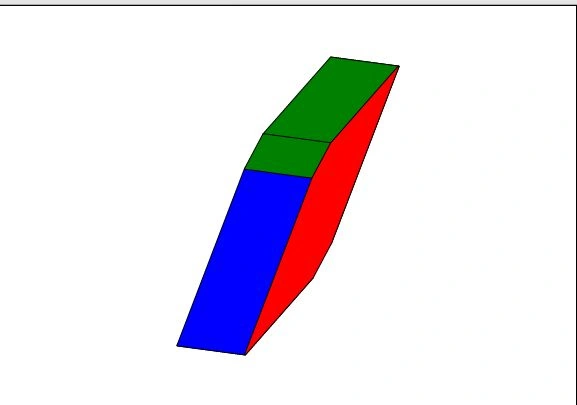
As the Hexagon is rotating we get:
Image 1
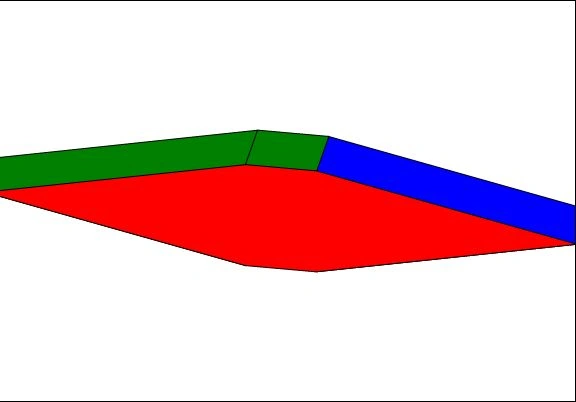
Image 2
Join the conversation! Your thoughts help the community grow.