
ADO.NET
ADO.NET is a set of classes (a framework) to interact with data sources such as databases and XML files. ADO is the acronym for ActiveX Data Objects. It allows us to connect to underlying data or databases. It has classes and methods to retrieve and manipulate data.
The following are a few of the .NET applications that use ADO.NET to connect to a database, execute commands and retrieve data from the database.
- ASP.NET Web Applications
- Console Applications
- Windows Applications.
Various Connection Architectures
There are the following two types of connection architectures:
- Connected architecture: the application remains connected with the database throughout the processing.
- Disconnected architecture: the application automatically connects/disconnects during the processing. The application uses temporary data on the application side called a DataSet.
Understanding ADO.NET and it's class library
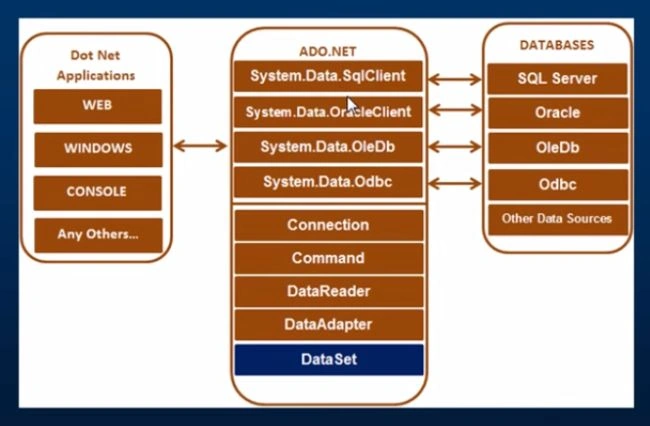
In this diagram, we can see that there are various types of applications (Web Application, Console Application, Windows Application and so on) that use ADO.NET to connect to databases (SQL Server, Oracle, OleDb, ODBC, XML files and so on).
Important Classes in ADO.NET
We can also observe various classes in the preceding diagram. They are:
- Connection Class
- Command Class
- DataReader Class
- DataAdaptor Class
- DataSet.Class
1. Connection Class
In ADO.NET, we use these connection classes to connect to the database. These connection classes also manage transactions and connection pooling. To learn more about connection classes, start here: Connection in ADO.NET.
2. Command Class
The Command class provides methods for storing and executing SQL statements and Stored Procedures. The following are the various commands that are executed by the Command Class.
- ExecuteReader: Returns data to the client as rows. This would typically be an SQL select statement or a Stored Procedure that contains one or more select statements. This method returns a DataReader object that can be used to fill a DataTable object or used directly for printing reports and so forth.
- ExecuteNonQuery: Executes a command that changes the data in the database, such as an update, delete, or insert statement, or a Stored Procedure that contains one or more of these statements. This method returns an integer that is the number of rows affected by the query.
- ExecuteScalar: This method only returns a single value. This kind of query returns a count of rows or a calculated value.
- ExecuteXMLReader: (SqlClient classes only) Obtains data from an SQL Server 2000 database using an XML stream. Returns an XML Reader object.
3. DataReader Class
The DataReader is used to retrieve data. It is used in conjunction with the Command class to execute an SQL Select statement and then access the returned rows. Learn more here: Data Reader in C#.
4. DataAdapter Class
The DataAdapter is used to connect DataSets to databases. The DataAdapter is most useful when using data-bound controls in Windows Forms, but it can also be used to provide an easy way to manage the connection between your application and the underlying database tables, views and Stored Procedures. Learn more here: Data Adapter in ADO.NET.
5. DataSet Class
The DataSet is the heart of ADO.NET. The DataSet is essentially a collection of DataTable objects. In turn each object contains a collection of DataColumn and DataRow objects. The DataSet also contains a Relations collection that can be used to define relations among Data Table Objects.
How to Connect to a Database using ADO.NET
Now let us learn how to connect to a database using ADO.NET. To create a connection, you must be familiar with connection strings. A connection string is required as a parameter to SQLConnection. A ConnectionString is a string variable (not case sensitive).
This contains key and value pairs, like provider, server, database, userid and word as in the following:
Server="nameof the server or IP Address of the server"
Database="name of the database"
userid="user name who has permission to work with database"
word="the word of userid"
Database="name of the database"
userid="user name who has permission to work with database"
word="the word of userid"
SQL Authentication
String constr="server=.;database=institute;user id=rakesh;word=abc@123";
Or:
String constr="data source=.;initial catalog=institute;uid=rakesh;pwd=abc@213";
Windows Authentication
String constr="server=.;database=institute;trusted_connection=true"
Or:
String constr="server=.;initial catalog=institute;integrated security=true"
String constr="server=.;database=institute;user id=rakesh;word=abc@123";
Or:
String constr="data source=.;initial catalog=institute;uid=rakesh;pwd=abc@213";
Windows Authentication
String constr="server=.;database=institute;trusted_connection=true"
Or:
String constr="server=.;initial catalog=institute;integrated security=true"
How to retrieve and display data from a database
- Create a SqlConnection object using a connection string.
- Handle exceptions.
- Open the connection.
- Create a SQLCommand. To represent a SQLCommand like (select * from studentdetails) and attach the existing connection to it. Specify the type of SQLCommand (text/storedprocedure).
- Execute the command (use executereader).
- Get the Result (use SqlDataReader). This is a forwardonly/readonly dataobject.
- Close the connection
- Process the result
- Display the Result
The following is code for connecting to a SQL Database:
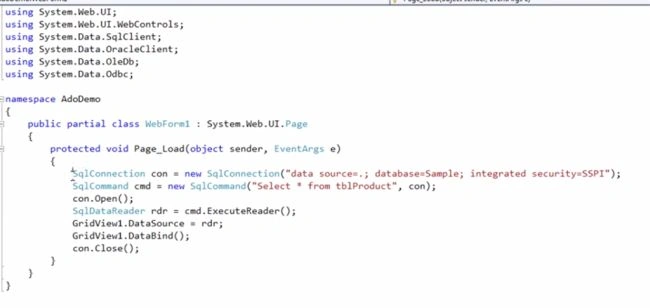
You must use the System.Data.SqlClient namespace to connect to a SQL Database. In the preceding code we are using the SqlConnection class, SqlCommand class and SqlDataReader class because our application is talking to SQL Server. SQL Server only understands SQL.
Code for connecting to Oracle Database
If you want to connect to an Oracle database, all you need to do is to change the connection class name from SqlConnection to OracleConnection Command class name from SqlCommand to OracleCommand and SqlDataReader to OracleDataReader and also in the beginning use the namespace System.Data.OralceClient.
This works for OleDb and ODBC also.
Learn more here: Working with Oracle Database using ADO.NET
Thank You.
Bhavleen SinghPosted Jun 22, 2019, 5:33 AM
Thanks a lot rakesh sir
Madan ShekarPosted Feb 1, 2019, 4:12 AM
Good explanation Rakesh
Kumaresh NatarajanPosted Apr 24, 2018, 5:15 AM
Thanks a lot bhai for this priceless (free) help!
sagar JinturkarPosted Mar 20, 2018, 1:09 AM
Nice Article ...The Complete SQL Connection....Very Useful
Sunil ReddyPosted Jun 15, 2017, 8:25 AM
This page is explanation to Kud Venkat Ado.Net video series?
susilkumar beheraPosted May 12, 2017, 9:37 AM
Good Explaining...:)
Gayathri AnbazhaganPosted Apr 9, 2017, 3:20 AM
Nice share........
SubashPosted Sep 7, 2016, 6:35 AM
Good one
Arul RPosted Jan 17, 2016, 3:22 AM
Nice share
RakeshPosted Mar 18, 2015, 1:39 PM
Thanks Ajay and Gowtham
ajay giriPosted Mar 18, 2015, 6:29 AM
Good One
Gowtham RajamanickamPosted Mar 16, 2015, 2:28 AM
useful...
Ervis TrupjaPosted Mar 3, 2015, 3:51 PM
Thanx! :)