

Introduction
The monitor class have two static method Wait() and Pulse(). The purpose of Wait and Pulse is to provide a simple signaling mechanism: Wait blocks until it receives notification from another thread; Pulse provides that notification.
Wait must execute before Pulse in order for the signal to work. If Pulse executes first, its pulse is lost, and the late waiter must wait for a fresh pulse, or remain forever blocked. This differs from the behavior of an AutoResetEvent, where its Set method has a "latching" effect and so is effective if called before WaitOne.
One must specify a synchronizing object when calling Wait or Pulse. If two threads use the same object, then they are able to signal each other. The synchronizing object must be locked prior to calling Wait or Pulse.
When a thread is temporarily blocked from running, it calls Wait() This causes the thread to go to sleep and the lock for that object to be released, allowing another thread to use the object. At a later point, the sleeping thread is awakened when some other thread enters the same lock and calls Pulse() or PulseAll(). A call to Pulse() resumes the first thread in the queue of threads waiting for the lock. A call to PulseAll signals the release of the lock to all waiting threads.
Here are two commonly used forms of Wait():
public
static bool
Wait(object waitObject)
public
static bool
Wait(object waitObject,
int milliseconds)
The first form waits until notified. The second form waits until notified or until the specified period of milliseconds has expired. For both waitObject specifies the object upon which to wait.
Here are the general forms for Pulse() and PulseAll():
public
static void
Pulse(object waitObject)
public
static void
PulseAll(object waitObject)
Here, waitObject is the object being released.
To
understand the need for and the application of Wait() and Pulse()
we create
following
program
using
System;
using
System.Threading;
namespace
WaitndPulesMethod
{
class PingPong
{
public void
ping(bool running)
{
lock (this)
{
if (!running)
{
//ball halts.
Monitor.Pulse(this); // notify any waiting threads
return;
}
Console.Write("Ping ");
Monitor.Pulse(this); // let pong() run
Monitor.Wait(this);
// wait for pong() to complete
}
}
public void
pong(bool running)
{
lock (this)
{
if (!running)
{
//ball halts.
Monitor.Pulse(this); // notify any waiting threads
return;
}
Console.WriteLine("Pong
");
Monitor.Pulse(this); // let ping() run
Monitor.Wait(this);
// wait for ping() to complete
}
}
}
class MyThread
{
public
Thread thread;
PingPong pingpongObject;
//construct a new thread.
public MyThread(string
name, PingPong pp)
{
thread = new
Thread(new
ThreadStart(this.run));
pingpongObject = pp;
thread.Name = name;
thread.Start();
}
//Begin execution of new thread.
void run()
{
if (thread.Name ==
"Ping")
{
for (int
i = 0; i < 5; i++)
pingpongObject.ping(true);
pingpongObject.ping(false);
}
else
{
for (int
i = 0; i < 5; i++)
pingpongObject.pong(true);
pingpongObject.pong(false);
}
}
}
class
BouncingBall
{
public static
void Main()
{
PingPong pp =
new PingPong();
Console.WriteLine("The
Ball is dropped... \n");
MyThread mythread1 =
new MyThread("Ping",
pp);
MyThread mythread2 =
new MyThread("Pong",
pp);
mythread1.thread.Join();
mythread2.thread.Join();
Console.WriteLine("\nThe
Ball Stops Bouncing.");
Console.Read();
}
}
}
Output
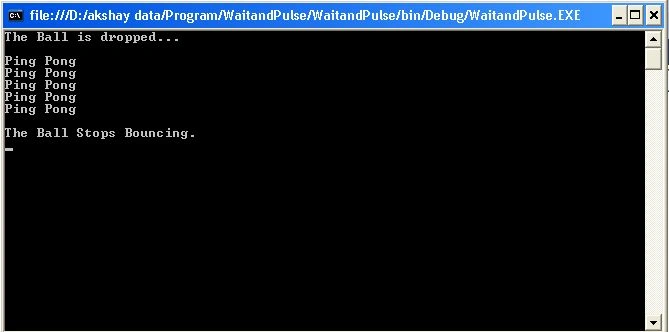
The principle is that you write the signaling logic yourself using custom flags and fields (in conjunction with lock statements), then introduce Wait and Pulse commands to mitigate CPU spinning. This advantage of this low-level approach is that with just Wait, Pulse and the lock statement, you can achieve the functionality of AutoResetEvent, ManualResetEvent and Semaphore, as well as WaitHandle's static methods WaitAll() and WaitAny(). Furthermore,Wait and Pulse can be amenable in situations where all of the Wait Handles are parsimoniously challenged.
A SynchronizationLockException will be thrown if Wait(), Pulse or PulseAll() is called from code that is not within a lock block.
Join the conversation! Your thoughts help the community grow.