
Introduction
Store private data on the device memory. You can directly save your application data to the internal memory. By default data is saved in internal memory and other applications cannot access it. When you uninstall your application all files will be removed from the device.
The FileInoutStream and FileOutPutStream classes are used to read and write data into the files.
FileInputStream
The FileInputStream gets input bytes from a file. The FileInputStream class provides the facility to read streams of raw bytes such as image data. It extends the InputStream class. The following are methods provided by the fileInputStream class:
FileOutputStraem is an output stream for writing data to a file. It extends the OutputStream class. The following are methods provided by the outputStream class:
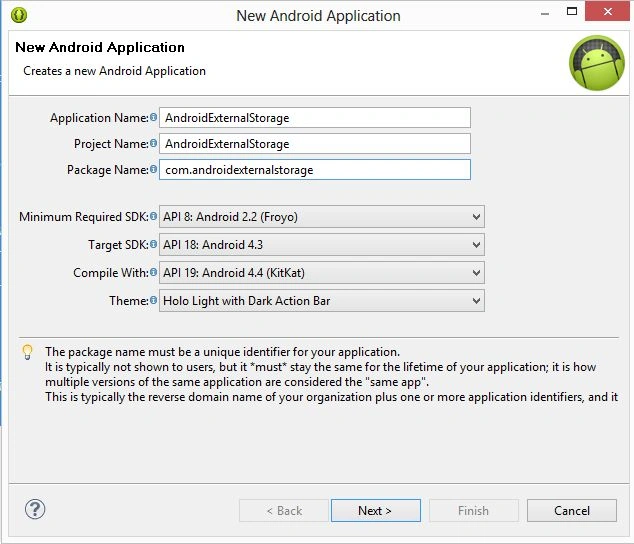 Step 2
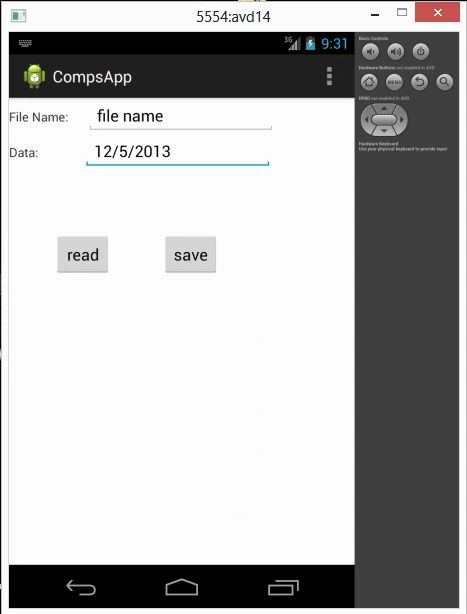
Create an XML file with this:
Step 2
Create an XML file with this:
-
public int read()
reads a single byte from this Stream and returns it as an integer in the range from 0 to 225. -
public void close()
closes the stream.
-
public void close()
closes the stream.
-
public void write()
writes a single byte to the stream.
- <RelativeLayout xmlns:android="http://schemas.android.com/apk/res/android"
- xmlns:tools="http://schemas.android.com/tools"
- android:layout_width="match_parent"
- android:layout_height="match_parent"
- tools:context=".MainActivity" >
- <LinearLayout
- android:id="@+id/linearlayout1"
- android:layout_height="wrap_content"
- android:orientation="horizontal"
- android:layout_width="fill_parent">
- <TextView
- android:id="@+id/textView1"
- android:layout_width="wrap_content"
- android:layout_height="wrap_content"
- android:text="File Name:" />
- <EditText
- android:id="@+id/edtText1"
- android:layout_width="wrap_content"
- android:layout_height="wrap_content"
- android:layout_marginLeft="20dp"
- android:ems="10" >
- </EditText>
- </LinearLayout>
- <LinearLayout
- android:layout_below="@+id/linearlayout1"
- android:layout_height="wrap_content"
- android:orientation="horizontal"
- android:layout_width="fill_parent">
- <TextView
- android:id="@+id/textView2"
- android:layout_width="wrap_content"
- android:layout_height="wrap_content"
- android:text="Data:" />
- <EditText
- android:id="@+id/edtText2"
- android:layout_width="wrap_content"
- android:layout_height="wrap_content"
- android:layout_marginLeft="50dp"
- android:ems="10" />
- </LinearLayout>
- <Button
- android:id="@+id/save_btn"
- android:layout_width="wrap_content"
- android:layout_height="wrap_content"
- android:layout_marginLeft="170dp"
- android:layout_marginTop="150dp"
- android:text="save" />
- <Button
- android:id="@+id/read_btn"
- android:layout_marginLeft="50dp"
- android:layout_marginTop="150dp"
- android:layout_width="wrap_content"
- android:layout_height="wrap_content"
- android:text="read" />
- </RelativeLayout>
Join the conversation! Your thoughts help the community grow.