This article explains how to get a row's cell value from a Grid View of a checked CheckBox in ASP.NET and C#. I have a GridView and inside it is a checkbox. Now I will explain how to get row values from a GridView when the checkbox is selected using ASP.NET and C#.
Procedure:
1. Now first create the Emp table in the database.
- Create table tbl_Emp(EmpId int, EmpName varchar(50), Company varchar(50), Address varchar(500))
2. And insert some records into the table.
- Insert into tbl_Emp( EmpId, EmpName, Company, Address) values(1, 'Ram', 'IDSLogic', 'DemoAddress')
- Insert into tbl_Emp( EmpId, EmpName, Company, Address) values(2, 'Shyam', 'HCl', 'DemoAddress')
- Insert into tbl_Emp( EmpId, EmpName, Company, Address) values(3, 'jitendra', 'Wipro', 'DemoAddress')
- Insert into tbl_Emp( EmpId, EmpName, Company, Address) values(4, 'Rihan', 'TCS', 'DemoAddress')
- Insert into tbl_Emp( EmpId, EmpName, Company, Address) values(5, 'Rohan', 'Tech', 'DemoAddress')
- Insert into tbl_Emp( EmpId, EmpName, Company, Address) values(6, 'Sohan', 'Newtech', 'DemoAddress')
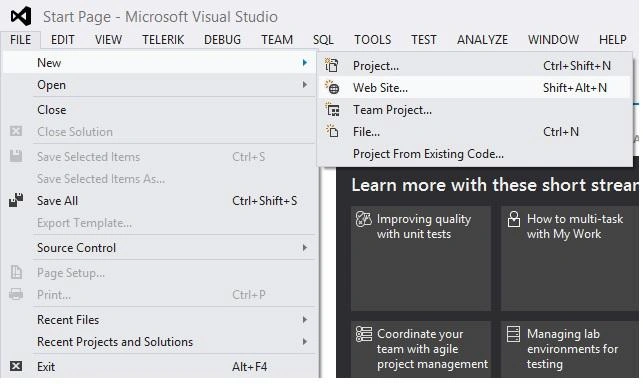
3. After creating the table create the application (File ---> New ---> Website).
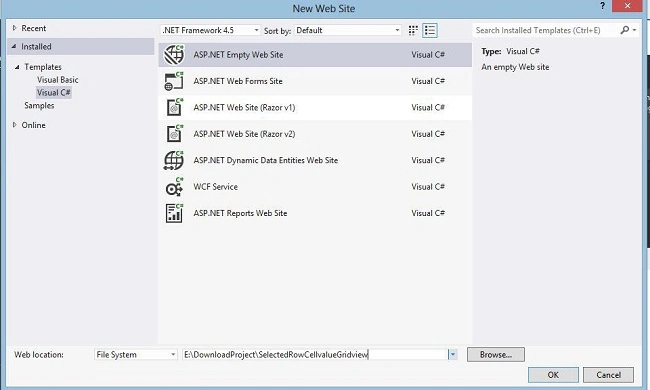
4. Give the application the name “SelectedRowCellvalueGridview”.
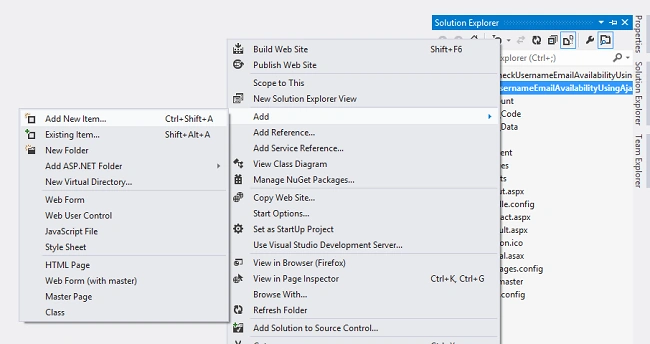
5. Then create a new item.
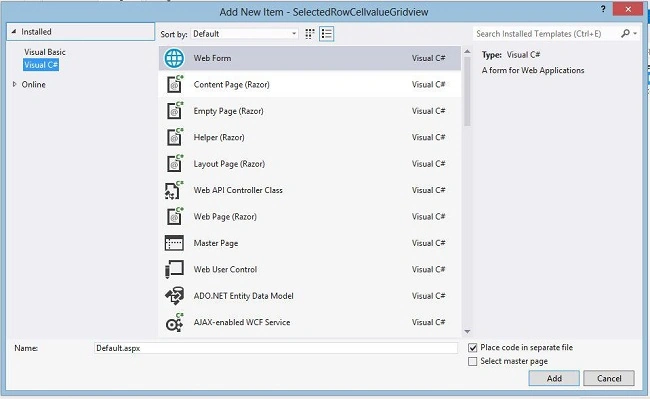
Now your aspx page is like this:
- <html xmlns="http://www.w3.org/1999/xhtml">
- <head runat="server">
- <title>Selected Row Cell value Gridview</title>
- </head>
- <body>
- <form id="form1" runat="server">
- <div>
- <asp:GridView ID="gvEmp" AutoGenerateColumns="false" CellPadding="5" runat="server">
- <Columns>
- <asp:TemplateField>
- <HeaderTemplate>
- <asp:CheckBox ID="chkAllSelect" runat="server" onclick="CheckAll(this);" />
- </HeaderTemplate>
- <ItemTemplate>
- <asp:CheckBox ID="chkSelect" runat="server" />
- </ItemTemplate>
- </asp:TemplateField>
- <asp:BoundField HeaderText="EmpId" DataField="EmpId" />
- <asp:BoundField HeaderText="EmpName" DataField="EmpName" />
- <asp:BoundField HeaderText="Company" DataField="Company" />
- <asp:BoundField HeaderText="Address" DataField="Address" />
- </Columns>
- <HeaderStyle BackColor="#5d5d5d" Font-Bold="true" ForeColor="White" />
- </asp:GridView>
- <asp:Button ID="btnGetRecord" Text="Get Selected Records" runat="server"
- Font-Bold="true" OnClick="btnGetRecord_Click" /><br /><br />
-
-
- <asp:Label ID="lblRecord" runat="server" />
- </div>
- </form>
-
-
- <script type="text/javascript">
-
- function CheckAll(Checkbox) {
- var GridVwHeaderCheckbox = document.getElementById("<%=gvEmp.ClientID %>");
- for (i = 1; i < GridVwHeaderCheckbox.rows.length; i++) {
- GridVwHeaderCheckbox.rows[i].cells[0].getElementsByTagName("INPUT")[0].checked = Checkbox.checked;
- }
- }
- </script>
- </body>
- </html>
Now add “using System.Data.SqlClient;” and “using System.Data;” in the code behind and write the following code to get the checked check box row values.
- protected void Page_Load(object sender, EventArgs e)
- {
- if (!IsPostBack)
- {
- Bindgv();
- }
- }
-
- protected void Bindgv()
- {
- SqlConnection con = new SqlConnection("data source=LENOVO;initial catalog=test;UID=sa;PWD=connect;");
-
- con.Open();
- SqlCommand cmd = new SqlCommand("Select EmpId, EmpName, Company, Address from tbl_Emp", con);
- SqlDataAdapter da = new SqlDataAdapter(cmd);
- DataSet ds = new DataSet();
- da.Fill(ds);
- con.Close();
- gvEmp.DataSource = ds;
- gvEmp.DataBind();
-
- }
-
- protected void btnGetRecord_Click(object sender, EventArgs e)
- {
- string str = string.Empty;
- string strname = string.Empty;
- foreach (GridViewRow gvrow in gvEmp.Rows)
- {
- CheckBox chk = (CheckBox)gvrow.FindControl("chkSelect");
- if (chk != null & chk.Checked)
- {
- str += "<b>EmpId :- </b>" + gvrow.Cells[1].Text + ", ";
- str += "<b>EmpName :- </b>" + gvrow.Cells[2].Text + ", ";
- str += "<b>Company :- </b>" + gvrow.Cells[3].Text + ", ";
- str += "<b>Addess :- </b>" + gvrow.Cells[4].Text;
- str += "<br />";
- }
- }
- lblRecord.Text = "<b>Selected EmpDetails: </b>" + str ;
- }
Test the page as in the following:
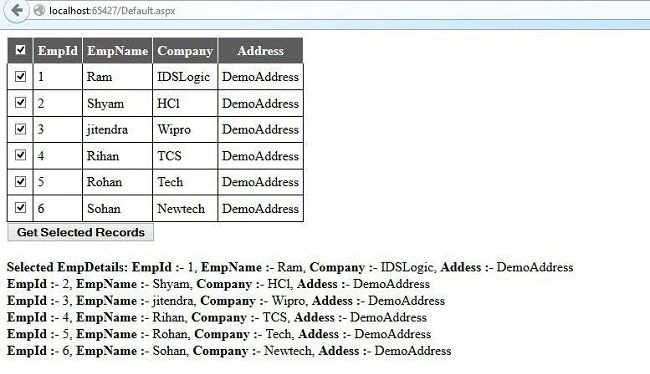
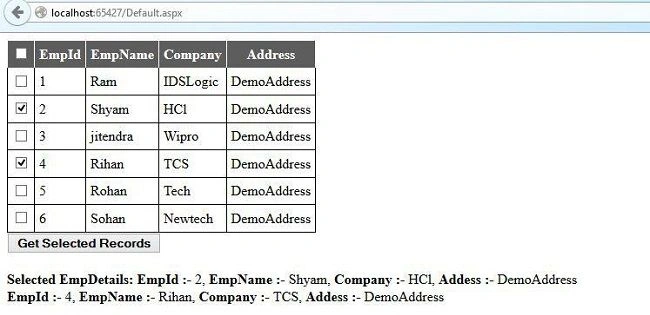


Ravi ChandranPosted Jan 21, 2021, 12:06 PM
From where did you get the word ClientID in the line var GridVwHeaderCheckbox = document.getElementById("<%=GridView1.ClientID %>"); please explain
Dharmendra Kumar PanditPosted Oct 17, 2019, 10:14 AM
Nice article
Mary DegamoPosted Aug 15, 2018, 9:01 PM
Public class MyTemplate : ITemplate { #region ITemplate Members public void InstantiateIn(Control container) { CheckBox chk = new CheckBox(); chk.ID = "chk1"; container.Controls.Add(chk); } #endregion }
Mary DegamoPosted Aug 15, 2018, 9:00 PM
How to get the ID of this checkbox?
Zouhair LoualidPosted Nov 14, 2017, 4:47 AM
How to get it from javascript please??!!
Suraj PandeyPosted Apr 5, 2016, 2:55 AM
Thanks for help
Manish Kumar ChoudharyPosted Nov 26, 2014, 10:57 PM
Good one..