

In this article, we will define authentication and authorization in the ASP.Net Web API. In this article, we also discuss how to secure our ASP.Net Web API. Now we will define the authorization and authentication.
- Authorization: Is a person that has permission to perform the action, in other words, a person that only has the permission for getting the resource but not create the resource.
- Authentication: Is a person that logins with a username and password and the server uses this password to authenticate that person.
We use the IIS server for web hosting. The IIS server uses the HTTP modules for checking the authentication. Various modules are built in the IIS server. We can provide these modules for checking the authentication of our project.
The host creates an IPrincipal object to authenticate the user, under the security of this object the code is executed. This principle is attached to the Thread.CurrentPrincipal. There is an "Identity.IsAuthenticated" property for authentication. If the user is authenticated then it will return true otherwise it returns false.
HTTP Message Handler for Authentication
We can use the HTTP message handler for authentication. There are important facts for using it:
- The requests passed from the ASP.Net pipeline are handled by the HTTP module. The requests that are routed to the Web API are handled by the Message handler.
- It is possible that we can select a specific Message handler and we can use that handler for authentication for a specified route.
- The HTTP modules are used by the IIS server for authentication, in other words, logging auditing.
- HTTP is the best option for supporting the self-hosting.
For performing the custom authentication logic, the principal can be set in two places.
- Thread.CurrentPrincipal: It sets the Thread principal in .Net
- HttpContext.Current.User: This is used for the ASP.Net.
- protected void Page_Load(object sender, EventArgs e)
- {
- private void SetPrincipal(IPrincipal pr)
- {
- Thread.CurrentPrincipal = pr;
- if (HttpContext.Current != null)
- {
- HttpContext.Current.User = pr;
- }
- }
- }
Authorization
Authorization is done when a control action has been performed. When the user request is not authorized, it will return the response error. And that action is not performed.

Use the AuthorizeAttribute
The Web API provides an attribute called "AuthorizedAttribute". We use this attribute to check the user request to determine whether it is authorized. If the request is not authorized then it will not call the action and returns the error response.
We use the Filter for an individual action in three ways, individually, globally and at control level.
Apply filter at individual action
- public class ValuesController : ApiController
- {
- public HttpResponseMessage Get() { }
- [Authorize]
- public HttpResponseMessage Post() { }
- }
Apply filter as globally
- public static void Register(HttpConfiguration act)
- {
- act.Filters.Add(new AuthorizeAttribute());
- }
Apply filter at controller level
- [Authorize]
- public class ValuesController : ApiController
- {
- public HttpResponseMessage Get(int ID) { }
- public HttpResponseMessage Post() { }
- }
For anonymous access we use the [AllowAnonymous] attribute for the Get method and we left the post method as restricted.
- [Authorize]
- public class ValuesController : ApiController
- {
- [AllowAnonymous]
- public HttpResponseMessage Get() { }
- public HttpResponseMessage Post() { }
- }
The preceding example specifies that only the authenticated person can access the method and all others are restricted. Now in the following example we will define that a method can be accessed by the specified user and in the specified role.
Restricted by user
- Authorize(Users="smith")]
- public class ValuesController : ApiController
- {
- }
Restricted by Role
- [Authorize(Roles="admin")]
- public class ValuesController : ApiController
- {
- }
Custom Authorization filter
-
AuthorizeAttribute: There is a class that is used for performing the authorization logic. This logic depends on the current user and role.
-
AuthorizationFilterAttribute: The synchronous authorization is performed by this class.
-
IAuthorizationFilter: This is an interface that performs the Asynchronous Authorization.
This is the class hierarchy of the AuthorizeAttribute class:
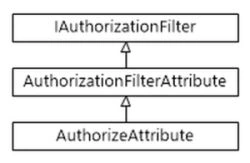
Authorization in the Controller Action
If we want the information to be returned depending on the role of user then we can use the principal from the "APIController.User" in the controller method.
- public HttpResponseMessage Get()
- {
- if (User.IsInRole("admin"))
- {
- }
- }
Raghavendra YadavPosted Apr 17, 2014, 7:45 AM
can we have source code for web api and client using that :)
Duduman Bogdan VladPosted May 10, 2013, 2:37 AM
Source code?