

Introduction
This article explains how to get the number of shared, number of likes, number of comments, number of clicks and the total number of counts of a Facebook account.
Use the following procedure to create a sample application.
Step 1
Create an application as in the following:
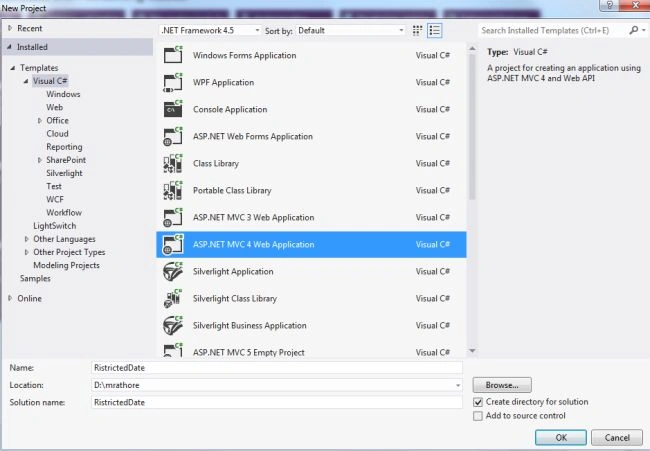
- Start Visual Studio 2012.
- From the Start window select "Installed" -> "Visual C#" -> "Web".
- Select "ASP.NET MVC4 Web Application" and click on the "Ok" button.
- From the "MVC4 Project" window select "Web API".
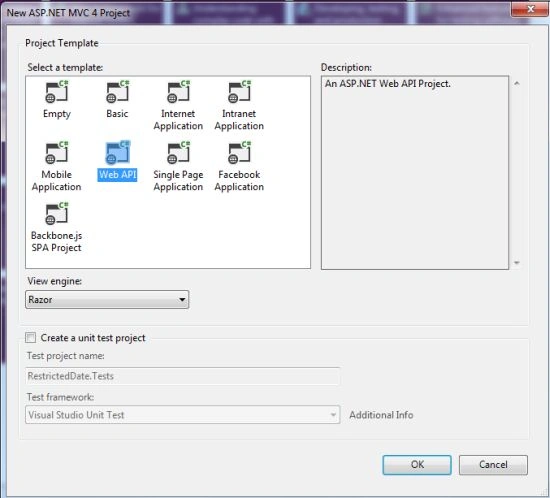
- Click on the "OK" button.
Step 2
Create a Model Class as in the following:
- In the "Solution Explorer".
- Right-click on the Model Folder.
- Select "Add" -> "Class".
- Select "Installed" -> "Visual C#" and select class.
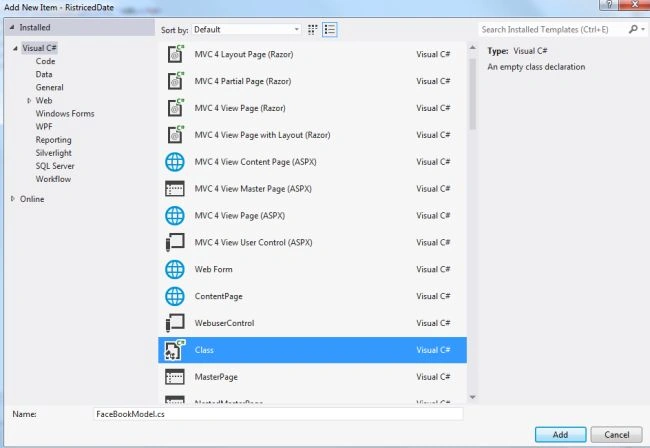
- Click on the "Add" button.
Add the following code:
- using System;
- using System.Collections.Generic;
- using System.Linq;
- using System.Web;
- namespace RistricedDate.Models
- {
- public class FaceBookModel
- {
- public string Url { get; set; }
- public string No_of_Shared { get; set; }
- public string No_of_Likes { get; set; }
- public string No_of_Comment { get; set; }
- public string No_of_Click { get; set; }
- public string TotalNo { get; set; }
- }
- }
Step 3
Now select the "HomeController".
- In the "Solution Explorer".
- Expand the Controller folder.
- Select the "HomeController".
Add the folowing code:
- using System;
- using System.Collections.Generic;
- using System.Linq;
- using System.Web;
- using System.Web.Mvc;
- using RistricedDate.Models;
- using System.Net;
- using System.IO;
- using System.Data;
- namespace RistricedDate.Controllers
- {
- public class HomeController : Controller
- {
- public ActionResult Index()
- {
- FaceBookModel objfbdetail = new FaceBookModel();
- WebClient web = new WebClient();
- string path = string.Format("https://api.facebook.com/method/fql.query?query=SELECT url, share_count, like_count, comment_count, total_count, click_count FROM link_stat where url='c-sharpcorner.com'");
- string res = web.DownloadString(path);
- DataSet obj = new DataSet();
- using (StringReader stringReader = new StringReader(res))
- {
- obj = new DataSet();
- obj.ReadXml(stringReader);
- }
- DataTable ndt = obj.Tables["link_stat"];
- foreach (DataRow dtrow in ndt.Rows)
- {
- objfbdetail.Url = dtrow["url"].ToString();
- objfbdetail.No_of_Likes = dtrow["like_count"].ToString();
- objfbdetail.No_of_Shared = dtrow["share_count"].ToString();
- objfbdetail.No_of_Comment = dtrow["comment_count"].ToString();
- objfbdetail.No_of_Click = dtrow["click_count"].ToString();
- objfbdetail.TotalNo = dtrow["total_count"].ToString();
- }
- return View(objfbdetail);
- }
- }
- }
Step 4
Now write some HTML code in the "index.cshtml" file as in the following:
-
In the "Solution Explorer".
-
Expand "Views" folder.
-
Select "Home" -> "index.cshtml".
Add the following code:
- @model RistricedDate.Models.FaceBookModel
- @{
- ViewBag.Title = "Get the Facebook detail of the Site";
- }
- <table width="50%" cellpadding="5" cellspacing="0" border="1">
- <tr>
- <td align="center" style="font-weight:bold;background-color:firebrick;color:yellow;">URL</td>
- <td align="center" style="font-weight:bold;background-color:firebrick;color:yellow;">Shared</td>
- <td align="center" style="font-weight:bold;background-color:firebrick;color:yellow;">Like</td>
- <td align="center" style="font-weight:bold;background-color:firebrick;color:yellow;">Comment</td>
- <td align="center" style="font-weight:bold;background-color:firebrick;color:yellow;">Click</td>
- <td align="center" style="font-weight:bold;background-color:firebrick;color:yellow;">Total</td>
- </tr>
- <tr>
- <td align="center">@Model.Url</td>
- <td align="center">@Model.No_of_Shared</td>
- <td align="center">@Model.No_of_Likes</td>
- <td align="center">@Model.No_of_Comment</td>
- <td align="center">@Model.No_of_Click</td>
- <td align="center">@Model.TotalNo</td>
- </tr>
- </table>
Step 5
Execute the application:

Join the conversation! Your thoughts help the community grow.