

Introduction
In this article you will learn about Windows Azure and how you can add it to your ASP. NET Web API.
What is the Windows Azure
Windows Azure is created by Microsoft, it is a cloud computing infrastructure and platform. It is designed for working on the global network of Microsoft. It is for building, managing and deploying services and applications. Windows Azure supports various programming languages, tools and frameworks. It can be included in both Microsoft specific and third party systems and software. It provides an infrastructure of services and platforms as a services. It is also an open and flexible cloud platform that makes it easy to work on the global network. It helps us to quickly create, manage and deploy applications on the global network.
Features of Windows Azure
Windows Azure runs and stores the data on Microsoft datacenters. There are many features that are specified here:
- Websites allows the developers to build the sites using ASP. NET, PHP etcetera and deploy these websites using FTP, Git etcetera.
- SQL Database, formally known as Azure database that creates, extends and scales the application into the cloud using Microsoft SQL Server.
- This is Microsoft's platform as a service that supports the Multi-tier applications and automated deployment.
- There is a Media service that is a Platform as a service, it can be used for content protection, encoding, streaming.
- The platform of Windows Azure that provide the API that is built on REST, HTTP and XML that allows the developer to create the interaction with services that are provided by Windows Azure.
These are the main features that are supported by Windows Azure.
Windows Azure Services
There are various types of services that are provides by Windows Azure:
- Web Sites: This feature is announced for creating the websites in PHP, .NET and select from several open source applications from a gallery to deploy the platform as a service offering for the Windows Azure platform.
- Cloud services: A cloud service is used as container for the hosted application. Developers can write the code for the cloud in various programming languages. There are specific software development kits provided by Microsoft for Java, .NET etc. The cloud services for Windows Azure comprises one aspect of the platform as a service offering from the Windows Azure platform.
- Virtual Machine: This feature of Windows Azure is announced for providing the infrastructure as a service that is the offering from Microsoft for their public cloud.
- Data Management:
SQL Database.
Tables. - Business Analytics
SQL Reporting.
Data Marketplace.
There is a specialized operating system used by Windows Azure, to run the fabric layer.
How to implement it
I will now define how to deploy to Window Azure using ASP. NET Web API.
For implementing the Windows Azure in ASP. NET Web API, we need to create the MVC4 Web API:
- Start Visual Studio 2012
- Click on "File" -> "New" -> "Project..." and select "ASP. NET MVC4 Web Application".
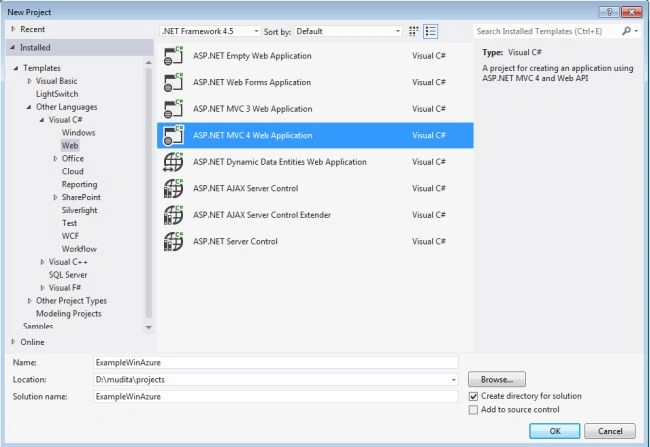
- Now open a New ASP. NET MVC4 Project template window.
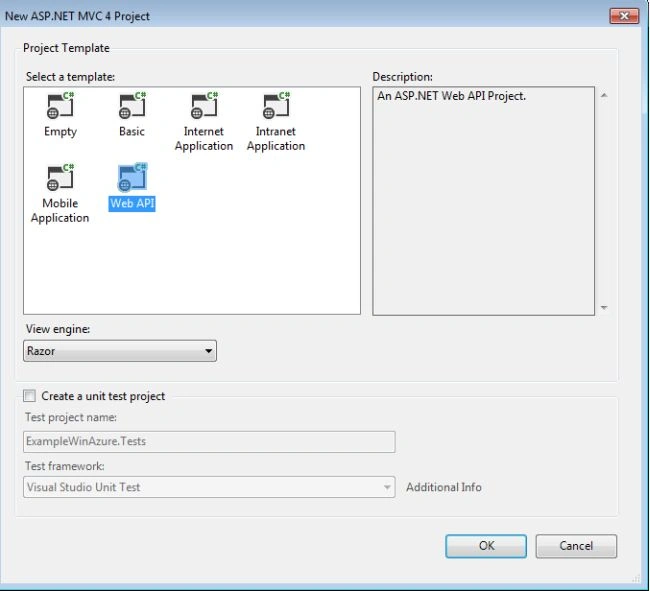
- From this window we select the Web API and click on the "OK" button.
Create a new project
We will now create a new project using the following procedure:
- In the solution Explore right-click on ExampleWinAzure project then select "New" -> "Project..." or from the menus select "File" -> "New" -> "Project...".
- Open a template window and select "Installed" -> "Other Languages" -> "Visual C#" -> "Cloud".
- And then select "Windows Azure Cloud".
- Change the name to "WebApiAzure" and click the "OK" button.
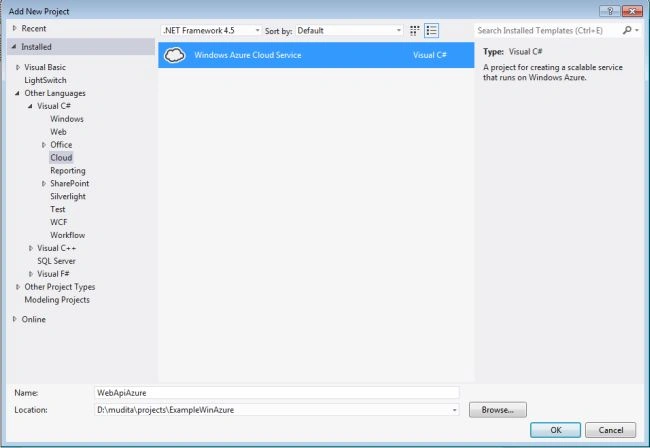
- Now open a New Azure Cloud Service window.
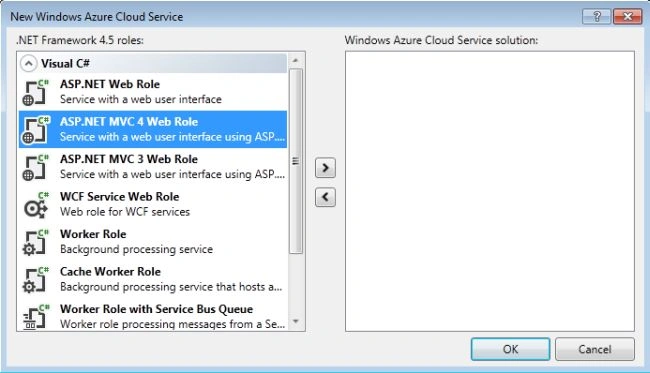
- In this window we select "ASP. NET MVC4 WebRole".
- And then click on the ">" button and the ASP.NETMVC4 Web Role displays on the right side window.
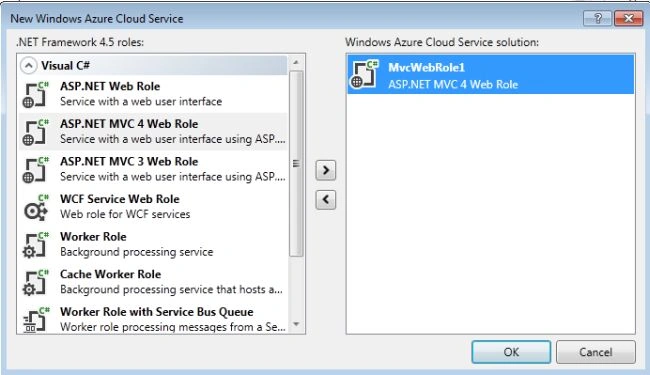
- Click the "OK" button.
- Open a ASP. NET MVC4 Project and select the Web API.
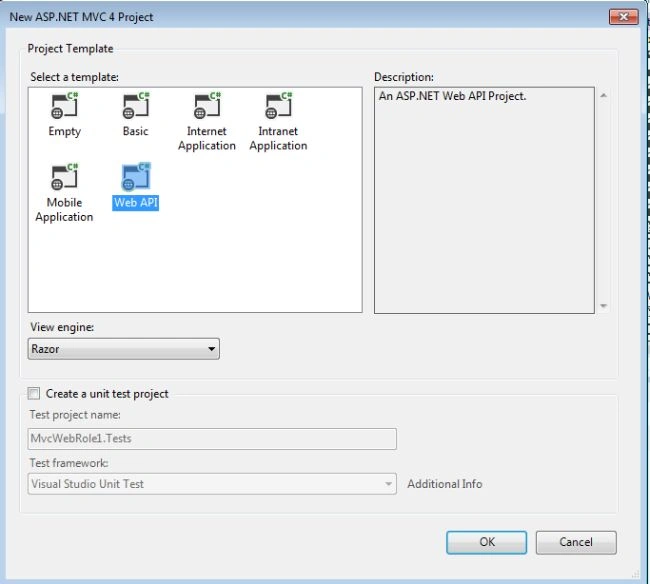
- Click the "Ok" Button.
Now it is displayed in the Solution Explorer.
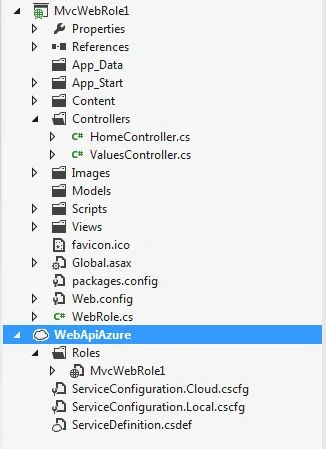
Mudita RathorePosted Jun 11, 2013, 12:15 AM
thanks....
Nitin BhardwajPosted Jun 10, 2013, 5:39 AM
Nice one