

Introduction
This article explains how to retrieve data from the database in the ASP. NET Web API. For retrieving the data we use the ADO.NET Entity Data Model. The Entity Data Model is an entity relationship data model. The Entity Data Model works with the SQL and other query Languages designed for invoking the declarative queries and updates in terms of entities and relationships.
The Entity Data Model gives links and information for working with the data used by the applications built on the Entity Framework.
The following is the procedure for retrieving the data from the database.
Step 1
First we create a table and insert some data into this table.
- Start SQL Server.
- Select "New Query".
- Create a database and a table.
Use the following queries:
create database Demo
use Demo
create table info(ID int IDENTITY PRIMARY KEY,Name varchar(50),Appointment varchar(50),Technology varchar(50), Task varchar(MAX) )
Insert into info values ('A.P godse','Software Develpoer','.NET, Database', 'Computer Graphics')
Insert into info values ('yashwant Kanitker','Programmer','.NET, PHP, JSON','Let us C')
Insert into info values ('E balaguruswami','Programmer', '.NET, Javascript','Object Oriented System')
Insert into info values ('R.S, Aggrawal','Software Developer',' Web API, MVC4','Design Analysis and Algorithm')
Step 2
-
Create ASP.NET Web API application.
-
Start Visual Studio.
-
From the start window select "New Project".
-
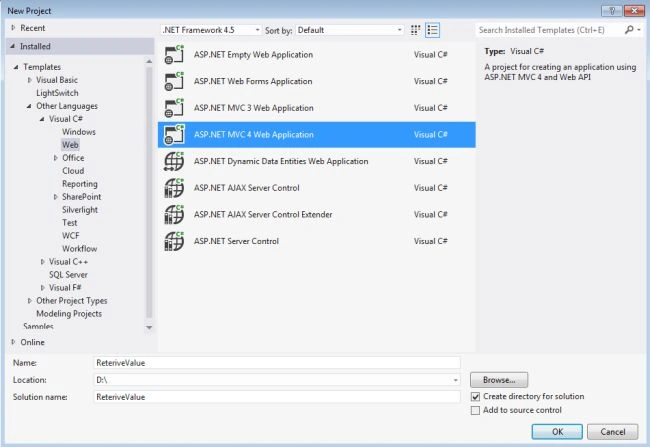
In the Template Window select "Installed" -> "Visual C#" -> "Web".
-
Select "ASP.NET MVC 4 Web Application" and click on "OK".
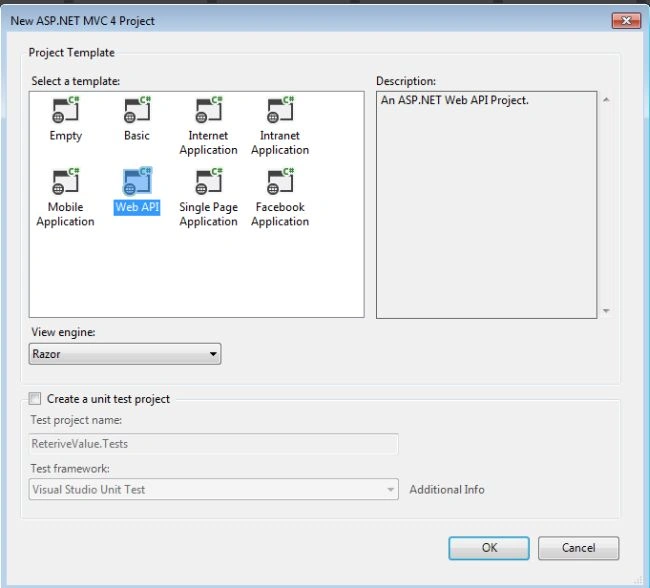
- From the "MVC4 Project" window select "Web API".
Step 3
Now add the Entity Framework to our application.
-
In the Solution Explorer.
-
Right-click on the Models folder then select "Add" -> "New Item".
-
From the window select "Installed" -> "Visual C#" -> "Data".
-
And then select "ADO.NET Entity Data Model".
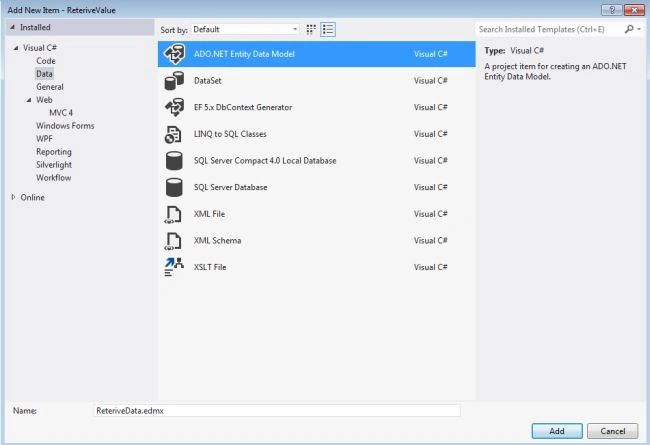
- Click on the "Ok" button.
Step 4
Now open the Entity Data Model Wizard.
-
Click on "Generate from Database".
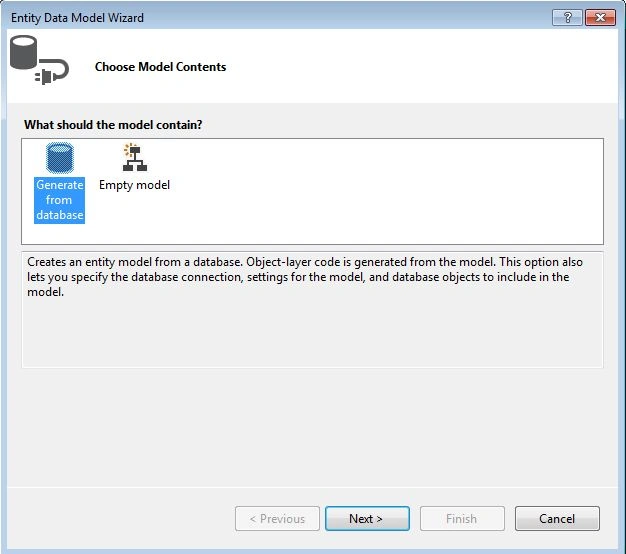
- Click on "New Connection".
-
Enter your server name.
- Choose your authentication, here we use the SQL Server Authentication, then we enter the user name and password.
- Select your database.
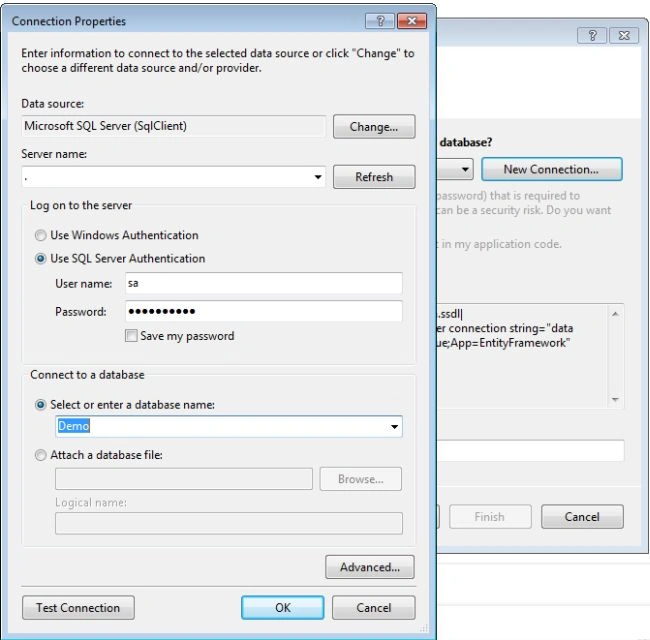
- Click on the "Ok" button.
Step 5
In this step:
-
We select the "Yes, include the sensitive data in the connection string."
-
Set the name of entity connection string in the Web.config file.
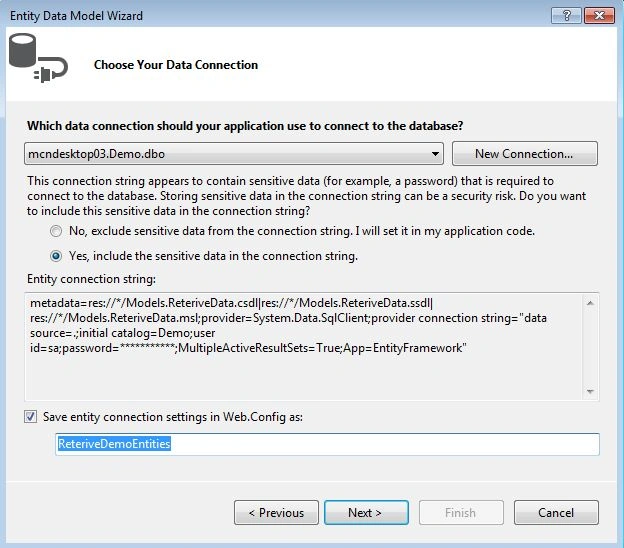
- Click on the "Next" button.
Step 6
In this step:
-
Choose your table.
-
Write the name of the Model Namespace
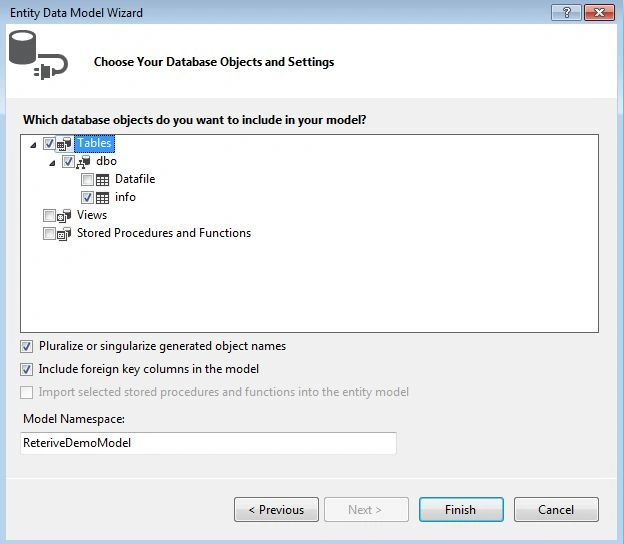
- Click on the "Finish" Button.
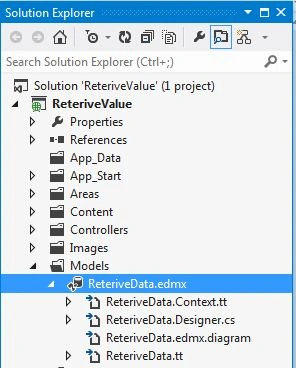
- After adding the model, the Solution Explorer looks like this:
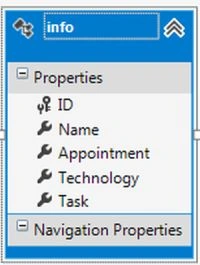
- The table diagram looks as in the following:
Step 7
Open the Home controller.
-
In the Solution Explorer.
-
Select the Controller folder then select "HomeController".
Enter this code:
using System;
using System.Collections.Generic;
using System.Linq;
using System.Web;
using System.Web.Mvc;
using ReteriveValue.Models;
namespace ReteriveValue.Controllers
{
    public class HomeController : Controller
    {
        ReteriveDemoEntities reterive = new ReteriveDemoEntities();
        public ActionResult Index()
        {
            return View(reterive);
        }
    }
}
Step 8
In the the "index.cshtml" file:
-
In the Solution Explorer.
-
Select the "View folder" then select "Home" -> "index.cshtml".
Write this code:
@model ReteriveValue.Models.ReteriveDemoEntities
@{
   ViewBag.Title = "Index";
}
<h2>Reteriving Data From Database</h2>
 <!DOCTYPE html>
<html>
<head>
<meta name="viewport" content="width=device-width" />
<title>Index</title>
<style type="text/css">
table, td, th {
 border: 1px solid green;
}
 th {
        background-color: Pink;
        color: white;
     }
    </style>
    </head>
    <body>
    <table style="margin-left: 25%; margin-top: 10px; border: 2px solid LightGray;">
     <tr>
         <th>ID</th>
         <th>Name</th>
         <th>Appointment</th>
         <th>Technology</th>
         <th>Task</th>
      </tr>
   @foreach (var item in Model.infoes)
   {
       <tr>
           <td>@item.ID</td>
           <td>@item.Name<td>
           <td>@item.Appointment<td>
           <td>@item.Technology</td>
           <td>@item.Task</td>
        </tr>
    }
 </table>
       </body>
</html>
Step 9
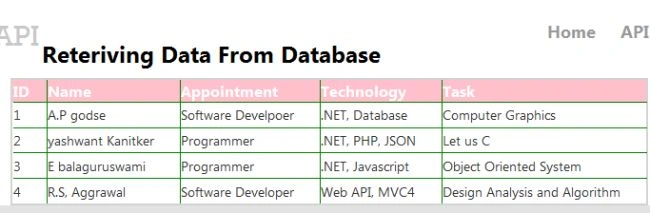
Execute the application, the output will look like this:
Michael MikhailPosted Oct 4, 2021, 9:28 PM
I'm working on VS2015 and can't find "ASP.NET MVC 4 Web Application"
Pintukumar ShashmalPosted Mar 4, 2021, 12:23 PM
Nice your docs
Kenil GandhiPosted Aug 3, 2018, 7:37 AM
Scrap at all
vish GPosted Jan 9, 2018, 1:44 PM
Could you please help me in retrieving data from mycouch db with asp.net web api.
Deepak PippalPosted Aug 11, 2017, 12:49 AM
Where did you use webapi?
Manav PandyaPosted May 29, 2017, 5:11 AM
But where is api controller ??
Manav PandyaPosted May 29, 2017, 5:10 AM
Nice share ..............................