

Introduction
In this article, you will learn about Send the HTML Form Data by using ASP. NET web API. The method of HTML is specified how to send form data, the form data is sent to page specified in the action attribute. The HTML forms is used two methods for sending the data to the server that are GET and Post Methods.
GET method
- It appends the data into the URL in name /values pairs.
- The Get method is used for only sending the nonsecure data. such as query string in Google.
- The length of URL is limited.
- It is useful for submissions where the user want to bookmarks the result.
POST method
- It is useful for appending the data inside the body of the HTTP request.
- There is no Size limitations of the URL.
- It can not be bookmarked when we use the POST method for the Submission form.
For creating this application follow this procedure.
Step 1
Create the Web API application.
- Start Visual Studio 2012.
- Select "File"->"New"->"Project".
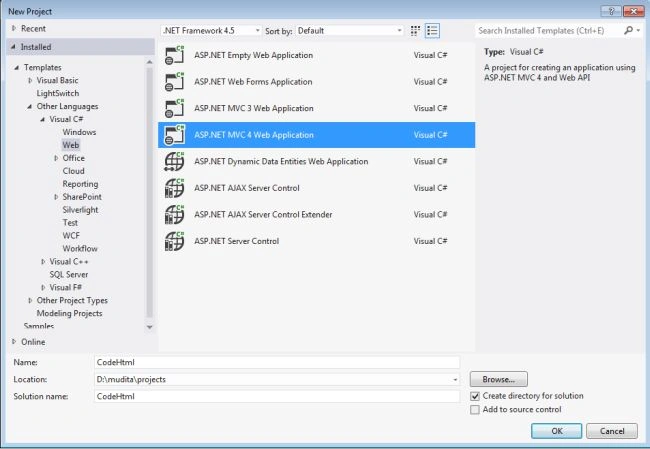
- On the template window select "Installed" -> "Template" -> "Other Languages" -> "Visual C#" -> "Web".
- Now choose "ASP. NET MVC4 Web Application" and change the name to "CodeHtml".
- Click on the "OK" button.
Now a New ASP .NET MVC4 Project window is opened, then: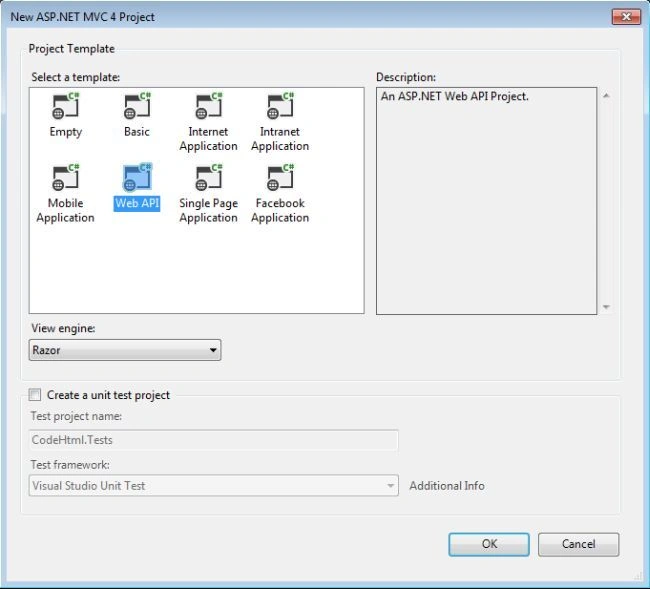
- In this window select the "Web API".
- And click on the "OK" button.
Step 2
Create the Model Class
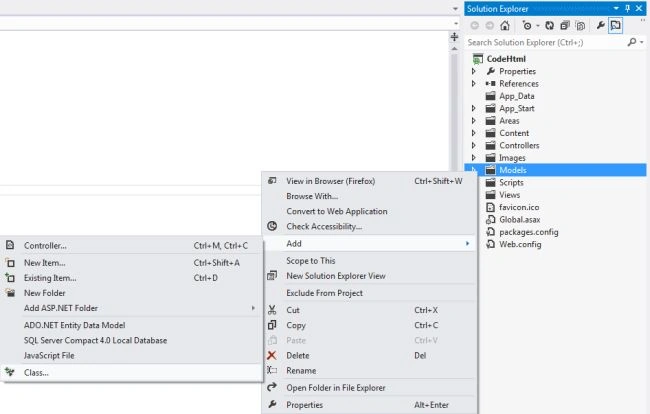
- In "Solution Explorer" Right click on
"Model Folder"->"Add"->"Class".
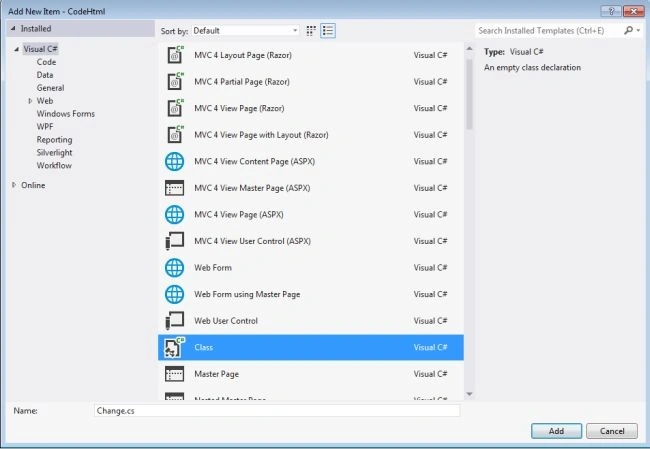
- In "template window" select "Installed"->"Visual C#".
- Choose "Class" change its name as "Change".
- Click on "OK" button.
Write this code in the "Model class" "Change.cs"
- namespace CodeHtml.Models
- {
- using System;
- using System.ComponentModel.DataAnnotations;
- public class Change
- {
- [Required]
- [MaxLength(140)]
- public string Type { get; set; }
- public DateTime Date { get; set; }
- }
- }
Step 3
Create the "Controller" Class
- In the "Solution Explorer" right click on
the "Controller Folder"->"Add"->"Controller".
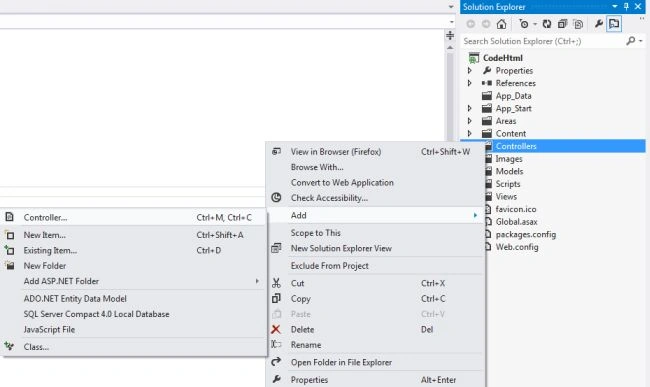
- In "Controller" window Change the name of Controller.
- In template choose "Empty API
Controller".
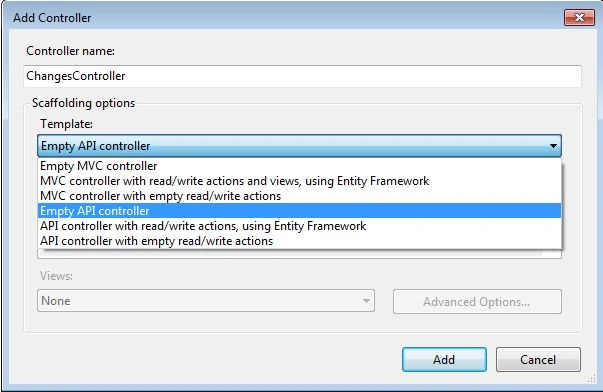
Write this code in the "ChangesController" class.
- namespace CodeHtml.Controllers
- {
- using System;
- using System.Collections.Generic;
- using System.Net;
- using System.Net.Http;
- using System.Web;
- using System.Web.Http;
- using CodeHtml.Models;
- public class ChangesController : ApiController
- {
- static readonly Dictionary<Guid, Change> changes = new Dictionary<Guid, Change>();
- [HttpPost]
- [ActionName("Code")]
- public HttpResponseMessage PostComplex(Change change)
- {
- if (ModelState.IsValid && change != null)
- {
- change.Type = HttpUtility.HtmlEncode(change.Type);
- var Id = Guid.NewGuid();
- changes[Id] = change;
- var response = new HttpResponseMessage(HttpStatusCode.Created)
- {
- Content = new StringContent(change.Type)
- };
- response.Headers.Location = new Uri(Url.Link("DefaultApi", new { action = "type", Id = Id }));
- return response;
- }
- else
- {
- return Request.CreateResponse(HttpStatusCode.BadRequest);
- }
- }
- [HttpPost]
- [ActionName("Decode")]
- public HttpResponseMessage PostSimple([FromBody] string value)
- {
- if (value != null)
- {
- Change change = new Change()
- {
- Type = HttpUtility.HtmlEncode(value),
- Date = DateTime.UtcNow
- };
- var Id = Guid.NewGuid();
- changes[Id] = change;
- var response = new HttpResponseMessage(HttpStatusCode.Created)
- {
- Content = new StringContent(change.Type)
- };
- response.Headers.Location = new Uri(Url.Link("DefaultApi", new { action = "type", Id = Id }));
- return response;
- }
- else
- {
- return Request.CreateResponse(HttpStatusCode.BadRequest);
- }
- }
- [HttpGet]
- public Change Type(Guid Id)
- {
- Change change;
- if (changes.TryGetValue(Id, out change))
- {
- return change;
- }
- else
- {
- throw new HttpResponseException(HttpStatusCode.NotFound);
- }
- }
- }
- }
Step 4
Write the code in the "Index.cshtml" file. The file is found in.
- In the "Solution Explorer" .
- IN "View folder"->"Home"->"Index.cshtml".
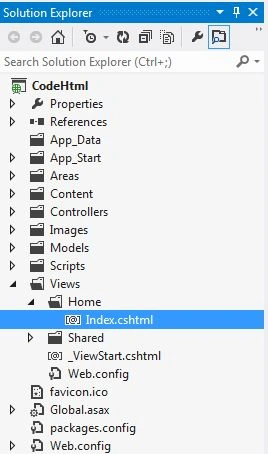
Write this code in the "Index.cshtml".
- @section Scripts {
- <script type="text/javascript">
- $("#form1").submit(function () {
- var Serial = $.post('api/changes/code', $('#form1').serialize())
- .success(function () {
- var path = Serial.getResponseHeader('Location');
- var i = $('<a/>', { href: path, text: path });
- $('#message').html(i);
- })
- .error(function () {
- $('#message').html("Error for changes.");
- });
- return false;
- });
- $('#form2').submit(function () {
- var Serial = $.post('api/changes/decode', { "": $('#type1').val() })
- .success(function () {
- var path = Serial.getResponseHeader('Location');
- var i = $('<a/>', { href: path, text: path });
- $('#message').html(i);
- })
- .error(function () {
- $('#message').html("Error for changes.");
- });
- return false;
- });
- </script>
- }
- <header>
- <div class="content-wrapper">
- <div class="float-left">
- <p class="site-title">
- <a href="~/">HTML Form Data</a></p>
- </div>
- </div>
- </header>
- <div id="body">
- <section class="content-wrapper main-content clear-fix">
- <h1>Data with Date</h1>
- <form id="form1" method="post" action="api/changes/code"
- enctype="application/x-www-form-urlencoded">
- <div>
- <label for="type">Code</label>
- </div>
- <div>
- <input name="type" type="text" />
- </div>
- <div>
- <label for="date">Date</label>
- </div>
- <div>
- <input name="date" type="text" />
- </div>
- <div>
- <input type="submit" value="Submit" />
- </div>
- </form>
- <h1>Data without Date</h1>
- <form id="form2">
- <div>
- <label for="type">Decode</label>
- </div>
- <div>
- <input id="type1" type="text" />
- </div>
- <div>
- <input type="submit" value="Submit" />
- </div>
- </form>
- <h3 id="message" />
- </section>
- </div>
Change the following code in the "WebApiConfig.cs" file.
- using System;
- using System.Collections.Generic;
- using System.Linq;
- using System.Web.Http;
- namespace wpfWebAPi
- {
- public static class WebApiConfig
- {
- public static void Register(HttpConfiguration config)
- {
- config.Routes.MapHttpRoute(
- name: "DefaultApi",
- routeTemplate: "api/{controller}/{id}",
- defaults: new { id = RouteParameter.Optional }
- );
- }
- }
- }
Output
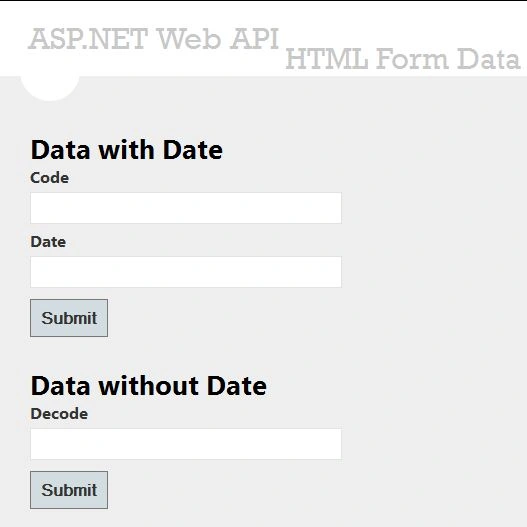
Insert the data into the Textboxes.
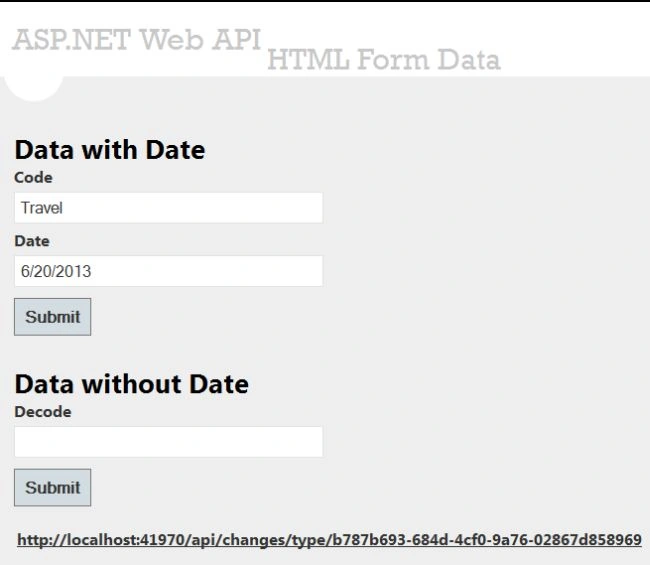
When the user clicks on the Submit Button then the action is performed and the browser sends the HTTP request and generates a URL.
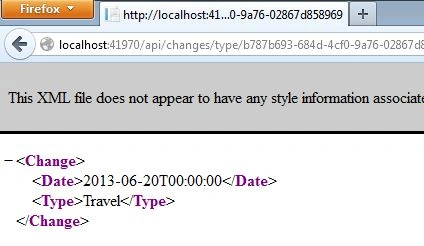
When the URL is clicked it shows the data that is inserted by the user.
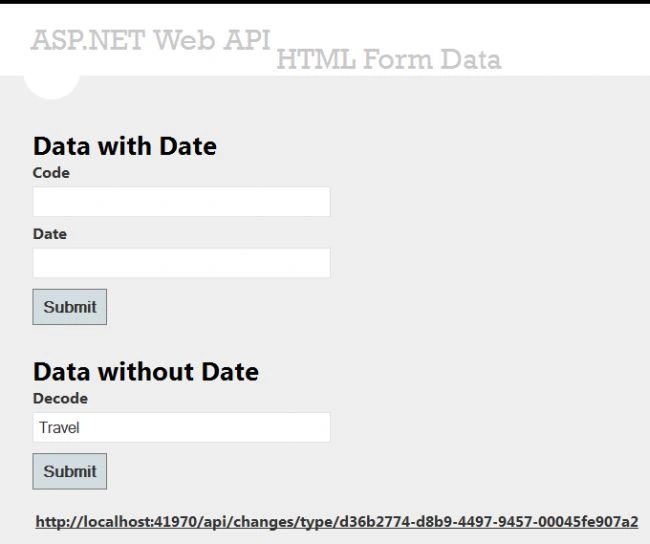
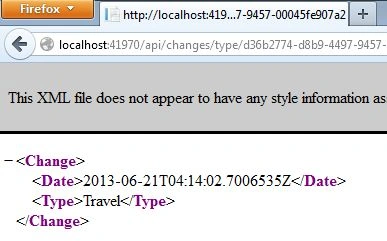
It generates by default the current Date.
Jay DeePosted Jul 23, 2023, 6:24 PM
Found the issue. typo in your code: new { action = "type", Id = Id })); first Id needs to be lower case as in id
Jay DeePosted Jul 23, 2023, 6:05 PM
Error: http://localhost:57478/api/changes/code 500 (Internal Server Error)
Jay DeePosted Jul 23, 2023, 5:49 PM
Change the following code in the "WebApiConfig.cs" file. You are using a different namespace, is there a reason? this cause an error
Jay DeePosted Jul 23, 2023, 5:34 PM
I am getting an error: Error for changes