

Let’s see the steps.
Firstly, we need to enable the following capability’s “Video Library” and “Webcam” in the Package.appxmanifest file like the following image.
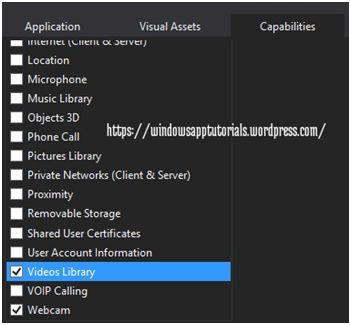
Next we need to add a button to capture Video and Media element control to show the captured video. Then we will save the video in the location of the current system.
Now go to MainPage.xaml and design your UI according to your wish. Here I created application bar with two buttons: one is for capture video and another one is for save video. Create one media element control to view the recorded video.
XAML Code
- <Page.BottomAppBar>
- <AppBarIsOpenAppBarIsOpen="True" IsSticky="True">
- <StackPanel Orientation="Horizontal">
- <AppBarButton x:Name="captureBtn" Label="Capture" Icon="Camera" Click="captureBtn_Click"></AppBarButton>
- <AppBarButton x:Name="saveBtn" Label="Save" Icon="Save" Click="saveBtn_Click"></AppBarButton>
- </StackPanel>
- </AppBar>
- </Page.BottomAppBar>
- <Grid Background="{ThemeResourceApplicationPageBackgroundThemeBrush}">
- <MediaElement x:Name="demoVideo"></MediaElement>
- </Grid>
- privateStorageFilestoreFile;
- privateIRandomAccessStream stream;
- privateasyncvoidcaptureBtn_Click(object sender, RoutedEventArgs e)
- {
- CameraCaptureUI video = newCameraCaptureUI();
- video.VideoSettings.Format = CameraCaptureUIVideoFormat.Mp4;
- video.VideoSettings.MaxResolution = CameraCaptureUIMaxVideoResolution.HighDefinition;
- storeFile = awaitvideo.CaptureFileAsync(CameraCaptureUIMode.Video);
- if (storeFile != null)
- {
- stream = awaitstoreFile.OpenAsync(FileAccessMode.Read);
- MediaClip media = awaitMediaClip.CreateFromFileAsync(storeFile);
- MediaCompositionmComposition = newMediaComposition();
- mComposition.Clips.Add(media);
- MediaStreamSource source = mComposition.GeneratePreviewMediaStreamSource((int) demoVideo.ActualWidth, (int) demoVideo.ActualHeight);
- demoVideo.SetMediaStreamSource(source);
- }
- }
- private async void saveBtn_Click(object sender, RoutedEventArgs e)
- {
- FileSavePicker save = new FileSavePicker();
- save.FileTypeChoices.Add("Video", newList < string > ()
- {
- ".mp4",
- ".wmv"
- });
- save.DefaultFileExtension = ".mp4";
- save.SuggestedFileName = "Video";
- save.SuggestedStartLocation = PickerLocationId.VideosLibrary;
- save.SuggestedSaveFile = storeFile;
- var s = awaitsave.PickSaveFileAsync();
- using(var reader = newDataReader(stream.GetInputStreamAt(0)))
- {
- awaitreader.LoadAsync((uint) stream.Size);
- byte[] buffer = newbyte[(int) stream.Size];
- reader.ReadBytes(buffer);
- awaitFileIO.WriteBytesAsync(s, buffer);
- }
- }

tarun clientPosted Nov 11, 2017, 8:09 AM
Please provide solution
Santhakumar MunuswamyPosted Jan 30, 2016, 2:31 AM
Thanks for nice share