

Introduction
Universal Windows Platform provides the common application platform and lets the developers build app using JavaScript/HTML, C#/XAML and C++, etc.
In this part we are going to see the requirements for developing Windows 10 application and SDK used to develop Windows 10 apps.
Hardware Requirements
- RAM: More than 4GB
- Hard Disk: Minimum 12GB Free space
- Virtual machine in Hyper-V
Software Requirements
- OS: Windows 10 64-bit (Microsoft Recommended)
- Microsoft Visual Studio 2015 pro or community (Community edition is free)
- Windows 10 Emulator
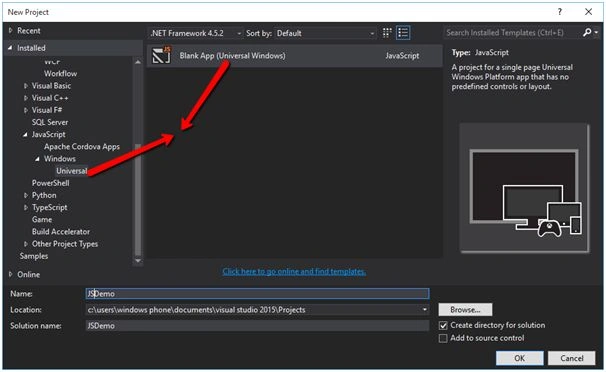
Create a new UWP project from the Blank App template with JavaScript as language like the following image:
This would create the necessary files and folders. Let’s look at the Visual Studio Solution explorer and review the items that gets created by default like the following image.
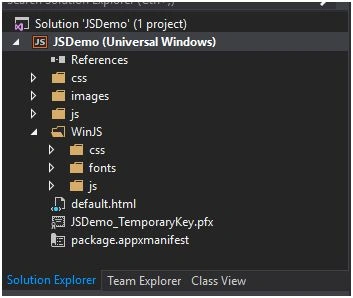
You can see all the required default files. Windows 10 offers you to build app using WinJs also,
- CSS- This folder contains the default styles. You can write your own style in this file.
- Images- This folder contains images, icons,logo, etc. You can add your image or any files required for you.
- JS- This folder contains script files. You can add your required script files in this folder.
- Default.html- This file is the default file to design the UI and also your logic.
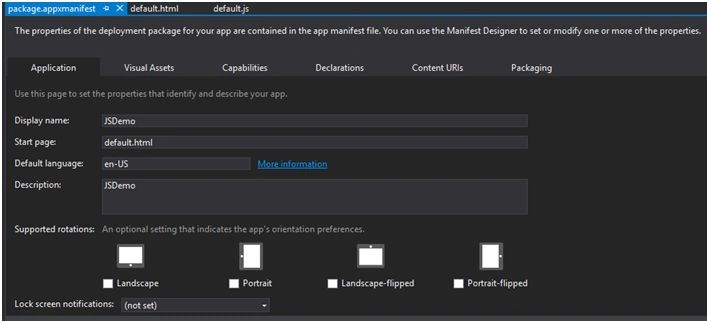
- Package.appxmanifest- This file contain the application properties like App capabilities, App logo, etc. Double click this file and see the GUI like the following image there you can set the app related properties.
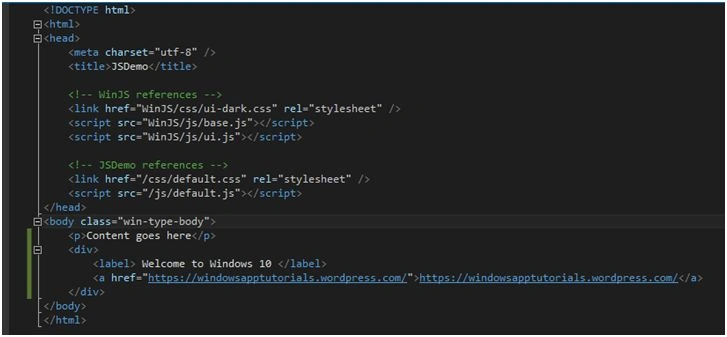
Now open the default.html file and start to write your code.
Add the following HTML code inside the body tag.
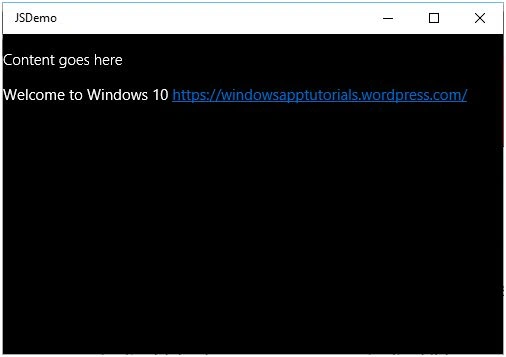
- <p>Content goes here</p>
- <div>
- <label> Welcome to Windows 10 </label>
- <ahref="https://windowsapptutorials.wordpress.com/">https://windowsapptutorials.wordpress.com/</a>
- </div
Now time to run the app. Start Debugging button will also be set to “Local Machine” by default. If you want to run this on the Windows Mobile device, you will have to set this as “Mobile Emulator”. Press Run button or F5 directly from your keyboard to run the application and see the output.
Read more articles on Windows 10:
Vignesh ManiPosted Feb 8, 2016, 4:41 AM
Good
Santhakumar MunuswamyPosted Feb 5, 2016, 3:35 PM
Thanks for nice article
Mohammed IbrahimPosted Feb 5, 2016, 1:14 PM
nice
Praveen KumarPosted Feb 5, 2016, 9:50 AM
Nice
Sibeesh VenuPosted Feb 5, 2016, 7:10 AM
Nice Share
Pramod ThakurPosted Feb 5, 2016, 5:37 AM
nice..
Nigel FernandesPosted Feb 5, 2016, 5:28 AM
Nice