
Introduction
A DropDownControl is an ASP.NET AJAX extender that can be attached to almost any ASP.NET control to provide a SharePoint-style drop-down menu. The displayed menu is merely another panel or control. The drop-down is activated by left- or right-clicking the attached control. If the behavior is attached to a Hyperlink or LinkButton, clicking on the link itself will operate normally.
DropDown extender control properties
- TargetControl ID
- DropDownControl ID
- Animation
- OnShow
- OnHide
Step 1. Open Visual Studio
- Select File->New->WebSite.
- ASP.NET WebSite.
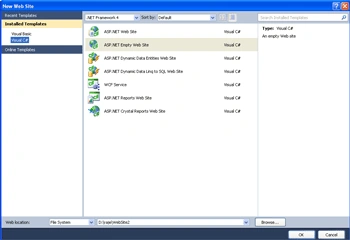
Step 2. Drag and drop control from Toolbox.
- Drag ScriptManager, DropDown, UpdatePanel, GridView.
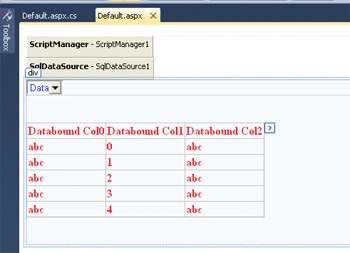
Now define the DataTable in the Database.
Step 3. Go to Solution Explorer and right-click.
- Create an App-Data Folder.
- Right-click in App-DataFolder.
- Select Add->New Item.
- Select SQL Server DataBase.
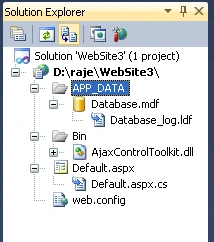
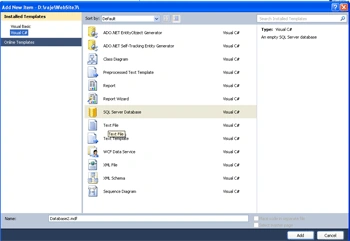
Step 4. Go to the Server Explorer and select the database name.
- Create a Table for the data value.
- Click->Table->Add New Table.
- Define all Data.
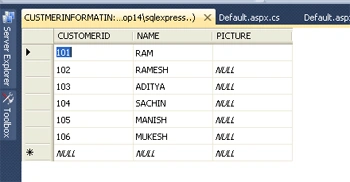
Step 5. Go to the Default.aspx page and click on the Design option.
Bind the data
Step 6. Select DropDown control and click on DropDownListTask.
- Select the DataSource option.
- Define SQDataSource1.
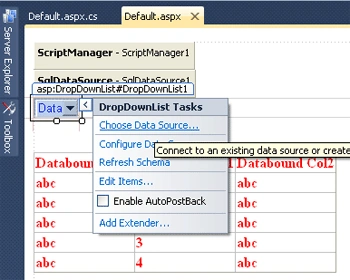
Connection String
Step 7. Define the DataSource and Connection String.
- Select the New Connection option and click on our database or server.
- Give the ServerName.
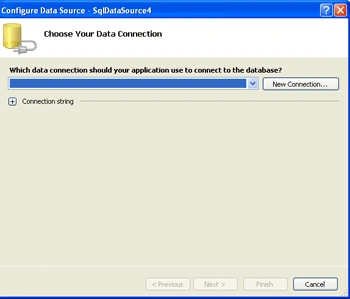
Step 8. Go to the Default.aspx page and write the following code.
Code
<title>my ajax application</title>
    </head>
<body>
    <form id="form1" runat="server">
    <asp:ScriptManager ID="ScriptManager1" runat="server">
    </asp:ScriptManager>
    <asp:SqlDataSource ID="SqlDataSource1" runat="server"
            ConnectionString="<%$ ConnectionStrings:.ConnectionString2 %>"
             SelectCommand="SELECT [CUSTOMERID], [NAME], [PICTURE] FROM [CUSTMERINFORMATIN]">
        </asp:SqlDataSource>
        <div>
        <asp:UpdatePanel ID="UpdatePanel1" runat="server">
        <ContentTemplate>
        <asp:DropDownList ID="DropDownList1" runat="server"
            DataSourceID="SqlDataSource1" DataTextField="CUSTOMERID"
            DataValueField="CUSTOMERID" Width = "50px" ForeColor ="Blue">
        </asp:DropDownList>
         </ContentTemplate>
        </asp:UpdatePanel>
         <br />
        <br />
         <asp:GridView ID="GridView1" runat="server" DataSourceID="SqlDataSource1"
                ForeColor ="Red" Font-Bold = "true"
                onselectedindexchanged="GridView1_SelectedIndexChanged">
            </asp:GridView>
             <br />
            <br />
             </div>
    </form>
</body>
</html>
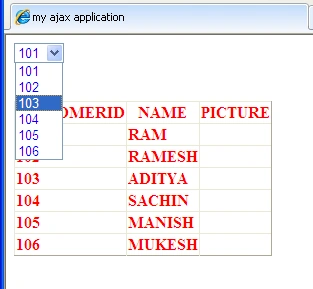
Step 9. Now press F5 and run the application.
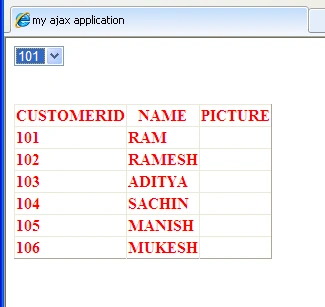
Step 10. When we click on the DropDown arrow then we see the single record fetch from the table.
Join the conversation! Your thoughts help the community grow.