

In an earlier blog post this year I provided a brief overview of Semantic Merge, which is an incredibly tool from PlasticSCM that makes the process of merging code both smarter and “prettier” through easy-to-understand visualizations that will show you exactly what is going on within your code during complex merges that might have your entire development team scratching their heads.
Semantic Merge emerged from its previous Beta phase and Version 1.0 was released today. This post is going to review over some of the older features if you are unfamiliar with all of the major features that the tool has to offer as well as some of the newer bells-and-whistles that ones that were just released in this version.
Features and Improvements
Unlike most existing merge and diff tools, Semantic Merge attempts to actually “understand” what your code does by analyzing the structure and underlying functionality within your code instead of focusing on location. Some of the previous strengths that I mentioned in my earlier post can be found below:
- Location Independent Merging: This feature basically ignores the location of your methods, which allows you to easily refactor your code and move things around. It actually merges on a method-by-method basis as opposed to looking at the entire code-base as a text file like a traditional “diff” operation might.
- Merge and Diff Visualization: Semantic Merge is an incredibly visual tool. This feature allows you to easily see a visual representation of your method at both its pre- and post-merge states which can be great if you are performing a major overhaul or refactoring lots of code.
- Method-based Conflict Resolution: If two developers try to modify the same method in parallel and there isn’t a collision, which can be a problem. But not with Semantic Merge, which will notify you of a conflict even if the text-block doesn’t explicitly state that one exists.
- Smarter Refactoring: If Developer A creates a class within an existing class and Developer B then moves the parent class to a different location, Semantic Merge can detect these changes and will ensure all of the code and its relocation resolves properly.
- Semantic Diffing: An aptly named tool called Semantic Diff is included within Semantic Merge as well and it provides a very (once again) visual method of determining exactly what change within a section of code.
- Language Support: It currently supports Java, Visual Basic and C# (with planned support for JavaScript, C, C++, PHP, Python and Ruby).
The newest iteration includes some of the following updates, changes and improvements.
- External Configuration Support: Semantic Merge now allows you to easily supply configuration data from an external source to ease the configuration process or if you have multiple applications or solutions that may require the same or similar settings.
- Improved Documentation: As with any major release, documentation is always extremely important and Semantic Merge made no exception. The previous iterations of the product were often lacking in this department, so this is a major improvement.
- Bug Fixes Galore: When you make the jump out of the Beta pool, the odds are that your application has been thoroughly vetted for bugs and other gotchas that may have been present in previous releases. This release features lots of bug fixes, both large and small, to make Semantic Merge ready to be thrown into a production-level environment.
- Updated Color Scheme: Because honestly who doesn't like colors.
Get Started Quicker
This version of Semantic Merge also has a Quick Start Guide which as the name implies can help you get Semantic Merge up and running on your current applications and solutions in a jiffy. The guide also provides a very easy to understand breakdown of how things in Semantic Merge might differ than that of a traditional merge or diff tool:
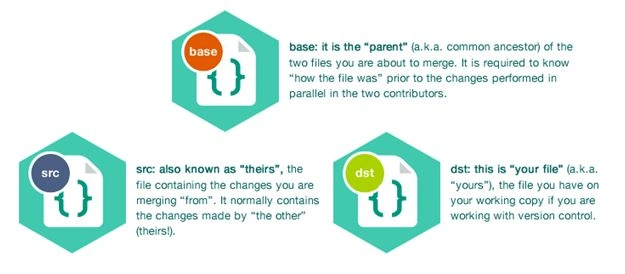
An example of the Getting Started guide demonstrating the three major types of files involved in a Semantic Merge operation: the base file, the source file and the destination file.
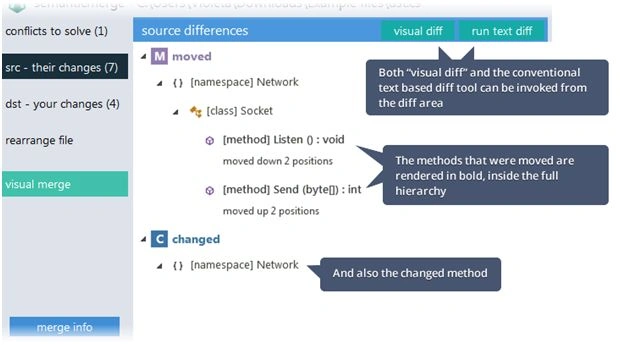
The guide not only reviews over the merging process in a very visual and easy to comprehend manner (which functions as a great tool to explain the process to those unfamiliar with working with bad developers that consistently cause conflicts), but it lets you know what you might expect to see throughout the application. For example, an actual diff operation within Semantic Merge might look something like this:
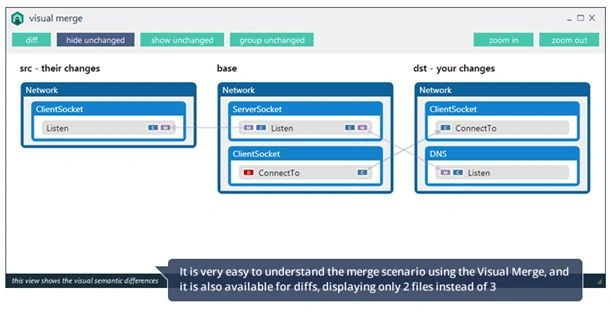
Whereas an actual Merge within Semantic Merge might look like the following:
Semantic Merge also comes with several different example and demo applications to help you better understand how to use it effectively prior to jumping in and trying it out on your 500,000+ LOC enterprise application so that you can at least stick a toe in the water before diving off a cliff. It can be used in a variety of ways and can be configured and integrated into most major source-control systems such as:
- Team Foundation Server
- SVN
- Git
- Mercurial
- Perforce
- IntelliJ
- Beyond Compare
- Visual Studio Tools Git Integration
Or it can easily be used on its own as a great Merging / Diff tool.
Check it out!
If you are still interested and still reading, check out PlasticSCM and read more about some of the other major features of Semantic Merge that I may have missed. Obviously, traditional merging and diff tools are plenty for some people, but if you are someone that is looking for a way to improve upon them, then I would urge you to at least download it and give it a try to see if it is something that might make life easier for you and your team.
Licensing plans for it start at around $3.99/month, however you can visit Semantic Merge for a 15-day free trial or simply download it from the link below:
Harshad PansuriyaPosted Nov 13, 2015, 10:59 PM
Nice one
Banketeshvar NarayanPosted Nov 13, 2015, 4:51 PM
Nice Article
Santhakumar MunuswamyPosted Nov 13, 2015, 10:07 AM
Good one
Sibeesh VenuPosted Nov 13, 2015, 3:53 AM
Nice