
Scope
The solution in this article will implement the MVVM pattern and will use the MVVMLight Toolkit.
Introduction
Bluetooth is an industry-standard protocol that enables wireless connectivity for computers, handheld devices, mobile phones and other devices.
Bluetooth is designed for use by C/C++ programmers. Some Bluetooth features are available with Windows Sockets. Familiarity with Microsoft Windows networking and Windows Sockets programming is required. The article Bluetooth Programming with Windows Sockets describes how to use Windows Sockets functions and structures to program a Bluetooth application and provide the Bluetooth connection sample. But in a first attempt it does not look so nice when our goal is to create a WPF application.
In Codeplex, there is a project called 32feet.NET. This project is a shared-source project to make personal area networking technologies such as Bluetooth, Infrared (IrDA) and more, easily accessible from .NET code. It supports desktop, mobile or embedded systems.
32feet.NET is available on Nuget and for desktop apps the reference is 32feet.NET 3.5.0 Nuget Package. That is the version we will use in the sample we will create.
Description
The WPF application will have two "modes": Sender and Receiver. Where the "Sender" has the responsibility to send messages and the "Receiver" will get the messages sent by "Sender".
Let's start!
Creating the project
First create the WPF application in Visual Studio.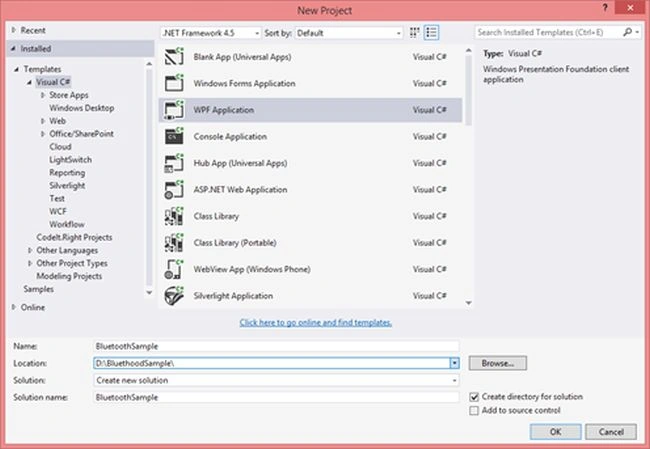
Then install the nugget packages: MVVMLight and 32feet.Net, as in the following: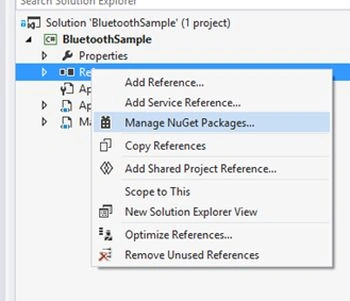
Installing the MVVM Light Toolkit: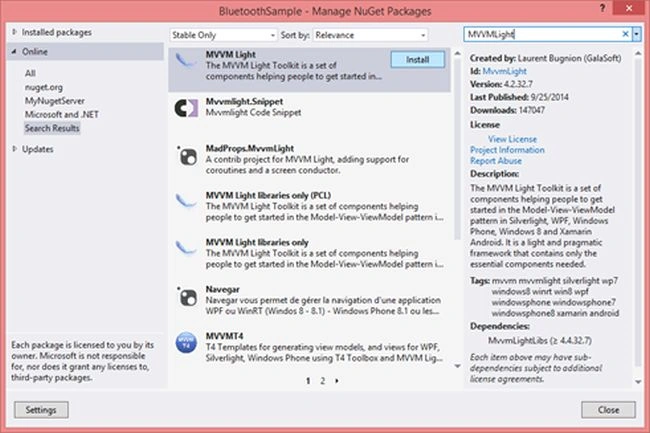
Installing 32feet.Net: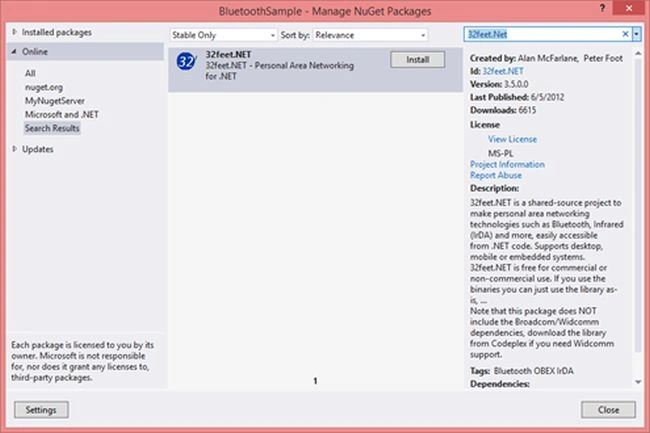
At the end our solution will have the base structure to implement MVVM, that MVVM Light installed using Nuget.
Now we need to define the model for the device that is required when we get the list of the devices around us with Bluetooth on.
The Model
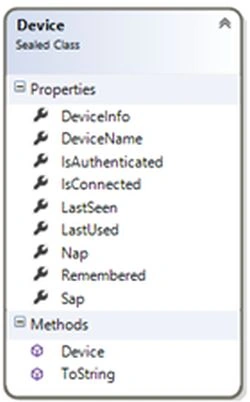
The model is defined by the Device class that represents the structure for the device around us. The implementation is:
- public sealed class Device
- {
- /// <summary>
- /// Gets or sets the device name.
- /// </summary>
- /// <value>
- /// The device name.
- /// </value>
- public string DeviceName { get; set; }
- /// <summary>
- /// Gets or sets a value indicating whether authenticated.
- /// </summary>
- /// <value>
- /// The authenticated.
- /// </value>
- public bool IsAuthenticated { get; set; }
- /// <summary>
- /// Gets or sets a value indicating whether is connected.
- /// </summary>
- /// <value>
- /// The is connected.
- /// </value>
- public bool IsConnected { get; set; }
- /// <summary>
- /// Gets or sets the nap.
- /// </summary>
- /// <value>
- /// The nap.
- /// </value>
- public ushort Nap { get; set; }
- /// <summary>
- /// Gets or sets the sap.
- /// </summary>
- /// <value>
- /// The sap.
- /// </value>
- public uint Sap { get; set; }
- /// <summary>
- /// Gets or sets the last seen.
- /// </summary>
- /// <value>
- /// The last seen.
- /// </value>
- public DateTime LastSeen { get; set; }
- /// <summary>
- /// Gets or sets the last used.
- /// </summary>
- /// <value>
- /// The last used.
- /// </value>
- public DateTime LastUsed { get; set; }
- /// <summary>
- /// Gets or sets a value indicating whether remembered.
- /// </summary>
- /// <value>
- /// The remembered.
- /// </value>
- public bool Remembered { get; set; }
- /// <summary>
- /// Gets or sets the device info.
- /// </summary>
- /// <value>
- /// The device info.
- /// </value>
- public BluetoothDeviceInfo DeviceInfo { get; set; }
- /// <summary>
- /// Initializes a new instance of the <see cref="Device"/> class.
- /// </summary>
- /// <param name="device_info">
- /// The device_info.
- /// </param>
- public Device(BluetoothDeviceInfo device_info)
- {
- if (device_info != null)
- {
- DeviceInfo = device_info;
- IsAuthenticated = device_info.Authenticated;
- IsConnected = device_info.Connected;
- DeviceName = device_info.DeviceName;
- LastSeen = device_info.LastSeen;
- LastUsed = device_info.LastUsed;
- Nap = device_info.DeviceAddress.Nap;
- Sap = device_info.DeviceAddress.Sap;
- Remembered = device_info.Remembered;
- }
- }
- /// <summary>
- /// The to string.
- /// </summary>
- /// <returns>
- /// The <see cref="string"/>.
- /// </returns>
- public override string ToString()
- {
- return DeviceName;
- }
- }
The Services
The services in the application will define the features for the "Sender" and for the "Receiver". These classes will be injected into the view model using the ServiceLocator and the setup is defined in the ViewModelLocator constructor.
To connect the "Sender" and the "Receiver", we need to define a Guid that is set to the ServiceClassId and it is the key for the communication. When the "Sender" sends a message using the ServiceClassID X only the "Receiver" that knows the ServiceClassID X will get the data, any other "Receiver" that only knows the ServiceClassID Y, for example, will not receive the data.
The ReceiverBluetoothService
The ReceiverBluetoothService defines how the "Receiver" will receive the data from the "Sender". Since it is used for a thread that will run and will be listening for data.
The implementation of this class is something like:
- public class ReceiverBluetoothService : ObservableObject, IDisposable, IReceiverBluetoothService
- {
- private readonly Guid _serviceClassId;
- private Action<string> _responseAction;
- private BluetoothListener _listener;
- private CancellationTokenSource _cancelSource;
- private bool _wasStarted;
- private string _status;
- /// <summary>
- /// Initializes a new instance of the <see cref="ReceiverBluetoothService" /> class.
- /// </summary>
- public ReceiverBluetoothService()
- {
- _serviceClassId = new Guid("0e6114d0-8a2e-477a-8502-298d1ff4b4ba");
- }
- /// <summary>
- /// Gets or sets a value indicating whether was started.
- /// </summary>
- /// <value>
- /// The was started.
- /// </value>
- public bool WasStarted
- {
- get { return _wasStarted; }
- set { Set(() => WasStarted, ref _wasStarted, value); }
- }
- /// <summary>
- /// Starts the listening from Senders.
- /// </summary>
- /// <param name="reportAction">
- /// The report Action.
- /// </param>
- public void Start(Action<string> reportAction)
- {
- WasStarted = true;
- _responseAction = reportAction;
- if (_cancelSource != null && _listener != null)
- {
- Dispose(true);
- }
- _listener = new BluetoothListener(_serviceClassId)
- {
- ServiceName = "MyService"
- };
- _listener.Start();
- _cancelSource = new CancellationTokenSource();
- Task.Run(() => Listener(_cancelSource));
- }
- /// <summary>
- /// Stops the listening from Senders.
- /// </summary>
- public void Stop()
- {
- WasStarted = false;
- _cancelSource.Cancel();
- }
- /// <summary>
- /// Listeners the accept bluetooth client.
- /// </summary>
- /// <param name="token">
- /// The token.
- /// </param>
- private void Listener(CancellationTokenSource token)
- {
- try
- {
- while (true)
- {
- using (var client = _listener.AcceptBluetoothClient())
- {
- if (token.IsCancellationRequested)
- {
- return;
- }
- using (var streamReader = new StreamReader(client.GetStream()))
- {
- try
- {
- var content = streamReader.ReadToEnd();
- if (!string.IsNullOrEmpty(content))
- {
- _responseAction(content);
- }
- }
- catch (IOException)
- {
- client.Close();
- break;
- }
- }
- }
- }
- }
- catch (Exception exception)
- {
- // todo handle the exception
- // for the sample it will be ignored
- }
- }
- /// <summary>
- /// The dispose.
- /// </summary>
- public void Dispose()
- {
- Dispose(true);
- GC.SuppressFinalize(this);
- }
- /// <summary>
- /// The dispose.
- /// </summary>
- /// <param name="disposing">
- /// The disposing.
- /// </param>
- protected virtual void Dispose(bool disposing)
- {
- if (disposing)
- {
- if (_cancelSource != null)
- {
- _listener.Stop();
- _listener = null;
- _cancelSource.Dispose();
- _cancelSource = null;
- }
- }
- }
- }
In the Listener method that is running in another thread, we defined a CancellationTokenSource that will be used to stop the process listening for data.
Note: The "Receiver" allows the starting or stopping of the process listening for data. If a "Sender" sends data but the "Receiver" does not allow for listening, the "Sender" will send the data but the "Receiver" will not get it.
The SenderBluetoothService
The SenderBluetoothService defines how the "Sender" will send the data, but it is required to select a device that is available. It is not possible to filter for devices that know the ServiceClassId and the name of the device for where the "Sender" wants to send the data should be known.
The implementation of this class is something like:
- public sealed class SenderBluetoothService : ISenderBluetoothService
- {
- private readonly Guid _serviceClassId;
- /// <summary>
- /// Initializes a new instance of the <see cref="SenderBluetoothService"/> class.
- /// </summary>
- public SenderBluetoothService()
- {
- // this guid is random, only need to match in Sender & Receiver
- // this is like a "key" for the connection!
- _serviceClassId = new Guid("0e6114d0-8a2e-477a-8502-298d1ff4b4ba");
- }
- /// <summary>
- /// Gets the devices.
- /// </summary>
- /// <returns>The list of the devices.</returns>
- public async Task<IList<Device>> GetDevices()
- {
- // for not block the UI it will run in a different threat
- var task = Task.Run(() =>
- {
- var devices = new List<Device>();
- using (var bluetoothClient = new BluetoothClient())
- {
- var array = bluetoothClient.DiscoverDevices();
- var count = array.Length;
- for (var i = 0; i < count; i++)
- {
- devices.Add(new Device(array[i]));
- }
- }
- return devices;
- });
- return await task;
- }
- /// <summary>
- /// Sends the data to the Receiver.
- /// </summary>
- /// <param name="device">The device.</param>
- /// <param name="content">The content.</param>
- /// <returns>If was sent or not.</returns>
- public async Task<bool> Send(Device device, string content)
- {
- if (device == null)
- {
- throw new ArgumentNullException("device");
- }
- if (string.IsNullOrEmpty(content))
- {
- throw new ArgumentNullException("content");
- }
- // for not block the UI it will run in a different threat
- var task = Task.Run(() =>
- {
- using (var bluetoothClient = new BluetoothClient())
- {
- try
- {
- var ep = new BluetoothEndPoint(device.DeviceInfo.DeviceAddress, _serviceClassId);
- // connecting
- bluetoothClient.Connect(ep);
- // get stream for send the data
- var bluetoothStream = bluetoothClient.GetStream();
- // if all is ok to send
- if (bluetoothClient.Connected && bluetoothStream != null)
- {
- // write the data in the stream
- var buffer = System.Text.Encoding.UTF8.GetBytes(content);
- bluetoothStream.Write(buffer, 0, buffer.Length);
- bluetoothStream.Flush();
- bluetoothStream.Close();
- return true;
- }
- return false;
- }
- catch
- {
- // the error will be ignored and the send data will report as not sent
- // for understood the type of the error, handle the exception
- }
- }
- return false;
- });
- return await task;
- }
- }
The ViewModel
We will define the following view models: ReceiverViewModel, SenderViewModel and MainViewModel that will be binding to the DataContext in ReceiverView, SenderView and MainWindow respectively.
The ReceiverViewModel
- public sealed class ReceiverViewModel : ViewModelBase
- {
- private readonly IReceiverBluetoothService _receiverBluetoothService;
- private string _data;
- private bool _isStarEnabled;
- private string _status;
- /// <summary>
- /// Initializes a new instance of the <see cref="ReceiverViewModel" /> class.
- /// </summary>
- /// <param name="receiverBluetoothService">The Receiver bluetooth service.</param>
- public ReceiverViewModel(IReceiverBluetoothService receiverBluetoothService)
- {
- _receiverBluetoothService = receiverBluetoothService;
- _receiverBluetoothService.PropertyChanged += ReceiverBluetoothService_PropertyChanged;
- IsStarEnabled = true;
- Data = "N/D";
- Status = "N/D";
- StartCommand = new RelayCommand(() =>
- {
- _receiverBluetoothService.Start(SetData);
- IsStarEnabled = false;
- Data = "Can receive data.";
- });
- StopCommand = new RelayCommand(() =>
- {
- _receiverBluetoothService.Stop();
- IsStarEnabled = true;
- Data = "Cannot receive data.";
- });
- Messenger.Default.Register<Message>(this, ResetAll);
- }
- /// <summary>
- /// Resets all.
- /// </summary>
- /// <param name="message">The message.</param>
- private void ResetAll(Message message)
- {
- if (!message.IsToShowDevices)
- {
- if (_receiverBluetoothService.WasStarted)
- {
- _receiverBluetoothService.Stop();
- }
- IsStarEnabled = true;
- Data = "N/D";
- Status = "N/D";
- }
- }
- /// <summary>
- /// The set data received.
- /// </summary>
- /// <param name="data">
- /// The data.
- /// </param>
- public void SetData(string data)
- {
- Data = data;
- }
- /// <summary>
- /// Gets or sets the data.
- /// </summary>
- /// <value>
- /// The data received.
- /// </value>
- public string Data
- {
- get { return _data; }
- set { Set(() => Data, ref _data, value); }
- }
- /// <summary>
- /// Gets the start command.
- /// </summary>
- /// <value>
- /// The start command.
- /// </value>
- public ICommand StartCommand { get; private set; }
- /// <summary>
- /// Gets the stop command.
- /// </summary>
- /// <value>
- /// The stop command.
- /// </value>
- public ICommand StopCommand { get; private set; }
- /// <summary>
- /// Gets or sets a value indicating whether is star enabled.
- /// </summary>
- /// <value>
- /// The is star enabled.
- /// </value>
- public bool IsStarEnabled
- {
- get
- {
- return _isStarEnabled;
- }
- set
- {
- Set(() => IsStarEnabled, ref _isStarEnabled, value);
- RaisePropertyChanged(() => IsStopEnabled);
- }
- }
- /// <summary>
- /// Gets or sets a value indicating whether is stop enabled.
- /// </summary>
- /// <value>
- /// The is stop enabled.
- /// </value>
- public bool IsStopEnabled
- {
- get
- {
- return !_isStarEnabled;
- }
- set
- {
- Set(() => IsStopEnabled, ref _isStarEnabled, !value);
- RaisePropertyChanged(() => IsStarEnabled);
- }
- }
- /// <summary>
- /// Gets or sets the status.
- /// </summary>
- /// <value>The status.</value>
- public string Status
- {
- get { return _status; }
- set { Set(() => Status, ref _status, value); }
- }
- /// <summary>
- /// Handles the PropertyChanged event of the ReceiverBluetoothService control.
- /// </summary>
- /// <param name="sender">The source of the event.</param>
- /// <param name="e">The <see cref="System.ComponentModel.PropertyChangedEventArgs"/> instance containing the event data.</param>
- private void ReceiverBluetoothService_PropertyChanged(object sender, System.ComponentModel.PropertyChangedEventArgs e)
- {
- if (e.PropertyName == "WasStarted")
- {
- IsStarEnabled = true;
- }
- }
- }
- public sealed class SenderViewModel : ViewModelBase
- {
- private readonly ISenderBluetoothService _senderBluetoothService;
- private string _data;
- private Device _selectDevice;
- private string _resultValue;
- /// <summary>
- /// Initializes a new instance of the <see cref="SenderViewModel"/> class.
- /// </summary>
- /// <param name="senderBluetoothService">
- /// The Sender bluetooth service.
- /// </param>
- public SenderViewModel(ISenderBluetoothService senderBluetoothService)
- {
- _senderBluetoothService = senderBluetoothService;
- ResultValue = "N/D";
- SendCommand = new RelayCommand(
- SendData,
- () => !string.IsNullOrEmpty(Data) && SelectDevice != null && SelectDevice.DeviceInfo != null);
- Devices = new ObservableCollection<Device>
- {
- new Device(null) { DeviceName = "Searching..." }
- };
- Messenger.Default.Register<Message>(this, ShowDevice);
- }
- /// <summary>
- /// Gets or sets the devices.
- /// </summary>
- /// <value>
- /// The devices.
- /// </value>
- public ObservableCollection<Device> Devices
- {
- get; set;
- }
- /// <summary>
- /// Gets or sets the select device.
- /// </summary>
- /// <value>
- /// The select device.
- /// </value>
- public Device SelectDevice
- {
- get { return _selectDevice; }
- set { Set(() => SelectDevice, ref _selectDevice, value); }
- }
- /// <summary>
- /// Gets or sets the data.
- /// </summary>
- /// <value>
- /// The data.
- /// </value>
- public string Data
- {
- get { return _data; }
- set { Set(() => Data, ref _data, value); }
- }
- /// <summary>
- /// Gets or sets the result value.
- /// </summary>
- /// <value>
- /// The result value.
- /// </value>
- public string ResultValue
- {
- get { return _resultValue; }
- set { Set(() => ResultValue, ref _resultValue, value); }
- }
- /// <summary>
- /// Gets the send command.
- /// </summary>
- /// <value>
- /// The send command.
- /// </value>
- public ICommand SendCommand { get; private set; }
- private async void SendData()
- {
- ResultValue = "N/D";
- var wasSent = await _senderBluetoothService.Send(SelectDevice, Data);
- if (wasSent)
- {
- ResultValue = "The data was sent.";
- }
- else
- {
- ResultValue = "The data was not sent.";
- }
- }
- /// <summary>
- /// Shows the device.
- /// </summary>
- /// <param name="deviceMessage">The device message.</param>
- private async void ShowDevice(Message deviceMessage)
- {
- if (deviceMessage.IsToShowDevices)
- {
- var items = await _senderBluetoothService.GetDevices();
- Devices.Clear();
- Devices.Add(items);
- Data = string.Empty;
- }
- }
- }
- public sealed class MainViewModel : ViewModelBase
- {
- private bool _isReceiver;
- /// <summary>
- /// Initializes a new instance of the <see cref="MainViewModel"/> class.
- /// </summary>
- public MainViewModel()
- {
- PropertyChanged += MainViewModelPropertyChanged;
- IsSender = false;
- }
- /// <summary>
- /// Gets or sets a value indicating whether is Receiver.
- /// </summary>
- /// <value>
- /// The is Receiver.
- /// </value>
- public bool IsReceiver
- {
- get
- {
- return _isReceiver;
- }
- set
- {
- Set(() => IsReceiver, ref _isReceiver, value);
- RaisePropertyChanged(() => IsSender);
- }
- }
- /// <summary>
- /// Gets or sets a value indicating whether is Sender.
- /// </summary>
- /// <value>
- /// The is Sender.
- /// </value>
- public bool IsSender
- {
- get
- {
- return !_isReceiver;
- }
- set
- {
- Set(() => IsSender, ref _isReceiver, !value);
- RaisePropertyChanged(() => IsReceiver);
- }
- }
- /// <summary>
- /// Gets or sets the Receiver visibility.
- /// </summary>
- /// <value>
- /// The Receiver visibility.
- /// </value>
- public Visibility ReceiverVisibility
- {
- get
- {
- return _isReceiver ? Visibility.Visible : Visibility.Collapsed;
- }
- set
- {
- _isReceiver = value == Visibility.Visible;
- }
- }
- /// <summary>
- /// Gets or sets the Sender visibility.
- /// </summary>
- /// <value>
- /// The Sender visibility.
- /// </value>
- public Visibility SenderVisibility
- {
- get
- {
- return !_isReceiver ? Visibility.Visible : Visibility.Collapsed;
- }
- set
- {
- _isReceiver = value != Visibility.Visible;
- }
- }
- /// <summary>
- /// Mains the view model property changed.
- /// </summary>
- /// <param name="sender">The sender.</param>
- /// <param name="e">The <see cref="System.ComponentModel.PropertyChangedEventArgs"/> instance containing the event data.</param>
- private void MainViewModelPropertyChanged(object sender, System.ComponentModel.PropertyChangedEventArgs e)
- {
- if (e.PropertyName == "IsReceiver" || e.PropertyName == "IsSender")
- {
- RaisePropertyChanged(() => ReceiverVisibility);
- RaisePropertyChanged(() => SenderVisibility);
- if (e.PropertyName == "IsReceiver")
- {
- Messenger.Default.Send(IsSender ? new Message(true) : new Message(false));
- }
- }
- }
- }
The MainWindow will be the starting point for the application and will contain the two user controls: ReceiverView and SenderView that will be shown if the user wants to be a "Sender" or a "Receiver".
The ReceiverView.xaml
The implementation will be something like:
- <UserControl x:Class="BluetoothSample.Views.ReceiverView"
- xmlns="http://schemas.microsoft.com/winfx/2006/xaml/presentation"
- xmlns:x="http://schemas.microsoft.com/winfx/2006/xaml"
- xmlns:mc="http://schemas.openxmlformats.org/markup-compatibility/2006"
- xmlns:d="http://schemas.microsoft.com/expression/blend/2008"
- DataContext="{Binding ReceiverViewModel, Source={StaticResource Locator}}"
- mc:Ignorable="d"
- d:DesignHeight="300" d:DesignWidth="400">
- <StackPanel Margin="20" Orientation="Vertical">
- <TextBlock>I am the Receiver</TextBlock>
- <StackPanel Orientation="Horizontal">
- <Button Margin="0,10,0,0" Width="80" Command="{Binding StartCommand}" IsEnabled="{Binding IsStarEnabled}" Content="Start"/>
- <Button Margin="20,10,0,0" Width="80" Command="{Binding StopCommand}" IsEnabled="{Binding IsStopEnabled}" Content="Stop"/>
- </StackPanel>
- <TextBlock Margin="00,20,0,0" Text="Data:"/>
- <TextBlock Margin="00,20,0,0" Text="{Binding Data}"/>
- </StackPanel>
- </UserControl>
The implementation will be something like:
- <UserControl x:Class="BluetoothSample.Views.SenderView"
- xmlns="http://schemas.microsoft.com/winfx/2006/xaml/presentation"
- xmlns:x="http://schemas.microsoft.com/winfx/2006/xaml"
- xmlns:d="http://schemas.microsoft.com/expression/blend/2008"
- xmlns:mc="http://schemas.openxmlformats.org/markup-compatibility/2006"
- DataContext="{Binding SenderViewModel,
- Source={StaticResource Locator}}"
- d:DesignHeight="400"
- d:DesignWidth="400"
- mc:Ignorable="d">
- <StackPanel Margin="20" Orientation="Vertical">
- <TextBlock>I am the Sender.</TextBlock>
- <TextBlock Margin="0,20,0,0">Select one device:</TextBlock>
- <ListBox Width="200"
- Height="100"
- MaxWidth="200"
- MaxHeight="100"
- Margin="0,20,0,0"
- HorizontalAlignment="Left"
- ItemsSource="{Binding Devices}"
- SelectedItem="{Binding SelectDevice}" />
- <TextBlock Margin="0,20,0,0" Text="Write the data to send:" />
- <TextBox Margin="0,20,20,0" Text="{Binding Data, Mode=TwoWay, UpdateSourceTrigger=PropertyChanged}" />
- <Button Width="80"
- Margin="0,20,20,0"
- HorizontalAlignment="Right"
- Command="{Binding SendCommand}"
- Content="Send" />
- <TextBlock Margin="0,20,0,0" TextWrapping="Wrap">
- Result:<Run Text="{Binding ResultValue}" />
- </TextBlock>
- </StackPanel>
- </UserControl>
The MainWindow will show/hide the user controls defined. The implementation is defined by:
- <Window x:Class="BluetoothSample.MainWindow"
- xmlns="http://schemas.microsoft.com/winfx/2006/xaml/presentation"
- xmlns:x="http://schemas.microsoft.com/winfx/2006/xaml"
- xmlns:views="clr-namespace:BluetoothSample.Views"
- DataContext="{Binding Main, Source={StaticResource Locator}}"
- Title="Bluetooth Sample"
- MinWidth="600" MinHeight="560"
- MaxWidth="600" MaxHeight="560">
- <StackPanel Orientation="Vertical">
- <GroupBox Margin="10,10,10,0" Header="Choose the type:">
- <StackPanel Orientation="Horizontal">
- <RadioButton Margin="20" IsChecked="{Binding IsReceiver, Mode=TwoWay}">Receiver - will receive data from Sender</RadioButton>
- <RadioButton Margin="20" IsChecked="{Binding IsSender, Mode=TwoWay}">Sender - will send data for the Receiver</RadioButton>
- </StackPanel>
- </GroupBox>
- <GroupBox Margin="10,10,10,0" Header="Dashboard">
- <StackPanel Orientation="Vertical">
- <!-- visibility binding not worked in user control and
- for this reason was added the stackpanel for each usercontrol-->
- <StackPanel Visibility="{Binding ReceiverVisibility}">
- <views:ReceiverView Height="390" x:Name="ReceiverView"/>
- </StackPanel>
- <StackPanel Visibility="{Binding SenderVisibility}">
- <views:SenderView Height="390" x:Name="SenderView" />
- </StackPanel>
- </StackPanel>
- </GroupBox>
- </StackPanel>
- </Window>
The ViewModelLocator
The ViewModelLocator will be a static resource for the application and is defined in App.xaml, as in the following;
- <vm:ViewModelLocator xmlns:vm="clr-namespace:BluetoothSample.ViewModel"
- x:Key="Locator"
- d:IsDataSource="True" />
- public class ViewModelLocator
- {
- /// <summary>
- /// Initializes a new instance of the ViewModelLocator class.
- /// </summary>
- public ViewModelLocator()
- {
- ServiceLocator.SetLocatorProvider(() => SimpleIoc.Default);
- SimpleIoc.Default.Register<IReceiverBluetoothService, ReceiverBluetoothService>();
- SimpleIoc.Default.Register<ISenderBluetoothService, SenderBluetoothService>();
- SimpleIoc.Default.Register<MainViewModel>();
- SimpleIoc.Default.Register<ReceiverViewModel>();
- SimpleIoc.Default.Register<SenderViewModel>();
- }
- /// <summary>
- /// Gets the main.
- /// </summary>
- /// <value>The main.</value>
- public MainViewModel Main
- {
- get
- {
- return ServiceLocator.Current.GetInstance<MainViewModel>();
- }
- }
- /// <summary>
- /// Gets the Receiver view model.
- /// </summary>
- /// <value>The Receiver view model.</value>
- public ReceiverViewModel ReceiverViewModel
- {
- get
- {
- return ServiceLocator.Current.GetInstance<ReceiverViewModel>();
- }
- }
- /// <summary>
- /// Gets the Sender view model.
- /// </summary>
- /// <value>The Sender view model.</value>
- public SenderViewModel SenderViewModel
- {
- get
- {
- return ServiceLocator.Current.GetInstance<SenderViewModel>();
- }
- }
- /// <summary>
- /// Cleanups this instance.
- /// </summary>
- public static void Cleanup()
- {
- // TODO Clear the ViewModels
- }
- }
To test the application we need two devices, where in the first device we will run as "Sender" and in the second device we will run as "Receiver".
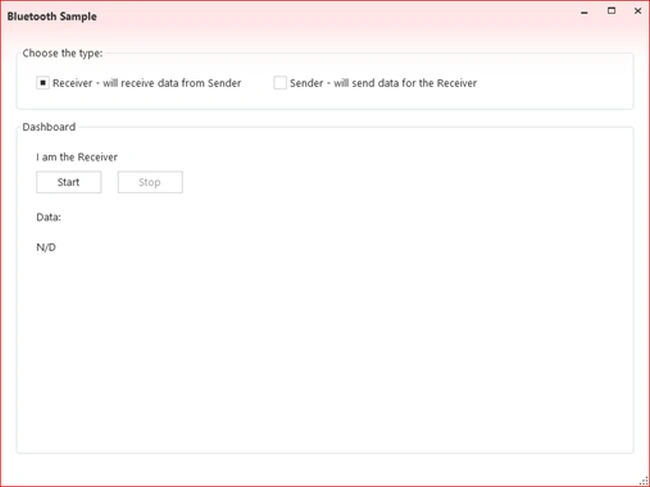
The "Receiver" can start listening as in the following:
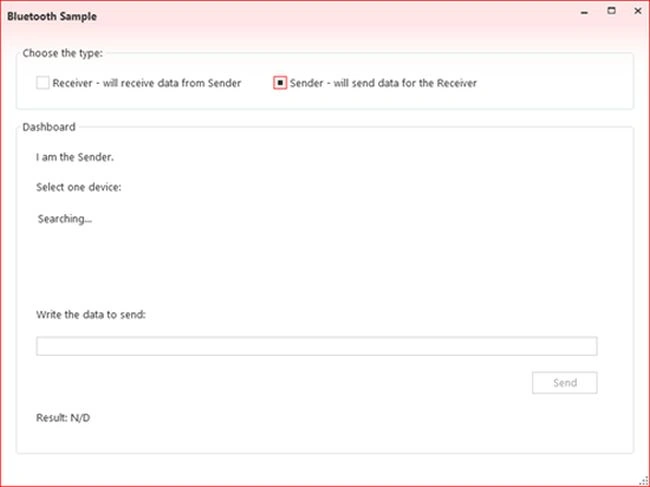
The "Sender" is searching for available devices as in the following:
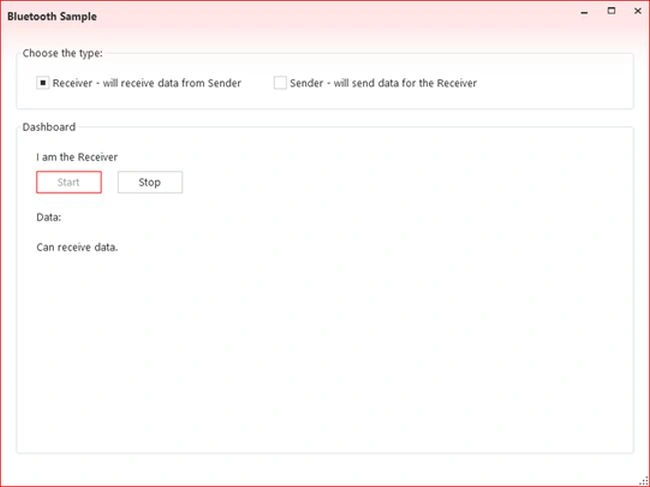
The "Receiver" begins to listen as in the following:
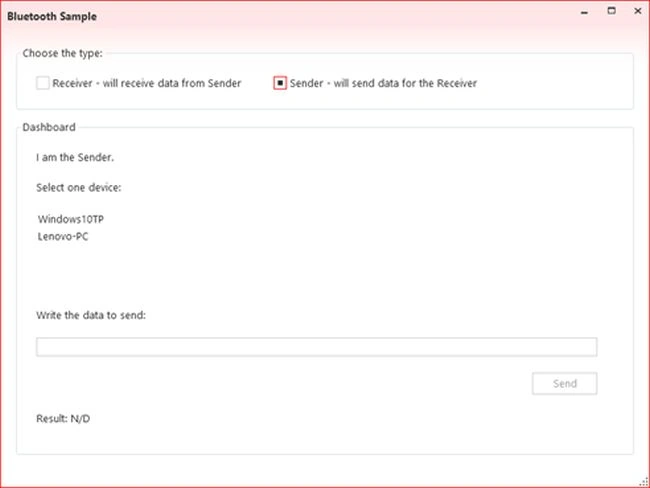
The "Sender" can select a device for sending the message as in the following:
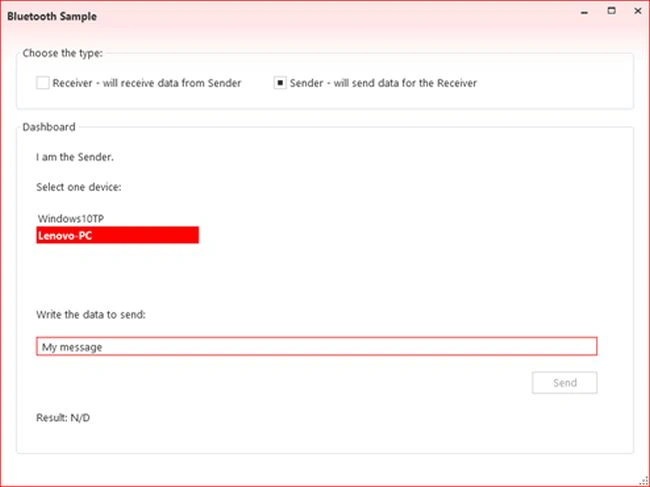
The "Sender" will send a message for the selected device as in the following:
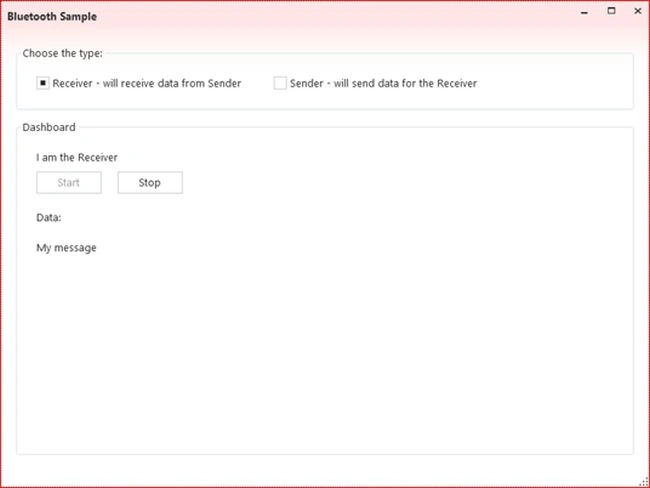
The "Receiver" received the data sent by "Sender" as in the following:
Conclusion
In conclusion, we can conclude the 32feet.Net is a great library to get all the devices around with Bluetooth on and to send data using Bluetooth. The library has a great documentation but could have more samples that we could run to test the features provided.
Another point that the developer should be aware of is the fact the project hasn´t been updated since 2012 but everyone can use the source code if needed, to fix any issue.
Source Code
The complete source code can be found in: Bluetooth Sample using 32feet.Net.
Credits
Thanks to Pedro Lamas and Peter Foot for helping me to make it work!
L chengPosted Feb 2, 2021, 9:43 AM
I cant download the source code, please help.
Niket ShahPosted May 27, 2020, 9:09 AM
I cant download the source code
Abubacker FaizalPosted Feb 13, 2020, 7:45 AM
I cant download the source code. Links are not working. Please tell me how to download the source code?
Manju AnoopPosted May 27, 2019, 8:24 AM
Hi today I am trying this sample , but there is no progress is observed after _listener.AcceptBluetoothClient() call... please guide me for resolving this problem
Akash NaginaPosted Jun 30, 2017, 12:46 PM
Hi Sara,Project is running fine but when i am sending data to paired device it is giving Result as "Data was not sent",so do i need other things to make it run.
Sourabh SomaniPosted Feb 25, 2015, 12:04 PM
Excellent Article.... thanks :)
Prasham SabadraPosted Feb 23, 2015, 5:10 AM
Thanks for sharing. Nice Article!
pradeep sharmaPosted Dec 4, 2014, 7:00 AM
nice article ...thanks
Sara SilvaPosted Dec 4, 2014, 4:50 AM
Thanks ppl :D
Pratham DavePosted Dec 4, 2014, 12:18 AM
Good Article..!
Arvind PradhanPosted Dec 3, 2014, 11:34 PM
Nice article.........Thanks for sharing it.
Manish Kumar ChoudharyPosted Dec 3, 2014, 11:15 PM
Nice one..
Praveen KumarPosted Dec 3, 2014, 11:05 PM
It's excellent !