

Calculating the size of a Site Collection or Sub Sites is a periodic task in the lifetime of a SharePoint Deployment. The calculation is required in the following scenarios:
- Determining the Site Collection usage & progress for Reporting purposes
- Finalizing Architectural Decisions on Expansions or Splitting of Site Collections
- Periodical Analysis of Site Quota & Usage
Note:
The term refers to the size occupied by the entity. Please note that the Total Size calculated might be less than the Content Database Storage Size as there is surplus space allocated.
Solutions
The following are the solutions to calculate the size.
Solution 1: STSADM Command
STSADM contains a command to return the Size of a Site Collection, as in:
stsadm -o enumsites -url http://Server
This command should return the number of Sites & the size for the URL specified, as in:
<Sites Count="2">
<Site Url="http://hp" Id="1abb65ae-5df0-491d-aaca-cff97c93a935" Owner="HP\hp" ContentDatabase="WSS_Content_10737a6d-4f76-4a8e-b7b0-047ad8c3da1e" StorageUsedMB="69.1" StorageWarningMB="0" StorageMaxMB="0" />
<Site Url="http://hp/sites/my" Id="ad2d7c45-db2b-47d4-97e4-dfddf9ec9a93" Owner="HP\hp" ContentDatabase="WSS_Content_10737a6d-4f76-4a8e-b7b0-047ad8c3da1e" StorageUsedMB="1.7" StorageWarningMB="0" StorageMaxMB="0" />
</Sites>
Note:
STSADM is deprecated and the preceding operation does not yield Drill Down results. We can continue our exploration of other possibilities.
Solution 2: Server Object Model using C#
Using the Server Object Model we can write a Console Application to display more drilled down information like the size of Site and Sub Sites. Here we are including the following entities:
-
Site
-
Sub Sites
-
Folders
-
Files
-
File Versions
-
Recycle Bin
Code
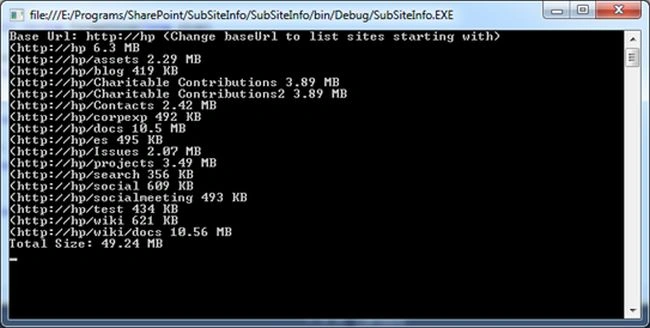
The following is the code which performs the above activities, formats the size and outputs the result on the console:
static void Main(string[] args)
{
long siteCollectionSize = 0;
string baseUrl = "http://hp";
Console.WriteLine("Base Url: " + baseUrl + " (Change baseUrl to list sites starting with)");
using (SPSite mainSite = new SPSite(baseUrl))
{
foreach (SPWeb web in mainSite.AllWebs)
{
long webSize = GetSPFolderSize(web.RootFolder) + web.RecycleBin.Cast<SPRecycleBinItem>().Sum(r => r.Size);
if (web.Url.StartsWith(baseUrl))
{
Console.WriteLine(string.Format("({0} {1}", web.Url, FormatSize(webSize)));
siteCollectionSize += webSize;
}
}
}
Console.WriteLine("Total Size: " + FormatSize(siteCollectionSize));
Console.ReadKey(false);
}
public static long GetSPFolderSize(SPFolder folder)
{
long folderSize = 0;
foreach (SPFile file in folder.Files)
folderSize += file.TotalLength
+ file.Versions.Cast<SPFileVersion>().Sum(f => f.Size);
folderSize += folder.SubFolders.Cast<SPFolder>().Sum(sf => GetSPFolderSize(sf));
return folderSize;
}
public static string FormatSize(long size)
{
if (size > Math.Pow(1024, 3))
return (size / Math.Pow(1024, 3)).ToString("#,#.##") + " GB";
else if (size > Math.Pow(1024, 2))
return (size / Math.Pow(1024, 2)).ToString("#,#.##") + " MB";
else if (size > 1024)
return (size / 1024).ToString("#,#.##") + " KB";
else
return size.ToString("#,#.##") + " Bytes";
}
Илья СвергинPosted Aug 4, 2016, 8:48 AM
For anyone, who has the same problem as Gangadhar. You need to move two functions - GetFolderSize and FormatBytes in the begining of the script (e.g. after variables). I had the same problem and this helped me.
Sr KarthigaPosted Feb 14, 2016, 12:29 AM
Good one
Gangadhar mPosted Sep 25, 2015, 2:18 PM
Hi Paul,Am executed above Powershell script to determine size for sites within the site collection in SharePoint 2007 but am not able to getting size it only showing/displaying sites and subsites names with in the site collection but not the size. while executing the script initialy few errors are encountered. please suggest me. thanks. Gangadhar.M
srikanth srikanthPosted Apr 23, 2014, 12:38 PM
I am implementing Solution2 in custom webpart, it is taking more time to complete Foldersize loop. Let me know any thing i need to consider for Sever object model.
Jean PaulPosted Nov 4, 2012, 10:11 PM
Thank You Vijay for the good words!
Vijay PrativadiPosted Nov 4, 2012, 9:33 PM
Superbbb...! This is called Awesome!
Jean PaulPosted Nov 1, 2012, 9:44 AM
Thank You Chandan, Mahesh, Neha, Veena, Dipali for the good words.. I had one more point to add here. (sorry for delay) In one of the client installations with 5 Terra Bytes of site collection items, the above c#/powershell code were sluggish as it looped through each items, versions etc. (took more than 3 hours and crashed) Following is the code which worked quickly, but it is a deprecated way (took only few seconds) siteCollection.StorageManagementInformation( SPSite.StorageManagementInformationType.DocumentLibrary, SPSite.StorageManagementSortOrder.Decreasing, SPSite.StorageManagementSortedOn.Size, 1000000 ) I will be adding an article on the same.
chandan kumarPosted Nov 1, 2012, 2:58 AM
Nice article..
Mahesh ChandPosted Oct 31, 2012, 11:35 PM
As Veena said, Interesting. I never thought of getting size this way. In one of my SharePoint projects, I needed the size and I used regular Directory and File classes in ASP.NET WebPart.
Neha SharmaPosted Oct 31, 2012, 3:45 AM
Good One.
Veena SardaPosted Oct 31, 2012, 1:16 AM
Interesting post.
dipali goelPosted Oct 30, 2012, 11:31 PM
Really such a knowledgeable article.I 'll try this definitely.
Lakshya AroraPosted Oct 30, 2012, 11:20 PM
Thanks for sharing this wonderful article.